Progress Tracking Software: A Guide to Achieving Your Goals
Discover how progress tracking software can turn your goals into achievements. This guide covers features, use cases, and how to choose the right tool for you.
You're probably here because your days feel full, but your goals still feel oddly far away.
You answer messages, attend meetings, clear small tasks, and maybe even end the day exhausted. Yet when you ask yourself a harder question, “Did I move the thing that matters?”, the answer is fuzzy. That gap frustrates founders trying to ship, professionals trying to lead, students trying to master difficult material, and anyone trying to build a real habit without drifting.
That's where progress tracking software becomes more than a project tool. At its best, it gives you a way to connect big outcomes to what you did today, how you used your time, and what the system learns from your patterns.
Table of Contents
- The Myth of Busyness and the Pursuit of Progress
- What Is Progress Tracking Software Really
- Key Features and Metrics That Drive Results
- Real-World Workflows for Different Ambitions
- How to Choose the Right Progress Tracking Tool
- From Planning to Achieving with Beyond Time
The Myth of Busyness and the Pursuit of Progress
A founder spends all week “working on the product” but mostly bounces between Slack, bug notes, and investor replies. A manager runs a packed quarter full of reviews and standups but can't clearly say which activities moved the campaign forward. A student studies for hours, highlights pages, rewatches lectures, and still feels unprepared.
These people aren't lazy. They're active. The problem is that activity and progress aren't the same thing.
A common assumption is that the solution is better planning. Another template. Another to-do app. Another weekly reset ritual. But the deeper problem often shows up after the plan is made. Work breaks down in execution, when daily choices stop connecting back to the outcome that matters. That gap is exactly what current discussions around progress tracking software often miss. As OpenSpace's overview of progress tracking highlights, many content frames tracking as a project-management problem, while many users need help connecting outcomes to daily behavior and time-use accountability.
Practical rule: If your system can't tell you what today's highest-leverage action is, it's tracking motion more than progress.
That's why many people stay busy and still feel stalled. Their tools capture lists, deadlines, and updates, but they don't create a reliable feedback loop. They don't help you notice patterns like “I spend my best morning hours on admin” or “I keep finishing easy tasks while avoiding the milestone that makes everything else possible.”
Good progress tracking software closes that loop. It takes a distant goal, breaks it into measurable movement, and helps you compare plan versus reality without relying on memory or mood. It turns “I'm working hard” into something more useful: “I know what matters, I know what moved, and I know what to do next.”
What Is Progress Tracking Software Really
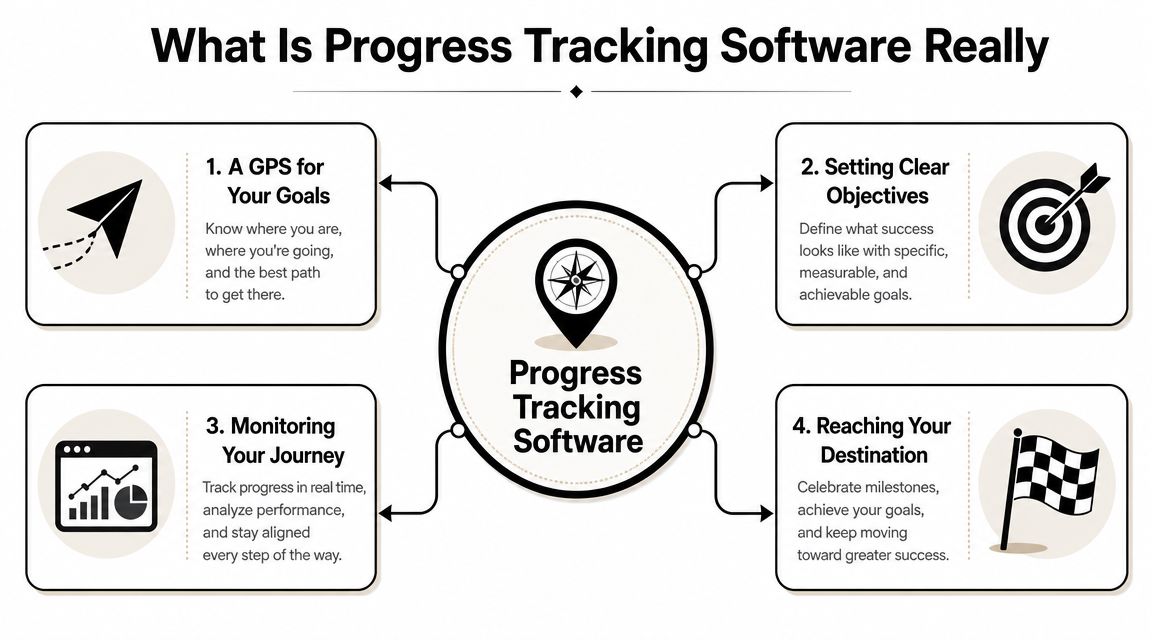
Think of progress tracking software as a GPS for your goals.
A basic to-do list is like a handwritten note with street names. Useful, but limited. A GPS does more. It shows the route, the next turn, traffic problems, and what happens if you miss an exit. Strong progress tracking software works the same way. It doesn't just store tasks. It helps you define the destination, map the path, detect friction, and adjust as real life changes.
More than a task list
A plain task app answers one question: “What should I do?”
Progress tracking software answers several tougher ones:
- What am I trying to achieve
- How will I know I'm moving
- What milestone matters next
- What changed since the original plan
- What should I do today because of that change
That difference matters. Many people don't fail because they forgot to write things down. They fail because their task list doesn't reflect priority, sequence, or learning.
If you want a grounded companion to this idea, Recurrr's task management advice is useful because it helps clarify the difference between collecting tasks and building a system that supports follow-through.
How the category evolved
Older tools often treated progress as a report you created after the work happened. Modern systems behave more like live control panels. According to ProjectManager's guide to measuring project progress, progress tracking tools evolved from static reports into real-time dashboards that update as teams work. The same guide notes that Jira became especially strong for agile engineering through backlogs, issues, sprints, and workflows, while Smartsheet became a natural fit for spreadsheet-oriented teams handling rollups and alerts.
That shift changed the purpose of the software.
Instead of waiting for a weekly status meeting, a team can see movement as it happens. Instead of rebuilding reports by hand, a manager can compare current work to the baseline. Instead of asking, “Are we busy?” they can ask, “Are we still on the route?”
The best tools reduce the delay between action and feedback. That's when better decisions become possible.
Here's a simple comparison:
| Tool style | What it mainly shows | What it often misses |
|---|---|---|
| Basic to-do list | Tasks to complete | Sequence, impact, drift |
| Static project plan | Planned work | Real-time change |
| Modern progress tracking software | Goals, milestones, current status, variance | Depends on how well you set it up |
A student can use this like a study map. A founder can use it like a launch dashboard. A small team can use it like an operating system for aligned action.
There's also a practical side to seeing the concept in motion. This short video gives a useful visual frame for how tracking systems support execution rather than just documentation.
Key Features and Metrics That Drive Results
Not every progress tracking tool creates real traction. Some look polished but still leave you guessing. The strongest systems do four things well: they translate goals into visible milestones, map dependencies, connect work to time, and give you feedback that's hard to ignore.
Goals need translation, not inspiration
A goal like “launch the product” or “get in shape” is too broad to guide a Tuesday morning. Good software breaks the goal into measurable parts.
That often includes:
- Outcome definition: A clear objective with a finish condition.
- Milestones: Important checkpoints that show whether the goal is advancing.
- Ownership: Someone knows what they're responsible for.
- Review rhythm: Progress gets checked often enough to influence behavior.
For startup teams, OKRs and KPIs can help, but only if they connect to action. If you want a practical refresher on choosing meaningful measures, this ultimate guide for startup KPIs offers a helpful framework for founders who struggle to define what “good progress” means.
Dependencies reveal hidden delay
One common source of confusion is this: a plan can look fine until one delayed task undermines everything downstream.
That's why dependency-aware software is so useful. In GanttPRO's explanation of software development progress tracking, the Gantt chart shows tasks, dates, and progress, while autoscheduling recalculates downstream dates automatically when a task or dependency changes. In plain language, if one milestone slips, the plan updates the rest of the route instead of hiding the impact.
That matters for individuals too. If your exam prep gets delayed by a week, your revision schedule should shift. If a product mockup isn't approved, your development sprint should reflect that. Otherwise, your timeline becomes fiction.
Coaching lens: A useful system doesn't just record delay. It shows what that delay changes.
Time use tells the truth
Many people estimate progress by effort. That's risky because effort feels productive even when it's scattered.
A stronger system connects milestones to actual time spent. It helps you compare planned work with the work that absorbed your hours. That's why this guide to productivity measurement is worth reading alongside any tool evaluation. It pushes the conversation beyond “Did you work?” toward “Did your time match your priorities?”
A good progress view often includes signals like:
- Planned versus actual time
- Routine consistency
- Check-in history
- Task completion tied to milestone movement
You don't need perfect data. You need honest data.
Metrics turn feelings into signals
At a certain point, progress has to become measurable. Otherwise your updates stay subjective.
Slack's overview of project progress metrics points to common tracking methods such as milestones, percent complete, and earned value, where EV = percent complete × budget. In agile settings, teams often use sprint burndown, velocity, and cycle duration. In value management, teams monitor Cost Variance (CV = EV – AC), Cost Performance Index (CPI = EV/AC), Schedule Variance (SV = EV – PV), and Schedule Performance Index (SPI = EV/PV).
Two examples make these metrics less intimidating:
- CPI of 0.89: This indicates 11% over budget in the Slack explanation.
- SPI of 0.8: This means a project is 20% behind schedule in the same source.
You may never use earned value in your personal life, and that's fine. The broader lesson still applies. The best progress tracking software turns “I think we're okay” into “Here's where plan and reality diverged.”
Real-World Workflows for Different Ambitions
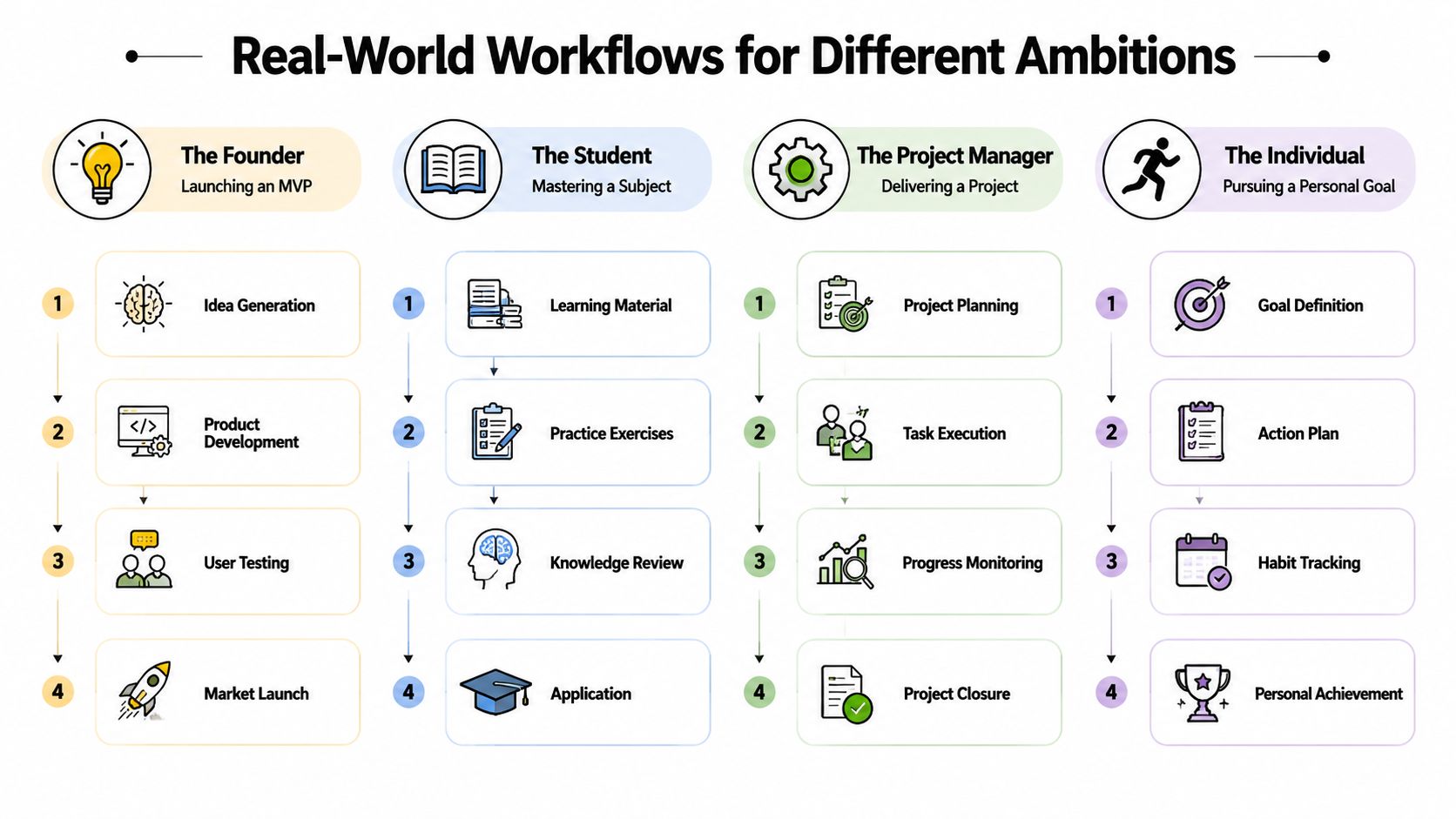
The same core idea shows up in very different lives. The goal changes. The workflow changes. The need for visible progress doesn't.
The founder launching an MVP
A founder usually has too many moving parts and too little attention. Product decisions, customer conversations, design revisions, technical blockers, and investor updates all compete for focus.
In a strong progress tracking system, the founder's top outcome might be “launch MVP.” Under that sit milestones such as validating the core problem, completing the feature set for first release, testing with early users, and preparing launch materials. Daily tasks should connect to those milestones, not float independently.
A roadmap beats a task dump. If the founder spends three days polishing brand assets while user testing is stalled, the software should make that mismatch obvious. The tool isn't there to admire activity. It's there to expose whether the hard things are moving.
The professional running a campaign
A manager leading a quarterly campaign needs alignment more than inspiration. Messaging, creative, approvals, execution, and reporting often live across multiple tools and people.
Progress tracking software helps by linking campaign milestones to ownership and review points. The manager can see which dependencies are at risk, where bottlenecks are forming, and whether work is still tied to the intended outcome. For professionals trying to design a cleaner operating rhythm, this guide to personal productivity systems is especially useful because it bridges individual discipline with collaborative execution.
One practical habit works well here: pair every status update with a next-action decision. “Design is delayed” isn't enough. “Design is delayed, so copy review moves to Thursday and paid setup shifts accordingly” is useful.
The student preparing for exams
Students often confuse familiarity with mastery. Reading notes feels good. Testing recall feels harder. Progress tracking software can help by making study work visible in stages.
A student might map progress like this:
- Coverage: What topics are assigned and complete
- Practice: Which problem sets or essays are done
- Weak spots: Where errors repeat
- Review cycle: When topics get revisited
That turns a vague plan like “study biology” into something measurable. Monday can be chapter review, Tuesday can be active recall, Wednesday can be timed questions, and Thursday can be error correction. Once that pattern exists, the student can compare intention to actual follow-through.
Study progress becomes real when you can see not just what you touched, but what you retained and what still breaks under pressure.
The self-improver building a fitness habit
Personal goals fail for a different reason. They usually don't collapse because the person lacks a vision. They collapse because the goal never gets anchored to behavior.
Someone trying to build a fitness routine benefits from a system that ties the larger outcome, such as improving strength or consistency, to recurring actions. The software should help answer simple daily questions: Did I train? Did I recover? Did my schedule support the habit or fight it?
Progress tracking software aligns more closely with coaching than with project management. A habit is not a one-time deliverable. It's a pattern. The system has to notice what helps the pattern continue.
What physical industries can teach the rest of us
Some of the clearest examples come from construction, where delay is visible, expensive, and hard to hide. In Sablono's roundup of construction progress tracking software, tools in this category use real-time capture and planned-versus-actual dashboards. The same source notes that Buildots uses AI-based computer vision to track site progress, flag deviations from plans, and generate visualizations such as heatmaps, helping teams intervene before delays compound.
The technology is different, but the lesson applies everywhere. Good systems reduce the gap between what's happening and what you can see. That's as useful for a solo creator as it is for a field team.
How to Choose the Right Progress Tracking Tool
Choosing progress tracking software gets easier when you stop asking, “Which tool has the most features?” and start asking, “Which tool will help me act better each day?”
Start with the job you need the tool to do
Some people need a personal execution system. Others need a team dashboard. Others need a structured project timeline.
Ask yourself:
- Personal or collaborative: Are you tracking your own habits, or coordinating several people?
- Goal style: Do you think in OKRs, milestones, sprints, or simple routines?
- Time sensitivity: Do delays have ripple effects that need visibility?
- Review needs: Do you need dashboards, check-ins, or lightweight daily prompts?
If your work revolves around goals and measurable outcomes, a focused tool comparison should include resources like this look at OKR tracking software, especially if you want to connect strategy with day-to-day execution rather than just manage tasks.
Check how the tool handles change
Plans rarely fail because they were written. They fail because reality changes and the tool doesn't adapt cleanly.
That's why technical behavior matters. A robust system often combines visual schedule tracking with dependency-aware recalculation. As described earlier in the article's cited GanttPRO source, autoscheduling can propagate one task change across dependent work, turning a static plan into active variance analysis. For users comparing tools, this is one of the easiest features to underestimate until the first plan slips.
A useful selection test is simple: change one milestone and watch what happens. If the rest of the system stays unrealistically frozen, you're probably buying a prettier spreadsheet.
Choose a tool you will actually keep using
A powerful tool that creates daily friction won't last. Adoption matters for teams, and consistency matters for individuals.
Here's a short checklist to make that practical:
- Clarity first: Can you tell what matters within a few seconds of opening the tool?
- Behavior link: Does it connect goals to today's actions, not just future deadlines?
- Feedback loop: Can it show planned versus actual movement?
- Review habit: Does it fit a weekly and daily rhythm you'll maintain?
- Learning value: Does it help you notice patterns over time?
For people who need social accountability more than formal project controls, lighter options can still help. This roundup of free tools for social tracking is worth exploring if your biggest challenge is staying consistent in public or with a partner.
A final filter helps most readers:
| Situation | Better fit |
|---|---|
| Agile product delivery | A tool built around backlogs, sprints, and workflows |
| Spreadsheet-heavy coordination | A platform comfortable with rollups and alerts |
| Long, dependency-driven plans | A tool with visual timelines and recalculation |
| Personal goals and habits | A system that ties outcomes to routines and time use |
From Planning to Achieving with Beyond Time
The hardest part of goal achievement isn't usually defining the ambition. It's keeping the chain intact between goal, milestone, today's focus, and what your actual time revealed.
That's the gap many tools leave open. They help you plan, but not necessarily execute. Or they help you list tasks, but not learn from your own behavior. A system only becomes useful when it closes that loop.

One example is Beyond Time by Tribble Software Private Limited. It uses an OKR-based model to turn objectives into sequenced milestones, links those milestones to routines and habits, and adds 15-minute time tracking with planned-versus-actual analysis. It also includes a daily AI critique designed to surface the single most impactful focus for the day, along with pattern learning that adapts recommendations over time.
That combination matters because it treats progress as a living system:
- Goals become milestones
- Milestones shape daily actions
- Daily actions get measured against real time
- The system learns from what worked
For a founder, that can mean seeing whether product work is outrunning customer learning. For a professional, it can mean spotting where meetings are crowding out execution. For a student, it can mean identifying whether revision time is going to weak areas or just familiar ones. For a self-improver, it can mean seeing the difference between wanting consistency and scheduling it.
Progress becomes easier to trust when your tool can explain both where you're going and why you're off course.
The most useful progress tracking software doesn't just make your work visible. It makes your decisions better. That's the shift from planning to achieving.
Keep going with Beyond Time
Beyond Time is built exactly for this — goals, milestones, and daily execution in one connected place.
- Goal Setting Worksheet — Turn vague ambitions into concrete, measurable objectives.
- Goal Prioritization Matrix — Quickly sort which goals deserve your time this week.
- AI-Native Goal Tracking Explained — Learn how AI keeps your plan connected to daily action.
- Beyond Time vs Notion for Goal Tracking — See which tool actually closes the plan-to-execution gap.
If you want a system that connects goals, milestones, routines, time tracking, and AI feedback in one place, Tribble Software Private Limited offers Beyond Time as a practical option for founders, professionals, students, and self-improvers who want more than a static plan.
Put this into practice
Free tools that match this article.
Goal Setting Worksheet
Turn a vague goal into milestones, habits, blockers, and a weekly review plan.
Try Goal WorksheetGoal SettingSMART Goal Validator
Instantly validate your goals against the SMART framework and get actionable improvement suggestions.
Try SMART ValidatorGoal SettingAI Milestone Generator
Turn your biggest goals into an actionable step-by-step plan in seconds with AI.
Try Milestone GeneratorGoal SettingOKR Generator
Transform any aspiration into a structured OKR with measurable key results in seconds.
Try OKR GeneratorKeep exploring this topic
Goal setting guide
Start with the fundamentals of setting goals that turn into action.
Goal frameworks compared
Choose between SMART goals, OKRs, BHAGs, and 12-week goals.
Time blocking guide
Turn priorities into protected calendar blocks.
Best goal tracking apps
Compare tools for goals, habits, and progress tracking.
Related Articles
AI Accountability Partner: Smarter Goal Setting
Tired of missed goals? An AI accountability partner provides the structure & feedback you need. Explore benefits, workflows, and tools.
Goal Planning Tools: Achieve Your 2026 Targets
Discover the best goal planning tools for founders, teams, & individuals. Our 2026 review covers OKR, habit trackers, & AI systems to hit targets.
10 Best Goal Setting Apps for 2026: A Full Review
Find the best goal setting apps for 2026. Our guide compares 10 top tools for OKRs, habits, and AI-powered planning to help you finally achieve your goals.
Productivity Tracking Software: Your Complete 2026 Guide
Discover what productivity tracking software is, how to choose the right tool, and how to use it to achieve real goals. A complete guide for 2026.
The Force of Habit: Master Your Autopilot for Success
Learn what the force of habit is and how to use its power. This guide explains the neuroscience and gives you evidence-based strategies to build good habits.
How to Be Efficient and Productive: A 2026 System
Stop being busy and start being efficient and productive. Learn a practical, AI-enhanced system to set goals, track progress, and build unstoppable momentum.