Personal Productivity Systems to Stop Planning, Start Doing
Feeling busy but not productive? Learn how to choose, build, and adapt personal productivity systems like GTD, OKRs, and more to finally achieve your goals.
Your day probably looks productive from the outside. The calendar is full. Slack keeps moving. Your inbox never stays empty for long. You answer questions fast, switch tabs faster, and end the afternoon with that strange feeling of having worked all day without moving anything important forward.
That's the trap. Professionals and creatives often don't need more effort. They need a system that can survive interruptions, unclear priorities, and the constant pull of reactive work. Personal productivity systems matter because they reduce the number of decisions you have to make in the moment. They turn intentions into repeatable actions, and they keep your work from falling apart every time the day gets messy.
The mistake is thinking a productivity system should look clean. Real life isn't clean. Founders get pulled into fires. Managers inherit other people's urgency. Students deal with shifting deadlines. Creators lose half a morning to admin before they touch the work that matters. A useful system has to work in that reality, not in a fantasy week with no meetings, no messages, and no energy dips.
Table of Contents
- Introduction The Myth of Being Constantly Busy
- What Exactly Is a Personal Productivity System
- A Tour of Major Productivity Frameworks
- How to Choose or Design Your Personal System
- Tools and Metrics That Bring Your System to Life
- Making Your System Resilient and Adaptive for the Long Haul
Introduction The Myth of Being Constantly Busy
Busy people often look disciplined. They're responsive, involved, and always in motion. But motion isn't the same as progress. A packed day can still produce very little if your attention gets sliced into tiny pieces by notifications, quick asks, and half-finished tasks.
I see the same pattern across roles. A founder spends the morning in meetings, the afternoon replying to customer issues, and pushes strategy work to “later” again. A manager clears messages all day, but never gets to the planning work that would prevent the same chaos next week. A student rewrites a study plan three times and still doesn't start the hardest assignment.
What breaks people isn't just volume. It's unstructured effort. When everything enters your day the same way, urgent and important blur together. You start reacting instead of directing.
You can be fully occupied and still underperform on the work that matters most.
That's why personal productivity systems help. Not because they make you robotic, and not because they give you a prettier to-do list. They give your work a shape. They answer a few questions before the day starts instead of forcing you to answer them twenty times under pressure.
A system handles things like:
- Incoming noise: where tasks, ideas, requests, and reminders go the moment they appear
- Priority decisions: what deserves attention now, what can wait, and what should be dropped
- Execution rules: how you protect focused work from the churn of reactive work
- Recovery: what you do when the day gets derailed, because it will
Most bad systems fail for a simple reason. They assume ideal conditions. They're built for a calm morning, a clear brain, and uninterrupted time. Then reality arrives. A meeting runs long. Someone needs an answer. Your energy drops. The system collapses because it was too fragile.
A strong productivity system does the opposite. It expects friction. It reduces the cost of restarting. It helps you return to the right task after an interruption instead of wandering into the next easy one. Over time, it should also get smarter by showing you where your plans keep breaking and where your time goes.
What Exactly Is a Personal Productivity System
A personal productivity system is your operating system for work and life. It's the set of rules, tools, and routines you rely on to capture commitments, decide what matters, do the work, and improve the process over time.
That definition matters because individuals often confuse a system with a tool. Todoist isn't a system. A paper planner isn't a system. Notion isn't a system. Those are containers. The system is the repeatable logic you use inside them.
Why structure beats effort
The old productivity advice was simple. Work harder. Stay later. Push more. That sounds admirable, but it breaks down fast in knowledge work where the primary bottleneck is attention, not physical output.
MIT Sloan's research found that working longer hours does not necessarily increase personal productivity, and that effective productivity is built from repeatable behaviors like routines, planning, and managing messages, not just raw effort, as described in MIT Sloan's productivity habits research.
That matches what works in practice. People don't usually fail because they lack ambition. They fail because they rely on memory, mood, and willpower. Those are unstable inputs. A system creates stability.
The four loops that make systems work
Most personal productivity systems work when they handle four control loops well: capture, organize, execute, and review.
| Loop | What it does | What it looks like in real life |
|---|---|---|
| Capture | Stops ideas and tasks from living in your head | One trusted inbox for notes, requests, and to-dos |
| Organize | Turns raw inputs into a usable queue | Daily or weekly triage by priority, context, and timing |
| Execute | Protects attention long enough to finish something meaningful | Focus blocks, reduced context switching, clear next actions |
| Review | Corrects the system so it stays useful | Recurring check-ins to delete, defer, delegate, and refine |
Many people are proficient at capture but struggle with review. They excel at collecting obligations yet fail to prune them. The result is a bloated system full of stale tasks that effectively trains you to ignore your own lists.
A working setup usually has these traits:
- One trusted intake point: if tasks live in your notes app, inbox, chat, and memory, you don't have a system. You have a scavenger hunt.
- A triage habit: captured items need sorting. Some become calendar blocks. Some become next actions. Some aren't worth keeping.
- Protected execution windows: if deep work sits on the same level as every incoming message, deep work loses.
- A review rhythm: through this habit the system becomes adaptive instead of static
Practical rule: If your system takes more energy to maintain than it saves, it's too complicated.
Another useful test is to audit your real behavior before you redesign anything. Many people build personal productivity systems around who they wish they were. That's how you end up with a beautifully organized weekly plan that assumes four uninterrupted hours every morning when your actual schedule is full of calls, handoffs, and interruptions.
Start with observed reality. Then build structure that fits it.
A Tour of Major Productivity Frameworks
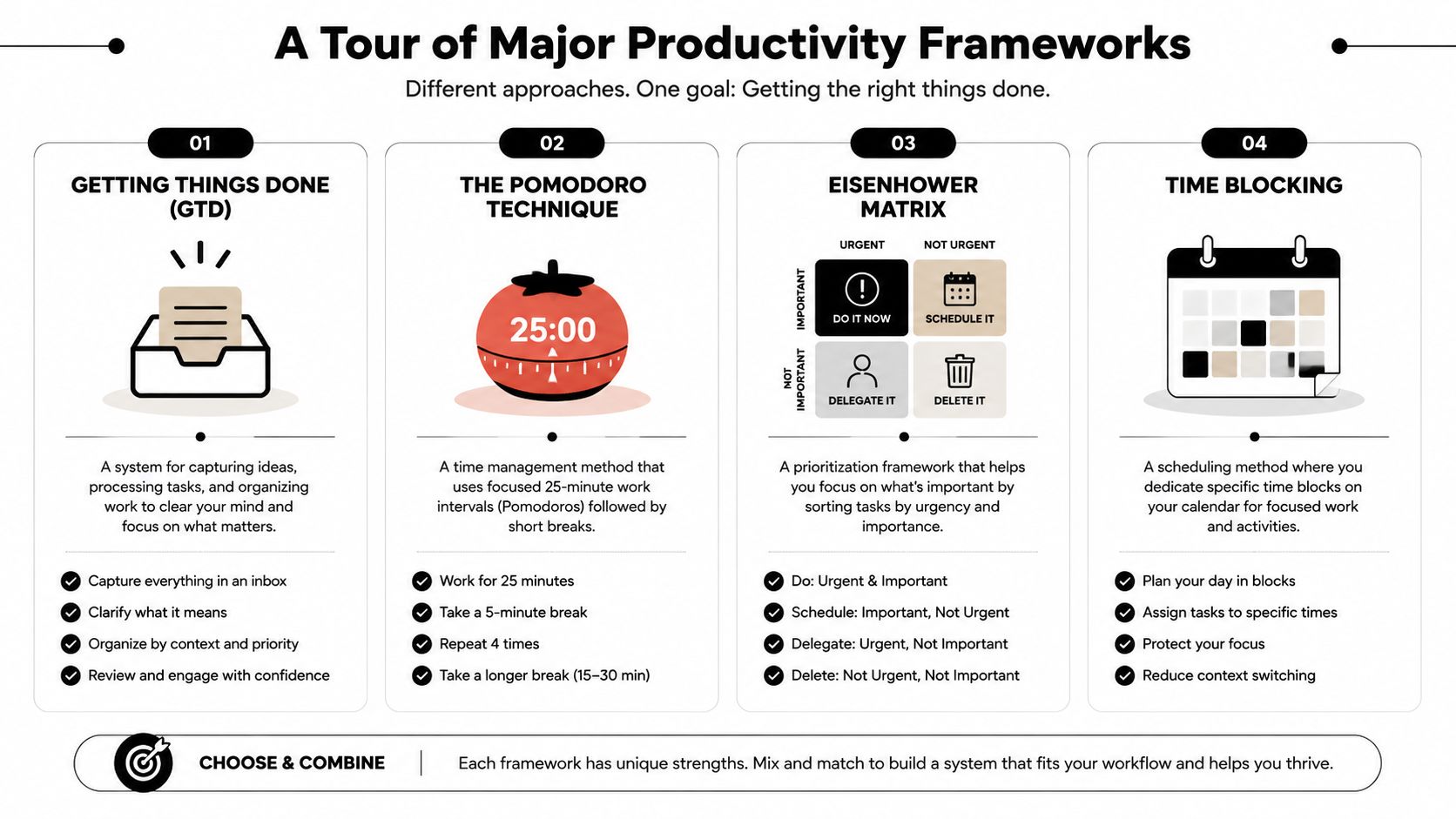
No framework fixes everything. Each one solves a different failure mode. Some are built for overload. Some are built for focus. Some are built for planning. If you pick the wrong one, you'll spend more time maintaining the system than doing the work.
The comparison below helps narrow the field fast.
A quick comparison
| Framework | Core Idea | Best For... | Effort to Start |
|---|---|---|---|
| Getting Things Done | Capture everything, clarify next actions, review regularly | People with lots of open loops and mental clutter | Medium |
| Time Blocking | Put work on the calendar before the day fills up | Busy professionals whose priorities get crowded out | Medium |
| Pomodoro Technique | Work in short focused intervals with breaks | People who struggle to start or stay on task | Low |
| Eisenhower Matrix | Sort work by urgency and importance | People who overreact to visible but low-value work | Low |
| OKRs | Connect long-term goals to measurable progress | Founders, managers, students with defined outcomes | Medium |
| Bullet Journaling | Use a flexible analog system for planning and reflection | People who think better on paper | Medium |
| Habit Stacking | Attach small behaviors to existing routines | Anyone trying to make consistency automatic | Low |
A lot of people pair these. Time Blocking and Eisenhower work well together. GTD and weekly review fit naturally. OKRs can sit above almost any day-to-day system because they answer a different question. They define what progress means.
For a more calendar-driven approach, a time-blocked calendar workflow can make planning visible enough to protect real work before meetings and requests take over.
After you've seen the frameworks visually, this walkthrough helps make the trade-offs concrete:
Where each framework works and breaks
Getting Things Done is strong when your problem is volume. If you constantly feel like you're forgetting something, GTD gives you a place for everything. Its weakness is overhead. If you don't review consistently, the system turns into a storage unit.
Time Blocking works when your priorities never happen unless they get reserved early. It's especially useful for managers and founders who lose the day to meetings and requests. The downside is brittleness. If you treat the calendar like a rigid contract, one interruption can make the whole day feel lost.
Pomodoro is less about planning and more about starting. It reduces the intimidation of big tasks by shrinking the commitment. It works well for students, writers, and anyone facing resistance. It's less useful when your work requires long, uninterrupted immersion and the timer becomes another interruption.
Eisenhower Matrix is a decision tool. It forces you to separate urgency from importance. That's valuable if you spend too much time pleasing other people's timelines. Its limitation is that it doesn't tell you how to execute. It helps you decide, not do.
The best framework is usually the one that compensates for your biggest failure pattern, not the one with the most elegant philosophy.
OKRs are useful when you have ambition but weak translation from goals to daily action. They create a bridge between direction and execution. They can become corporate theater if they live in a slide deck and never influence the calendar.
Bullet Journaling gives you flexibility and friction. For some people, that friction is useful because it slows down mindless accumulation. For others, it creates enough manual work that they stop maintaining it during busy stretches.
Habit Stacking is excellent for recurring behaviors like planning, exercise, study, and shutdown routines. It's weak for complex project work because projects need active prioritization, not just repetition.
The practical move isn't to choose a framework and obey it. It's to borrow the parts that solve your actual problem.
How to Choose or Design Your Personal System
Individuals often ask the wrong question. They ask, “Which system is best?” The better question is, “What keeps breaking in my week?”
That shift matters because personal productivity systems should fit your constraints, not your aspirations. A creator with long focus needs a different setup than a manager who spends the day responding, coordinating, and unblocking other people.
Start with your actual work
Before choosing tools or methods, audit the shape of your work for a week. Not the plan. Your actual output.
Ask yourself:
- Where do tasks enter your life most often. Email, chat, meetings, notes, text messages, or verbal requests?
- What fails most often. Prioritizing, starting, finishing, remembering, or protecting focus?
- What kind of role do you have. Maker, manager, student, operator, hybrid?
- What interrupts you repeatedly. Meetings, pings, last-minute requests, low energy, unclear next steps?
The answers usually tell you what your system needs more of. If work enters from everywhere, tighten capture. If you know what matters but never protect time for it, strengthen execution. If your list gets longer but not smarter, improve review.
Build around energy not just urgency
A lot of planning systems assume all hours are equal. They aren't. Some tasks need your best thinking. Others need only basic attention. Matching the work to your state makes a major difference.
Modern guidance on productivity systems emphasizes energy-aware scheduling, where deep work goes in peak periods and lower-effort admin work goes into lower-energy windows. One source cited in this area associates AI-assisted prioritization with 31% more time spent on high-impact work versus manual methods, which supports the value of aligning tasks with human state rather than urgency alone, as summarized in this discussion of energy-aware scheduling and AI prioritization.
Many systems become more humane at this point. Instead of asking, “What's due?” also ask, “What kind of brain do I have available right now?”
A practical pattern looks like this:
- Peak energy: strategy, writing, analysis, problem-solving
- Middle energy: meetings, collaboration, feedback, planning
- Low energy: admin, scheduling, cleanup, routine replies
If prioritization is your weak spot, a simple goal prioritization matrix can help you separate high-impact work from work that only feels urgent.
Run small experiments
Don't redesign your entire life in one weekend. Test one behavior at a time.
Try experiments like these:
- Capture everything for one week. Don't trust memory. Push every task, idea, and request into one inbox.
- Block one deep-work window for three days. Protect a realistic block, not an aspirational one.
- Add a shutdown review. Spend a few minutes deciding what matters tomorrow before today fully ends.
- Map your energy. Note when you feel sharp, flat, distracted, or resistant.
A system becomes personal when it reflects your real constraints, not when it perfectly matches a framework diagram.
Tools and Metrics That Bring Your System to Life
A framework tells you how to think. A tool tells you whether you'll keep using it on a Tuesday when your day goes sideways. That's why good tool selection is less about features and more about fit.
Some people need paper because it slows them down enough to think clearly. Others need a task manager because search, recurrence, and mobile capture reduce friction. Many individuals need a mix: calendar for time, task manager for commitments, notes for thinking.
Choose tools by job not by hype
A useful stack often includes a few categories:
- Task managers: Todoist, Microsoft To Do, Things, TickTick
- Calendars: Google Calendar, Apple Calendar, Outlook
- Notes and thinking tools: Apple Notes, Obsidian, Notion, plain text
- Habit and routine trackers: Streaks, Habitify, a paper checklist
- Integrated goal systems: tools that connect objectives, milestones, daily actions, and review
The shift in recent years is that tools aren't only storing tasks anymore. They're starting to guide decisions. According to a 2026 summary of workplace research, workers who adopt AI are 90% more likely to report high productivity, and automation saves an average of 3.6 hours per week, as reported in Archie's roundup of employee productivity statistics.
That matters because the bottleneck for many knowledge workers isn't capture. It's interpretation. They don't need another place to dump tasks. They need help identifying what deserves attention, what can be automated, and where their plans consistently break.
One example is Beyond Time's productivity score calculator, which fits the broader trend toward systems that connect goals with daily execution and measurable review. Tribble Software Private Limited's Beyond Time also combines an OKR-based structure, planned-versus-actual time tracking, and daily AI critique in one system. That kind of setup is useful if your current tools leave goals, routines, and reflection disconnected.
Measure what changes behavior
Most people track the wrong things. They count completed tasks, then wonder why they're still not moving. Task count is a weak metric because ten small tasks can hide the fact that the meaningful work never happened.
Better signals include:
| Metric | Why it matters | What it reveals |
|---|---|---|
| Planned versus actual time | Shows where your schedule breaks | Chronic underestimation, interruptions, unrealistic planning |
| Goal progress | Ties daily work to larger outcomes | Whether effort is aligned or scattered |
| Energy patterns | Exposes when you do your best work | Better scheduling decisions |
| Support-system usage | Shows whether your system is helping in practice | Where workflows need simplification |
If a metric doesn't change your decisions, it's just decoration. The point of measurement is feedback. You want your system to tell you something useful, like “your hardest tasks never start after lunch” or “meeting-heavy days destroy your plan, so stop scheduling deep work there.”
A smart productivity system doesn't just record activity. It teaches you how you actually work.
Making Your System Resilient and Adaptive for the Long Haul
Most productivity systems don't fail because they were badly intentioned. They fail because they were too delicate. They assumed stable days, clear minds, and uninterrupted attention.
Research discussed by Microsoft points toward a more grounded view of productivity. Effective work practices align with actual work conditions, which is why systems that reduce cognitive load and match real constraints tend to hold up better in practice, as noted in Microsoft's research on productivity and wellbeing.
Design for recovery not perfection
A resilient system assumes interruption. It gives you a fast way to recover after a meeting runs over, a message thread explodes, or your energy disappears.
That usually means:
- Short restart rituals: a quick glance at your next action, not a full replanning session
- Visible priorities: one clear target for the current block of time
- Flexible planning: fewer brittle hour-by-hour assumptions
- Lower cognitive load: fewer places to check and fewer decisions to remake
Use review as the repair mechanism
Review is the part people skip because it doesn't feel urgent. It's also the part that keeps the system honest. Without review, stale tasks pile up, priorities drift, and your tools become a record of guilt instead of a guide to action.
A good review asks simple questions. What moved? What stalled? What kept interrupting the work? What should be deleted, delegated, deferred, or broken into a smaller next step?
The goal isn't to build a perfect system. It's to build one that keeps teaching you how to work better under real conditions.
Keep going with Beyond Time
Beyond Time is built for this exact problem — a system that connects your goals, routines, and real time use.
- Smart Goal Validator — Check whether your goals are specific enough to act on.
- Personal Development Plan Generator — Map your growth from where you are to where you want to be.
- Time Blocking: The Method Elite Performers Use — See how top performers protect their most important work.
- Goal-First Productivity Method — Redesign your system starting from outcomes, not tasks.
If your current setup feels scattered, Tribble Software Private Limited offers an AI-powered goal achievement system designed to connect objectives, milestones, routines, habits, time tracking, and daily coaching in one place. For founders, professionals, students, and other knowledge workers, that kind of connected loop can make personal productivity systems easier to maintain because planning, execution, and review stop living in separate tools.
Put this into practice
Free tools that match this article.
Time Blocking Template
Map your day into focused time blocks with a free printable time blocking template.
Try Time BlockingTime ManagementWeekly Schedule Optimizer
Generate an optimized weekly schedule with AI-powered time blocking for maximum productivity.
Try Schedule OptimizerGoal SettingGoal Setting Worksheet
Turn a vague goal into milestones, habits, blockers, and a weekly review plan.
Try Goal WorksheetGoal SettingSMART Goal Validator
Instantly validate your goals against the SMART framework and get actionable improvement suggestions.
Try SMART ValidatorKeep exploring this topic
Goal setting guide
Start with the fundamentals of setting goals that turn into action.
Goal frameworks compared
Choose between SMART goals, OKRs, BHAGs, and 12-week goals.
Time blocking guide
Turn priorities into protected calendar blocks.
15-minute time blocks
Plan and review your day with more realistic precision.
Related Articles

Master Your Estimated Completion Date in 2026
Calculate and manage an accurate, motivating estimated completion date. Our 2026 guide covers formulas, tracking, and common pitfalls to help you achieve goals.
How to Improve Work Productivity: A Complete System
Learn how to improve work productivity with a step-by-step system. Go beyond simple tips to diagnose bottlenecks, build routines, and track progress.
What Is Time Tracking: Your 2026 Productivity Guide
Discover what is time tracking, its methods, and how it boosts productivity. Learn to achieve your goals effectively with our 2026 guide.

The Complete Guide to Weekly Reviews — Complete Guide
Discover the 5-step weekly review framework that takes 30 minutes and transforms your productivity. Learn why top performers never skip this habit.
A Goal Planning Template That Actually Works: OKR Method
Stop just setting goals. Use our OKR-based goal planning template to turn big ambitions into a daily action plan. Includes a free downloadable template.

Difference Between Short and Long Term Goals: A 2026 Guide
Learn the core difference between short and long term goals. This guide covers time horizons, purpose, and how to connect your vision to daily actions.