How to Improve Work Productivity: A Complete System
Learn how to improve work productivity with a step-by-step system. Go beyond simple tips to diagnose bottlenecks, build routines, and track progress.
Most advice on how to improve work productivity is backward. It starts with tactics. Install a task app. Wake up earlier. Batch email. Use Pomodoro. Cut meetings.
Those can help, but they're often just better ways to run a broken system.
The main problem is usually disconnect. Your goals sit in one place, your calendar in another, your task list in a third, and your actual day gets hijacked by whatever feels urgent. If your work doesn't connect from objective to milestone to scheduled block to review, productivity turns into maintenance. You stay busy and still miss the work that matters most.
A better approach is closed-loop. Diagnose what leaks time and focus. Build a structure that ties goals to projects. Run a daily operating rhythm that protects meaningful work. Then review planned versus actual so the system gets sharper instead of noisier.
Table of Contents
- First Diagnose Your Productivity Leaks
- Design Your Productivity Architecture
- Build Your Daily Operating Rhythm
- Implement Feedback Loops for Radical Accountability
- Example Workflows for Founders, Managers, Students, and Creators
- Stop Planning and Start Achieving
First Diagnose Your Productivity Leaks
Stop treating effort as the problem
When people say they need to be more productive, they usually mean one of two things. They either want to get more done in the same time, or they want to stop ending the day feeling scattered. In both cases, the default reaction is the same. Add a new tool or push harder.
That's usually the wrong first move.
Recent management guidance has pushed a more useful idea. Measurement quality matters. Many organizations struggle to define the right productivity metric for knowledge work, and the better approach is to focus on outcomes, role clarity, and high-value work instead of time spent looking busy, as noted in Lyra Health's guide to increasing employee productivity.
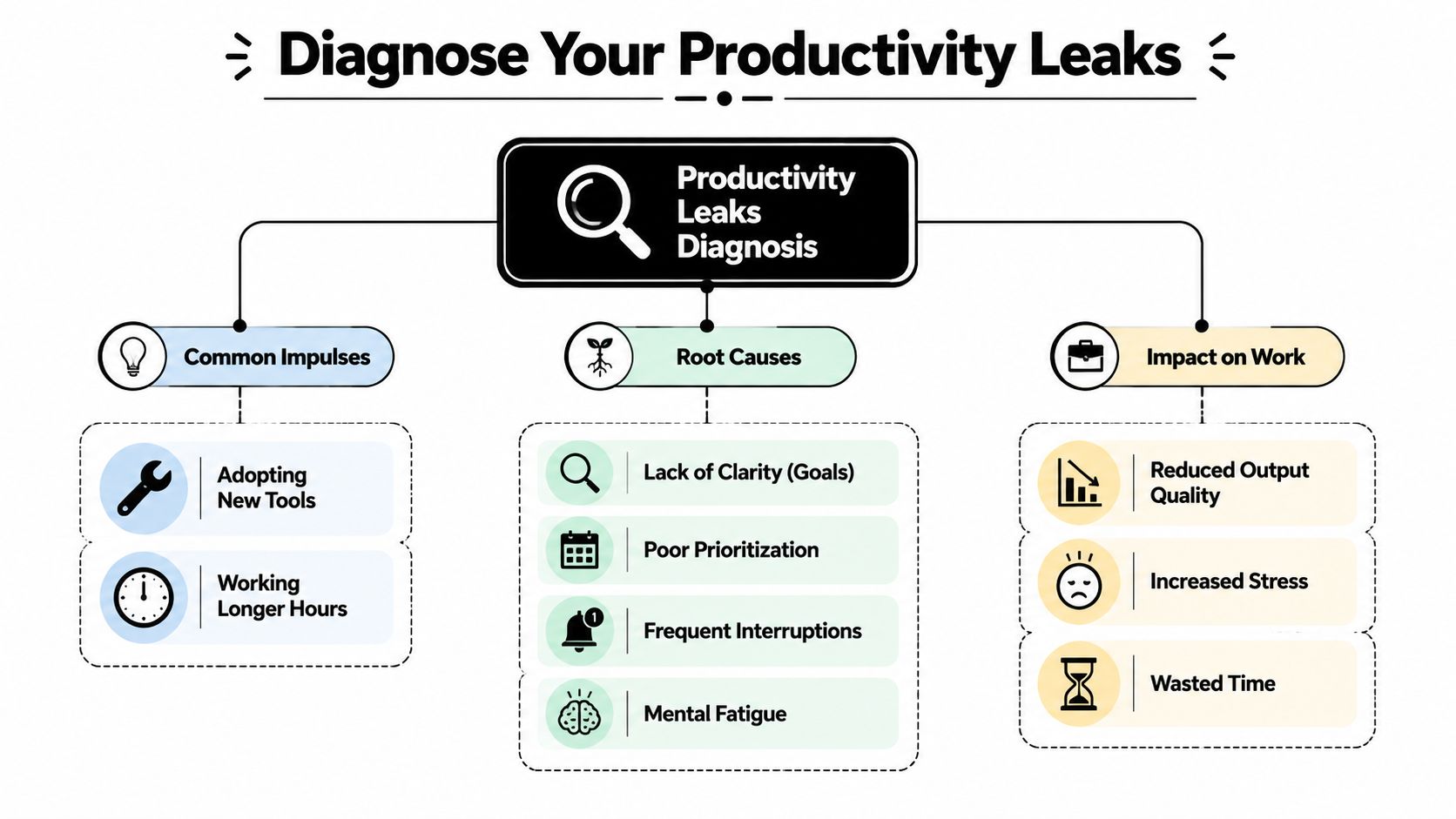
If you don't know what kind of leak you have, any fix will feel plausible. More calendar discipline won't help if your main issue is unclear priorities. Better software won't help if your day gets shattered by interruptions. A stricter routine won't save you if you consistently try to do deep work during your lowest-energy hours.
Practical rule: Never prescribe a productivity solution before you can name the leak in one sentence.
I use four diagnosis buckets because they cover most real-world breakdowns:
- Priority leaks: You start the week without a clear hierarchy, so urgent requests outrank important work.
- Focus leaks: Notifications, meetings, and message-checking break work into fragments before you can finish a meaningful unit.
- Energy leaks: You schedule hard thinking when you're mentally flat and leave low-value admin for your peak hours.
- Time leaks: Your calendar says one thing, but your day gets spent elsewhere.
Audit one real week
Don't audit your ideal week. Audit the last normal one.
Take five working days and reconstruct them precisely. Calendar events help, but they won't tell the full story. You need to see where your attention went. If you want a structured starting point, a productivity score calculator can help you turn vague frustration into a measurable snapshot.
Use a simple review table like this:
| Area | What to inspect | Warning sign |
|---|---|---|
| Priorities | Top 3 weekly outcomes | You can't name them quickly |
| Focus | Interruptions and switching | Work happens in tiny fragments |
| Energy | Time of day vs task difficulty | Deep work scheduled at the wrong time |
| Time | Planned vs actual usage | Calendar and reality don't match |
Then write a plain-language problem statement. Not a motivational slogan. A diagnosis.
Examples:
- I lose my best morning hours to reactive communication.
- I carry too many active projects, so nothing reaches completion.
- My afternoons are meeting-heavy, and I don't protect any deep work window.
- I confuse task completion with strategic progress.
That sentence becomes your anchor. It tells you what to fix first and what to ignore for now.
Design Your Productivity Architecture
A productive person doesn't just have good habits. They have a structure that makes good habits easier than drift.
Start with an objective, not a task list
Most productivity systems collapse because they start too low. They begin with tasks. Answer this. Draft that. Update the deck. Review comments. The list grows, and none of it tells you whether the month is moving in the right direction.
A better build starts with one objective per major area of work. Clear enough to guide decisions. Concrete enough to reject distractions.
For example:
- A founder might choose: ship the next product release without stalling customer conversations.
- A manager might choose: improve team execution quality while reducing avoidable coordination drag.
- A student might choose: finish the term with consistent study output instead of last-minute cramming.
- A creator might choose: publish on a reliable cadence without letting promotion consume all creative energy.
Once the objective is clear, define a short sequence of milestones. Many individuals subsequently make a serious mistake. They create broad ambitions but no path. Milestones force order.
For students, the same logic applies outside business work. If you're trying to connect long-term academic goals to weekly execution, this guide to boosting retention and grades is useful because it grounds study planning in practical learning behavior instead of generic motivation.
Later, if you want examples of full personal systems that connect goals, planning, and review, this personal productivity systems guide is a strong companion to the framework here.
Build the layers underneath
McKinsey's research on IT productivity points to a lesson that applies far beyond engineering. The biggest gains tend to come from structural choices, such as better developer journeys, product-led ways of working, and fewer dependencies between systems, not merely more effort, as explained in McKinsey's guide to optimizing IT productivity for revenue growth.
The personal version of that lesson is simple. Don't ask, "How can I work harder?" Ask, "What in my setup creates friction every day?"
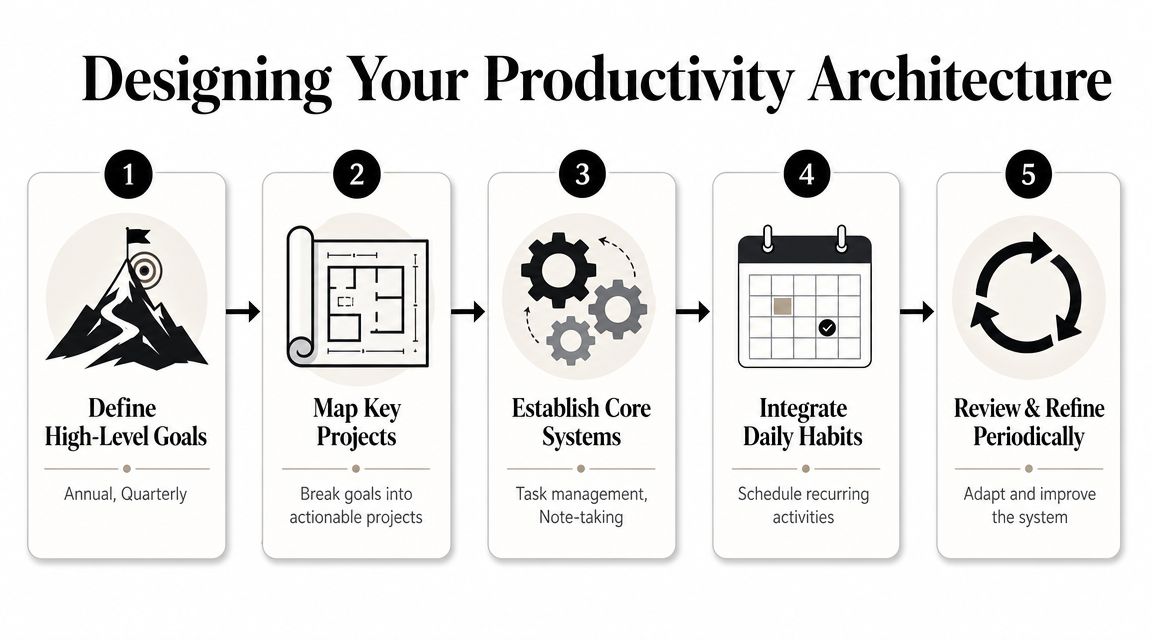
Build your architecture in layers:
Objective layer
One outcome that matters for the quarter or current season of work.Project layer
A small number of active projects that directly serve that objective. If a project doesn't support the objective, it's a candidate for delay, delegation, or removal.Milestone layer
Clear checkpoints that let you see progress without waiting for a final result.System layer
The operating tools. Usually a calendar, a task manager, notes, and one place to review progress. Keep this stack lean.Routine layer
Recurring actions that keep the system alive. Weekly planning, daily startup, end-of-day review.
Your architecture should make the right work obvious. If you need to rethink priorities every morning, the structure is too weak.
This is also the right place to choose tools carefully. Tribble Software Private Limited's Beyond Time is one example of a system that connects OKR-style goals, milestones, routines, and planned-versus-actual time tracking in one workflow. That's useful if your current setup splits planning and execution across too many apps. But the principle matters more than the product. One connected system beats five clever but disconnected ones.
Build Your Daily Operating Rhythm
Plans fail in the gap between intention and Tuesday at 2:15 p.m.
That's why daily rhythm matters more than inspirational planning. If your week doesn't already contain space for your most important work, it won't appear on its own. Meetings, chat, email, and minor fires will take it.
Use a template week
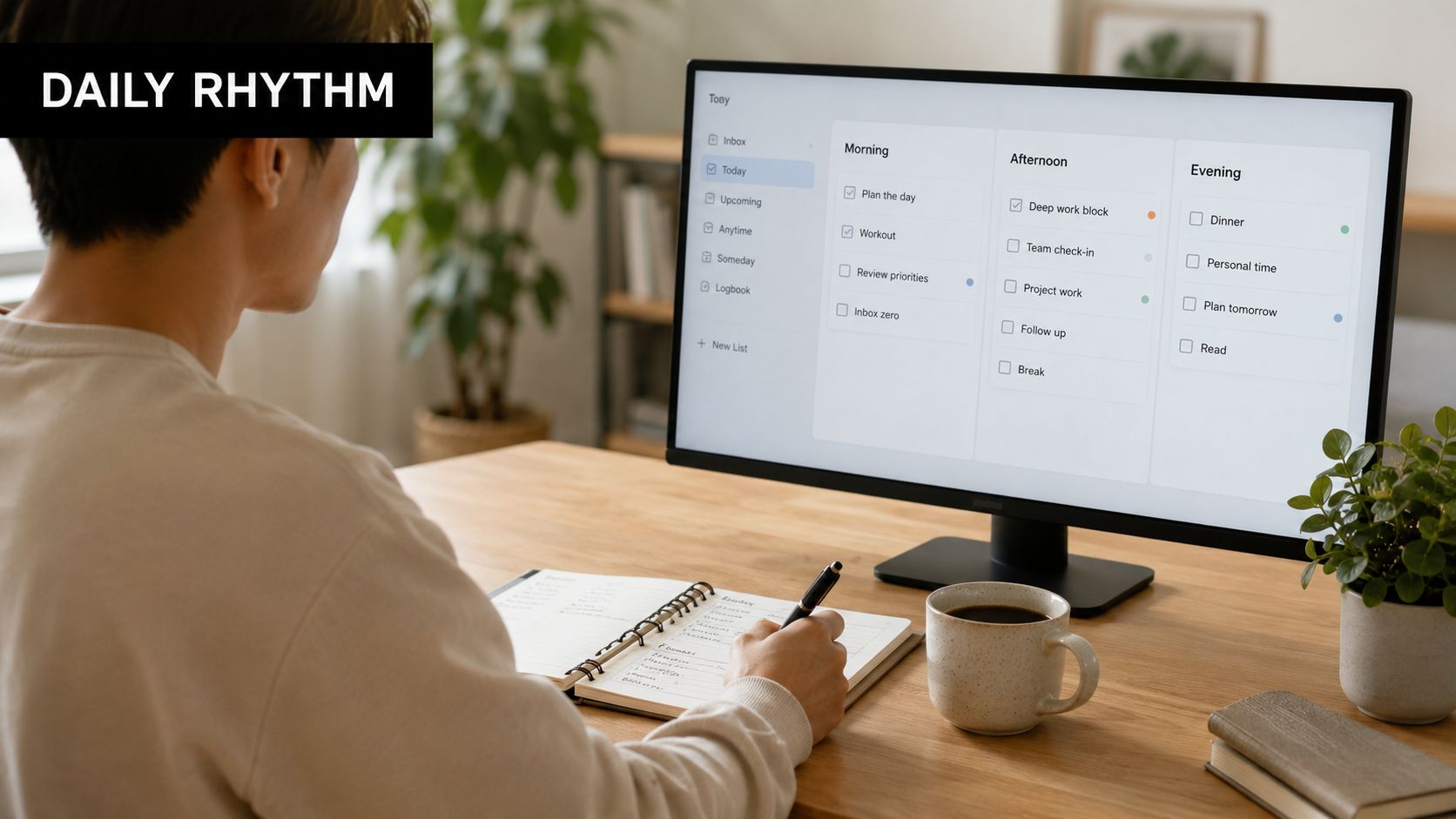
Instead of building every day from scratch, build a template week. This is a default structure, not a prison. It tells you where deep work, communication, admin, planning, and recovery belong before randomness enters the picture.
A solid template week usually includes:
- Deep work blocks: Reserved for thinking, writing, analysis, building, or problem-solving.
- Communication windows: Specific periods for email, Slack, approvals, and check-ins.
- Admin blocks: Paperwork, scheduling, expense tasks, low-cognitive maintenance.
- Review blocks: Time to plan, close loops, and reset.
- Buffer space: Unsold time for spillover and surprises.
The order matters. Put cognitively heavy work where your mind is strongest. For many people, that's earlier in the day. Put reactive work later, when the cost of interruption is lower.
The hidden enemy here is fragmented work. Slack highlights the penalty of time confetti in modern work and recommends responses like meeting-free blocks, mono-tasking, and turning off notifications to protect deep-focus windows in its article on strategies for improving business productivity.
Protecting focus isn't about discipline alone. It's about redesigning the day so interruption isn't the default.
If you're trying to make this practical on a calendar, a time-blocked calendar approach makes the template visible enough to use, not just admire.
Track in short blocks
Short-block tracking sounds obsessive until you use it properly. The point isn't surveillance. It's awareness.
Track your day in brief increments, such as 15-minute blocks. Label what you planned to do, then what happened. Over a few days, patterns show up fast:
- Work that always takes longer than expected
- Meetings that trigger hours of recovery and cleanup
- Tasks you avoid until low-energy periods
- Communication windows that expand and eat the day
This method changes behavior because it removes fantasy. Many people don't have a motivation problem. They have a visibility problem.
Try a simple daily operating sequence:
| Time | Action | Purpose |
|---|---|---|
| Start of day | Review top milestone and first deep block | Reduce drift |
| Midday | Check whether the day is still on plan | Catch slippage early |
| End of day | Log actual time and note deviations | Create feedback for tomorrow |
The trade-off is real. Short-block tracking creates a little friction. That's why it works. It forces contact with reality before the week disappears into vague effort.
Implement Feedback Loops for Radical Accountability
Most productivity advice stops at planning. That's why people get good at organizing and stay bad at finishing.
A working system needs feedback. Not annual reflection. Not vague self-awareness. Tight, repeated feedback from today's plan to today's reality.
Run a planned versus actual review
At the end of each day, compare what you intended with what happened. This isn't a guilt exercise. It's operating data.
Ask four questions:
- What did I plan?
- What ended up taking my time?
- Where did the plan break?
- What single adjustment would improve tomorrow?
That fourth question matters most. If you generate five fixes each day, you won't apply any of them well. Choose one. Move the hard task earlier. Decline the recurring meeting. Turn one collaboration block into async updates. Split an oversized task into a finishable unit.
A strong review often looks like this:
| Planned | Actual | Gap | Next adjustment |
|---|---|---|---|
| Write proposal draft | Responded to inbound requests all morning | Deep work block unprotected | Put DND on and delay message checks |
| Team planning block | Meeting overran | No buffer around meetings | Add recovery space after coordination-heavy sessions |
| Research reading | Energy collapsed late afternoon | Wrong task at wrong time | Move reading to morning and admin later |
Improve one variable at a time
The utility of process improvement thinking becomes apparent. Evidence-based frameworks such as DMAIC and PDCA recommend defining a measurable problem, testing changes on a small scale, and comparing against a baseline before scaling, as described in ProAction International's overview of sustained process improvement methodologies.
That discipline matters in personal productivity too.
Don't redesign your whole life because you had one messy Tuesday. Run small tests. If your diagnosis says meetings are breaking concentration, test two meeting-free mornings next week. If context switching is the issue, test fixed communication windows. If your estimates are weak, add planning buffers before trying a new app.
Small experiments beat dramatic resets because you can tell what actually caused the improvement.
This is what radical accountability really means. Not self-criticism. Not heroic effort. It means you stop telling stories about why work feels hard and start collecting enough evidence to improve the system.
People who get good at this become calmer. They don't need to guess whether a tactic works. They can see it.
Example Workflows for Founders, Managers, Students, and Creators
The same system works across roles, but the pressure points change. Founders drown in competing priorities. Managers get pulled into everyone else's work. Students face delayed consequences and weak structure. Creators lose hours to invisible work around the work.
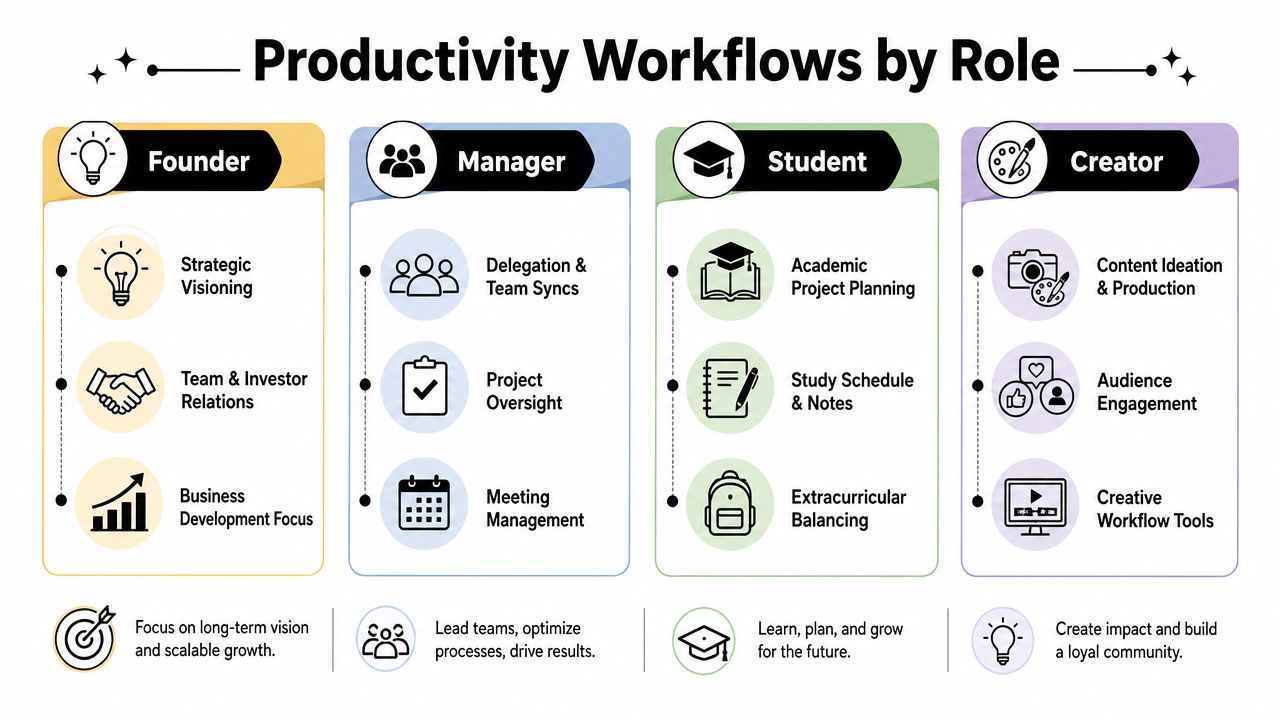
This is how the closed-loop method looks in practice.
Founder workflow
A founder's calendar often lies. It says product, strategy, and growth. The day becomes recruiting, customer support, investor follow-up, and internal problem solving.
That founder needs one dominant operating objective, not seven equal priorities. Example: stabilize product delivery while keeping sales conversations moving.
A workable weekly template might include:
- Two deep product blocks for roadmap and spec decisions
- Dedicated customer or sales windows
- A single batch for investor and stakeholder communication
- One review block to compare strategic time versus reactive time
The daily metric isn't "hours worked." It's whether the day included movement on the current milestone and whether reactive tasks displaced founder-level work.
Manager workflow
Managers often feel productive because they're constantly engaged. That's the trap. High responsiveness can hide low impact.
The right system for a manager ties team outcomes to protected individual thinking time. Their objective might be: improve team execution quality without becoming the bottleneck.
A good manager rhythm often includes:
- A weekly planning block for team priorities
- Clustered one-on-ones on the same days
- Protected time for decision-making, writing, and escalation handling
- A daily review focused on where they inserted themselves unnecessarily
Engagement holds significant importance. Gallup-based findings summarized by ActivTrak report that highly engaged business units saw 14% higher productivity and 23% higher profitability, making engagement a performance lever, not a soft perk, in these workplace productivity statistics. For a manager, that means clarity, recognition, and better communication aren't side work. They are part of output.
A manager who owns every decision may look busy, but they're usually training the team to wait.
Student workflow
Students often need structure more than motivation. The common failure isn't laziness. It's weak conversion from syllabus-level goals into weekly actions.
A student objective might be: perform consistently across the term instead of relying on deadline panic. Their milestones are usually visible. Finish readings, draft papers in stages, prepare for exams early, and protect revision time.
A strong student week often has:
- Fixed study blocks linked to specific courses
- Separate sessions for review, practice, and assignment production
- A catch-up block to prevent one missed day from becoming a lost week
- A brief end-of-day review asking whether study time matched the academic priorities of the week
The main metric is simple. Did time go to the course work with the highest near-term academic consequence, or only to what felt easiest to start?
Creator workflow
Creators lose output in a different way. They spend too much time near the work. Researching, tweaking tools, checking comments, adjusting thumbnails, reworking outlines. Productive activity surrounds the actual creative act and crowds it out.
The objective might be: publish consistently without sacrificing quality or burning all energy on distribution. That requires separating the workflow into stages.
A creator template week often works best when split into:
- Idea capture and research
- Production
- Editing
- Publishing
- Promotion and audience engagement
The review question is sharper for creators than for most roles: did I spend my best hours making the asset, or managing the environment around the asset?
The answer changes everything.
Sample productivity focus by role
| Role | Primary Objective | Key Milestone Example | Core Daily Routine | Main Metric |
|---|---|---|---|---|
| Founder | Protect strategic progress while handling volatility | Complete next product decision checkpoint | Morning strategic block before reactive work | Strategic time completed vs planned |
| Manager | Improve team output without becoming the bottleneck | Finalize weekly team priorities and unblock owners | Team support windows plus protected decision time | Time spent on leverage work vs rescue work |
| Student | Maintain steady academic progress | Finish assignment draft before deadline week | Fixed study sessions by course and workload | Study time aligned to top academic priority |
| Creator | Publish reliably without drowning in admin | Complete one content asset through production stage | Separate creation blocks from promotion blocks | Creation time vs surrounding admin time |
The role changes. The logic doesn't. Define the objective. Sequence milestones. Protect time. Review the truth. Adjust the system.
Stop Planning and Start Achieving
If you want to know how to improve work productivity, stop collecting isolated tips and start building a connected operating system.
The useful sequence is simple. Diagnose the leak. Build an architecture that ties daily work to meaningful objectives. Create a rhythm that protects focus. Review planned versus actual so each day teaches you something. That's what turns productivity from hope into process.
The payoff isn't just more output. It's cleaner decisions. Less false urgency. Fewer days lost to reaction. You stop asking, "How do I get everything done?" and start asking a much better question: "What system makes the right work happen consistently?"
That's when productivity stops feeling like self-control and starts feeling like design.
Keep going with Beyond Time
Ready to go deeper? These Beyond Time resources turn each step of this system into action.
- Goal Prioritization Matrix — Rank competing priorities so the important work wins.
- Time Blocking Template — Build a template week that protects your best focus hours.
- Goal-First Productivity Method — Start every week from your objectives, not your inbox.
- Work-Life Balance Goal Setting Framework — Set goals that sustain performance without burning out.
If you want a tool that supports this closed-loop approach, Tribble Software Private Limited builds Beyond Time, an AI-powered goal achievement system that connects objectives, milestones, routines, habits, and planned-versus-actual time tracking. It's built for people who don't need more motivation. They need a tighter link between what matters, what gets scheduled, and what gets done.
Put this into practice
Free tools that match this article.
Time Blocking Template
Map your day into focused time blocks with a free printable time blocking template.
Try Time BlockingTime ManagementWeekly Schedule Optimizer
Generate an optimized weekly schedule with AI-powered time blocking for maximum productivity.
Try Schedule OptimizerAssessmentProductivity Score Calculator
Discover your productivity score and get personalized recommendations to improve.
Try Productivity ScoreGoal SettingGoal Setting Worksheet
Turn a vague goal into milestones, habits, blockers, and a weekly review plan.
Try Goal WorksheetKeep exploring this topic
Goal setting guide
Start with the fundamentals of setting goals that turn into action.
Time blocking guide
Turn priorities into protected calendar blocks.
Morning routine template
Build a practical morning routine around energy and focus.
Goal frameworks compared
Choose between SMART goals, OKRs, BHAGs, and 12-week goals.
Related Articles
A Goal Planning Template That Actually Works: OKR Method
Stop just setting goals. Use our OKR-based goal planning template to turn big ambitions into a daily action plan. Includes a free downloadable template.
Weekly Goal Tracker: How to Plan and Achieve Your Goals
Design a weekly goal tracker that works. This guide shows you how to connect big objectives to daily tasks, build a tracker, and use AI to stay on course.
How to Be Efficient and Productive: A 2026 System
Stop being busy and start being efficient and productive. Learn a practical, AI-enhanced system to set goals, track progress, and build unstoppable momentum.

Master Your Estimated Completion Date in 2026
Calculate and manage an accurate, motivating estimated completion date. Our 2026 guide covers formulas, tracking, and common pitfalls to help you achieve goals.
How to Improve Focus: A 6-Step System for Deep Work
Learn how to improve focus with a practical, evidence-backed system. This guide covers everything from sleep and nutrition to time-blocking and daily routines.
Regain Focus and Clarity: A System for High Achievers
Stop feeling busy and start being effective. Learn a practical, evidence-backed system to build sustained focus and clarity for meaningful, measurable results.