What Is Time Tracking: Your 2026 Productivity Guide
Discover what is time tracking, its methods, and how it boosts productivity. Learn to achieve your goals effectively with our 2026 guide.
You close your laptop after a long day and feel oddly dissatisfied. You answered messages, jumped into meetings, reviewed documents, fixed small fires, and probably worked hard the whole time. But if someone asked what moved your biggest goal forward, you might hesitate.
That gap is where time tracking becomes useful.
For a busy founder, professional, student, or creator, the problem usually isn't laziness. It's low visibility. You can't improve how you spend time if your memory gives you a flattering but blurry summary. Time tracking fixes that by turning a vague day into something you can inspect, question, and improve.
If you've been wondering what is time tracking, the short answer is simple. It's the practice of recording how your work hours are spent so you can compare intention with reality. The more useful answer is bigger. Done well, time tracking is not a digital punch clock. It's a decision-making system.
Table of Contents
- That "Busy" Feeling Is a Data Problem
- Why Time Tracking Is Your New Financial Budget
- Core Time Tracking Methods and Key Metrics
- Time Tracking in Action for Different Roles
- How to Implement Time Tracking Effectively
- Common Pitfalls and How to Avoid Them
- From Tracking Time to Mastering Your Day
That "Busy" Feeling Is a Data Problem
A founder spends the day in back-to-back calls. Between meetings, she answers Slack, approves invoices, reviews hiring notes, and gives feedback on product copy. By evening, she's drained. Yet the one thing she wanted to do, defining next quarter's priorities, never happened.
That experience feels personal, but it's usually structural. She doesn't have a motivation problem. She has a measurement problem.
Individuals often rely on recall to judge where their day went. Recall is bad at this. It overweights urgent tasks, underestimates fragmented work, and forgets transition time. That's why a day can feel full while still failing to support your main objective.
The adoption gap makes this clearer. In one time-management survey, only 18% of people reported having a proper time management system, while over 80% said they had none. Another industry summary says only 17% of people track their time, and those who do report higher productivity levels, according to Acuity Training's time management statistics summary.
Why smart people still avoid it
Time tracking sounds boring. It can also sound restrictive, as if every minute must be defended. That's why many capable people avoid it until their calendar, team, or workload becomes too complex to manage by instinct.
But the point isn't to create surveillance over your own day. The point is to replace guesswork with evidence.
Practical rule: If you can't say where your last week went, you can't confidently improve your next one.
What time tracking actually means
Time tracking means recording how long you spend on tasks, projects, or categories of work. That can be as simple as starting a timer when you begin writing, or as structured as logging time against clients, initiatives, and approvals.
The deeper value is what happens after the log entry. Once your time has a category, a project, and a purpose, you can ask better questions:
- What consumed more time than expected
- Which work created progress versus motion
- What keeps interrupting deep work
- Whether your calendar matches your priorities
That's when time tracking stops being a chore and becomes a management tool.
Why Time Tracking Is Your New Financial Budget
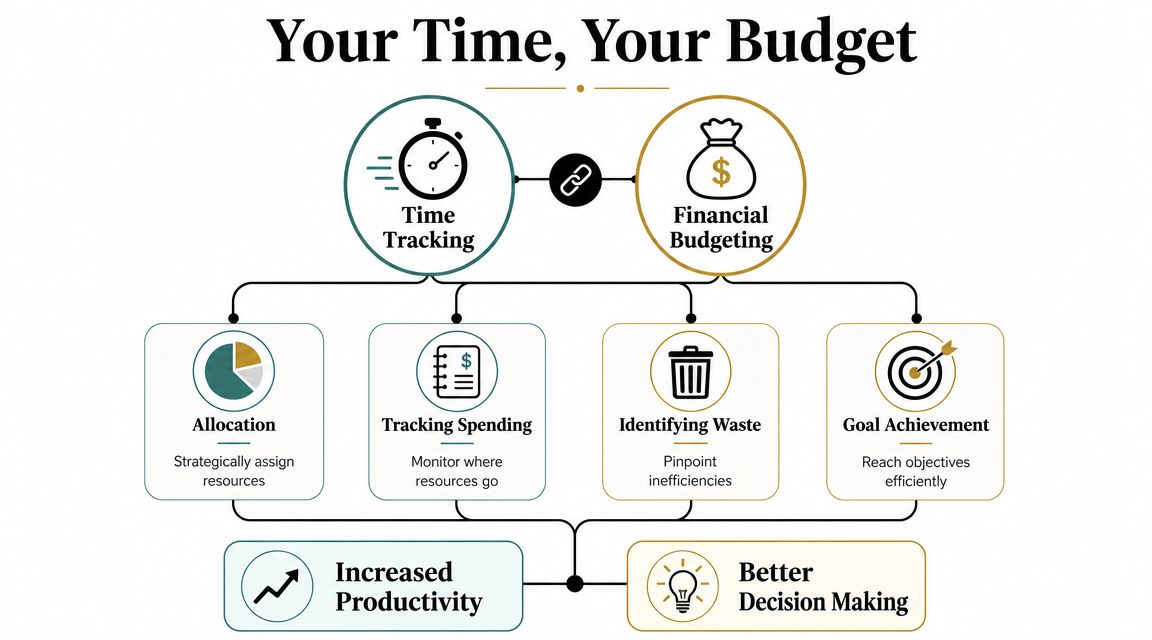
Most founders would never run the company without looking at cash flow. They track spend, compare actuals to budget, and question categories that keep expanding. Time deserves the same treatment.
A budget doesn't control your money by magic. It gives you visibility, then better choices. Time tracking works the same way. It shows where your hours go, which makes tradeoffs visible.
Why this analogy matters
When people ask what is time tracking, they often expect a narrow answer about timers and timesheets. That's incomplete. The stronger frame is this:
- Income becomes available hours
- Expenses become meetings, admin, delivery, planning, and interruptions
- Savings become protected focus time
- Investments become strategic work that compounds
- Budget drift becomes a week that disappears into reactive tasks
If you already know how to manage family expenses using Google Sheets, you already understand the core habit. First you measure. Then you notice patterns. Then you decide what deserves more, less, or none at all.
Why serious teams use it
This isn't a niche habit anymore. The time-tracking software market was valued at $6.1 billion in 2025 and is projected to reach $11.43 billion by 2030, according to Breeze's time tracking statistics roundup. The same source reports that employees using automated tracking are 15% more productive than those using manual systems.
That matters for one reason. Businesses don't keep buying software categories at that scale unless the data changes decisions.
When you budget money, you learn what to cut. When you budget time, you learn what to stop doing.
What you can do with a time budget
A useful time-tracking system helps you do four things well:
See reality clearly
You stop relying on impressions like "I spent the whole day on product" and start seeing whether product work was one hour wrapped in six hours of coordination.Create accountability without drama
For individuals, accountability means facing your own patterns. For teams, it means discussing workload and priorities using evidence instead of opinion.Price and plan with more confidence
If a client project, feature sprint, or content workflow keeps taking longer than expected, tracked time gives you a basis for estimating future effort.Protect strategic work
The biggest value often isn't efficiency. It's permission to remove low-value recurring tasks that crowd out the work that matters.
A financial budget doesn't exist to shame spending. It exists to align spending with goals. The same is true here. Time tracking isn't about squeezing every minute. It's about making sure your hours are funding the life and work you're trying to build.
Core Time Tracking Methods and Key Metrics
There are two basic ways to track time. You either enter it yourself or let software capture it automatically. Both can work. The right choice depends on your role, your workflow, and how much detail you need.
Two ways to capture time
Manual tracking means you start and stop a timer, or you log time after finishing a task. Automatic tracking means software records activity in the background and turns it into usable records.
A guide from Hubstaff on time tracking methods describes automatic tracking as continuous capture that can feed timesheets, dashboards, and invoices. It also notes that some systems use geofencing to create location-linked entries for field work.
| Attribute | Manual Tracking | Automatic Tracking |
|---|---|---|
| How it works | You start a timer or log hours yourself | Software records time in the background |
| User effort | Higher, because you have to remember | Lower, because capture is ongoing |
| Context accuracy | Strong when you label work carefully | Strong on duration, sometimes needs review for context |
| Data richness | Mostly duration and category | Duration plus activity or location signals in some tools |
| Best fit | Freelancers, consultants, creators, focused project work | Remote teams, field teams, operational roles, compliance-heavy workflows |
| Main risk | Forgetting to track | Collecting more data than you actually use |
If you're evaluating systems for attendance and operational workflows, DynamicsHub's time & attendance guide is a useful companion read because it helps separate simple logging from broader workforce process needs.
The metrics that matter
People often think tracked time means one number: hours worked. That's too shallow. The most useful systems organize time into decision-friendly metrics.
Here are the ones that matter most:
Billable versus non-billable time
If you serve clients, this split tells you how much effort generates revenue and how much goes to coordination, admin, or internal work.Planned versus actual time
This is the cornerstone for improvement. You estimate a task, then compare that estimate to reality. The gap teaches you whether you're optimistic, distracted, under-scoping, or dealing with hidden complexity.Time by project or goal
This shows whether your hours match your declared priorities.Time by task type
You can separate deep work, meetings, email, planning, support, and review. That makes patterns easier to act on.
A good metric doesn't just count effort. It tells you where your system is leaking attention.
For a broader view of how teams interpret these patterns, productivity measurement in practical terms is useful because it pushes past raw activity and toward outcome-aware analysis.
From raw entries to operational data
Modern time tracking isn't just a notebook with timestamps. In more structured environments, each entry is tied to a task, project, person, or workflow. That turns the data into something other systems can use.
Think about the difference:
- A simple note says, "worked three hours"
- A structured entry says, "three hours on onboarding flow redesign for Project A"
- A workflow-aware system can route that entry into a timesheet, approval step, invoice, or project report
That shift matters because the value of time tracking rises when the data becomes reusable. A founder can review team effort by initiative. A consultant can generate cleaner invoices. A manager can compare effort across similar work. A student can see whether revision time aligns with exam priorities.
If you remember one thing from this section, make it this: time tracking is not just about collecting hours. It's about attaching hours to meaning.
Time Tracking in Action for Different Roles
The concept clicks faster when you see it in real life. The mechanics stay the same, but the payoff changes depending on who you are and what kind of work fills your week.

The founder
A startup founder keeps saying the team needs to focus on product and sales, but everyone feels stretched. After a few weeks of time tracking, she notices a pattern. Strategic work keeps getting eaten by internal coordination, hiring admin, and unplanned support.
That doesn't mean the team is failing. It means capacity was misunderstood.
With tracked time, she can make cleaner decisions about delegation, hiring, meeting limits, and which projects deserve active attention right now. If you're trying to model this kind of workflow, project manager time tracking offers a practical template-oriented view.
The professional
A manager or individual contributor often feels busy all week but struggles to show what they delivered. Time tracking creates evidence.
One professional might discover that "project work" is really fragmented into short bursts between messages and meetings. Another may realize their best thinking happens early, but they keep giving that time away to reactive tasks.
The value here isn't proving busyness. It's protecting meaningful output and making your contribution easier to explain.
The student
Students usually don't need corporate timesheets. They need honesty.
A student may believe they studied all weekend, then find that only a small share of that time was focused revision. The rest went to switching subjects, organizing notes, chatting, searching for resources, and taking longer breaks than intended.
Once time is visible, planning gets less emotional. You can decide how much time each subject needs, spot imbalance early, and reduce the panic that comes from vague preparation.
The creator
Creators and freelancers face a different trap. They underestimate how much time goes into the non-creative parts of creative work.
Writing, design, filming, editing, revisions, admin, client communication, asset prep, and invoicing all blend together. Without tracking, it's easy to underprice projects or resent work that looked profitable on paper.
A creator who tracks time can separate the craft from the overhead. That leads to better quotes, cleaner schedules, and fewer surprises.
Coach's note: If your work feels heavier than your plan suggested, the missing weight is often hidden in setup, switching, and coordination.
Across all four roles, the pattern is the same. Time tracking doesn't just answer "How long did this take?" It answers "What is this work really costing me, and is it worth it?"
How to Implement Time Tracking Effectively
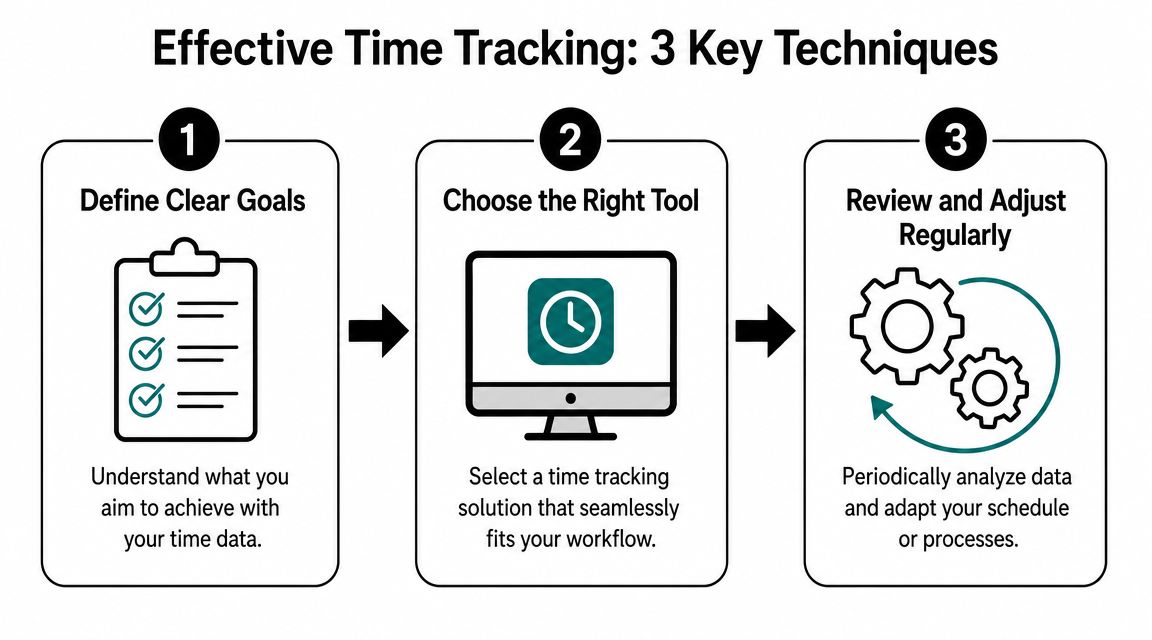
Most time-tracking systems fail because people treat them like filing cabinets. They log time, store it, and never let it influence tomorrow. The more useful approach is to treat tracking as a feedback loop.
Start simple, but make the data do real work.
Start with short intervals
If your categories are too broad, you won't learn much. "Worked on marketing" is too fuzzy to improve. Shorter intervals give you sharper feedback.
A practical method is to track in 15-minute blocks. That level of detail is enough to reveal switching, drift, and hidden admin without turning the process into a burden.
This works especially well for knowledge work because many days aren't lost in one giant mistake. They're lost in dozens of small fragments. Short-interval tracking makes that visible.
Use planned versus actual reviews
Before the day starts, sketch a simple plan. It doesn't need to be elaborate. Just map your intended blocks of time to key tasks.
Ultimately, compare that plan with what happened.
Ask questions like:
- Which task took longer than expected
- What got interrupted
- What never started
- Which estimate was unrealistic
- What should be scheduled differently tomorrow
Tracking becomes developmental. You're no longer collecting history. You're improving forecasting.
A number of tools can support this approach. One option is Beyond Time from Tribble Software Private Limited, which includes 15-minute time tracking and planned-versus-actual analysis inside an OKR-based goal system. If you want a wider view of how software supports these review loops, progress tracking software in practice is a useful reference.
Here is a quick walkthrough that pairs well with this habit:
Connect time to goals and OKRs
This is the step many individuals skip.
If your time data isn't connected to goals, you'll end up optimizing activity instead of progress. That's why founders and ambitious professionals get more value when they link time entries to projects, milestones, and key results.
For example:
- Hours spent on customer interviews can map to a product discovery objective
- Time on outreach can map to a pipeline goal
- Writing and review time can map to a publishing cadence or launch milestone
Once you do this, your week becomes easier to evaluate. You can ask whether your time supported your objectives, not just whether you stayed busy.
In more formal environments, this structure extends into operational workflows. SAP's overview of employee time tracking describes time tracking as a system that captures entries at the task or project level, compiles them into timesheets, routes them through approvals, and can use AI to detect anomalies and generate predictive insights for scheduling and resource planning.
That enterprise example matters even for individuals. The principle is the same. Useful time data has structure. Once time is linked to meaningful units of work, it becomes easier to review, approve, compare, and improve.
Common Pitfalls and How to Avoid Them
Time tracking gets a bad reputation for good reasons. Teams have seen it used as a control mechanism. Individuals have turned it into a guilt machine. And many people have collected data they never review.
The problem usually isn't the act of tracking. It's the way the system is framed and used.
When tracking turns into theater
The biggest mistake is assuming that logging time automatically improves performance. It doesn't.
A large field experiment found that time-use logging increased self-awareness but did not meaningfully change productivity for most workers. The employees who improved were the ones who used the data for reflection and planning, according to Deltek's summary of time tracking research.
That finding is important because it strips away the fantasy. Tracking is not magic. It is feedback.
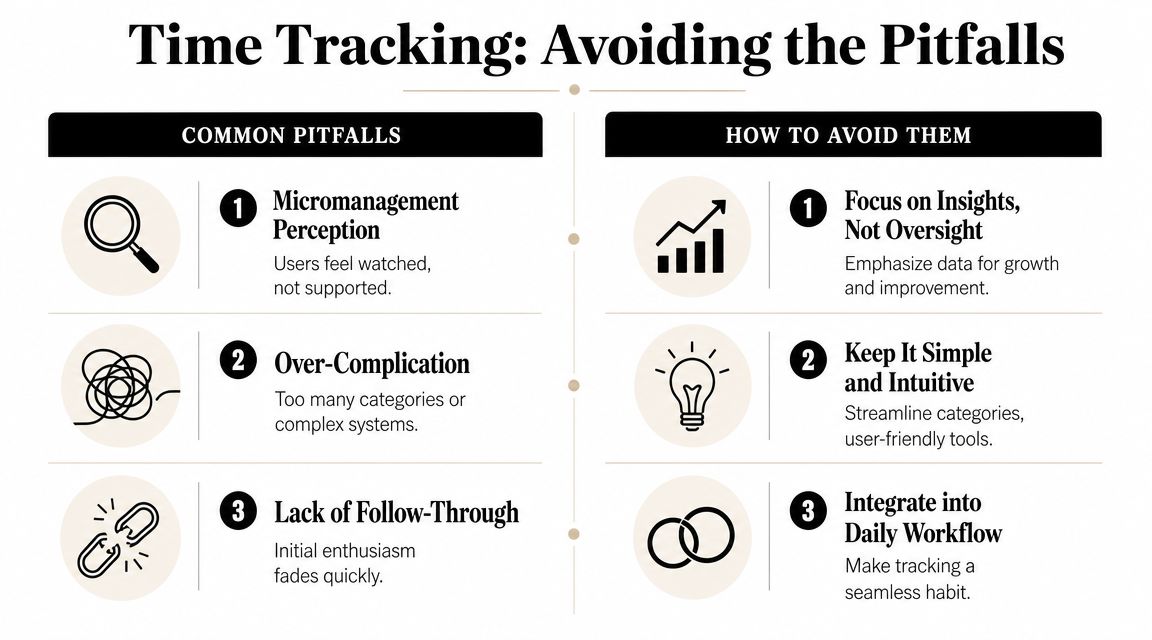
Common failure patterns look like this:
Micromanagement framing
A manager uses time data to watch people rather than understand work.Too much complexity
Categories multiply until logging becomes its own form of admin.No review habit
People track diligently for a while, then stop because nothing changes.
Don't punish deviations. Diagnose them.
How to keep it empowering
A good system should make people feel clearer, not smaller. That requires a few rules.
Use time data to improve estimates
If a task regularly overruns, the fix may be better planning, not more pressure.Keep categories lean
You only need enough detail to make decisions. If a category won't influence action, remove it.Review patterns, not isolated moments
One chaotic day means little. Repeated patterns mean something.Protect focus, don't just fill calendars
The goal isn't to eliminate white space. The goal is to preserve the time that produces real progress.
Time tracking becomes unhealthy when every minute feels judged. It becomes powerful when every week becomes easier to understand.
From Tracking Time to Mastering Your Day
By now, the answer to what is time tracking should feel more practical than technical. It's the habit of recording how your time is spent so you can compare plans with reality, connect effort to goals, and make better decisions with your finite hours.
The strongest version of the practice isn't obsessive. It's intentional. You don't need to account for every second. You need enough signal to notice where your time is helping, leaking, or drifting away from what matters.
If you want a simple next step, choose one method from this guide and track your time for one week. Don't try to optimize anything yet. Just observe. At the end of the week, review the pattern and ask one question: What surprised me?
That question often opens the door to the next one. If this is how I'm spending my days, what would it take to design them on purpose? A time-blocked calendar approach is often the natural next move once your data becomes clear.
Keep going with Beyond Time
Time tracking is most powerful when it connects to your goals — here is where to go next.
- Productivity Score Calculator — See your actual productivity in one number.
- Beyond Time vs RescueTime — Compare passive tracking vs. goal-linked time mastery.
- Is Time Tracking Worth It? — Research-backed answer to the classic objection.
- Sunday Reset Weekly Time Review — Turn one weekly habit into a better every week.
If you want a structured way to connect goals, milestones, routines, and time data in one place, Tribble Software Private Limited builds Beyond Time for that purpose. It combines OKR-based goal planning with planned-versus-actual time tracking so founders, professionals, students, and creators can turn intent into measurable daily execution.
Put this into practice
Free tools that match this article.
Goal Setting Worksheet
Turn a vague goal into milestones, habits, blockers, and a weekly review plan.
Try Goal WorksheetGoal SettingSMART Goal Validator
Instantly validate your goals against the SMART framework and get actionable improvement suggestions.
Try SMART ValidatorGoal SettingAI Milestone Generator
Turn your biggest goals into an actionable step-by-step plan in seconds with AI.
Try Milestone GeneratorTime ManagementTime Blocking Template
Map your day into focused time blocks with a free printable time blocking template.
Try Time BlockingKeep exploring this topic
Goal setting guide
Start with the fundamentals of setting goals that turn into action.
Goal frameworks compared
Choose between SMART goals, OKRs, BHAGs, and 12-week goals.
Time blocking guide
Turn priorities into protected calendar blocks.
15-minute time blocks
Plan and review your day with more realistic precision.
Related Articles

Master Your Estimated Completion Date in 2026
Calculate and manage an accurate, motivating estimated completion date. Our 2026 guide covers formulas, tracking, and common pitfalls to help you achieve goals.

Difference Between Short and Long Term Goals: A 2026 Guide
Learn the core difference between short and long term goals. This guide covers time horizons, purpose, and how to connect your vision to daily actions.
How to Improve Work Productivity: A Complete System
Learn how to improve work productivity with a step-by-step system. Go beyond simple tips to diagnose bottlenecks, build routines, and track progress.
Personal Productivity Systems to Stop Planning, Start Doing
Feeling busy but not productive? Learn how to choose, build, and adapt personal productivity systems like GTD, OKRs, and more to finally achieve your goals.

How to Track Multiple Goals Without Getting Overwhelmed
Learn a proven system for managing multiple goals simultaneously without losing focus or burning out. Practical frameworks for tracking 3-5 goals at once.
Accountability Partner Guide: Achieve Goals Faster
Learn how to find, structure, and get the most from an accountability partner. Research shows accountability can boost goal achievement by up to 95%.