Toggl Alternatives for Personal Time Tracking (2026)
Looking for a Toggl alternative to track your own life, not billable hours? Compare 7 personal time tracking apps and who each one genuinely suits best.
If you want a Toggl alternative for personal time tracking, the short answer is this: pick the tool that matches how you want to capture your day. Clockify is the closest like-for-like swap with a free plan. aTimeLogger is built for personal activities on your phone. RescueTime and ActivityWatch record screen time automatically. Timing does the same on a Mac. Harvest suits you if the real goal is invoicing.
Toggl Track is a good product. It is also built around work: projects, clients, billable rates and team reports. If what you want is to see where your own 16 waking hours go, including the walk, the dinner and the hour you lost to your phone, you need different things from a tracker.
This guide covers seven options, including Beyond Time, which we make. We say who each one is genuinely best for, including when it is a better fit than ours. Product details come from each company's own website and were checked at the time of writing. Plans and limits change, so confirm on the product's site before you commit.
Key takeaways
- Toggl Track is designed for work and billing. Personal tracking asks for different things: fast capture, life categories, and a view of the whole day.
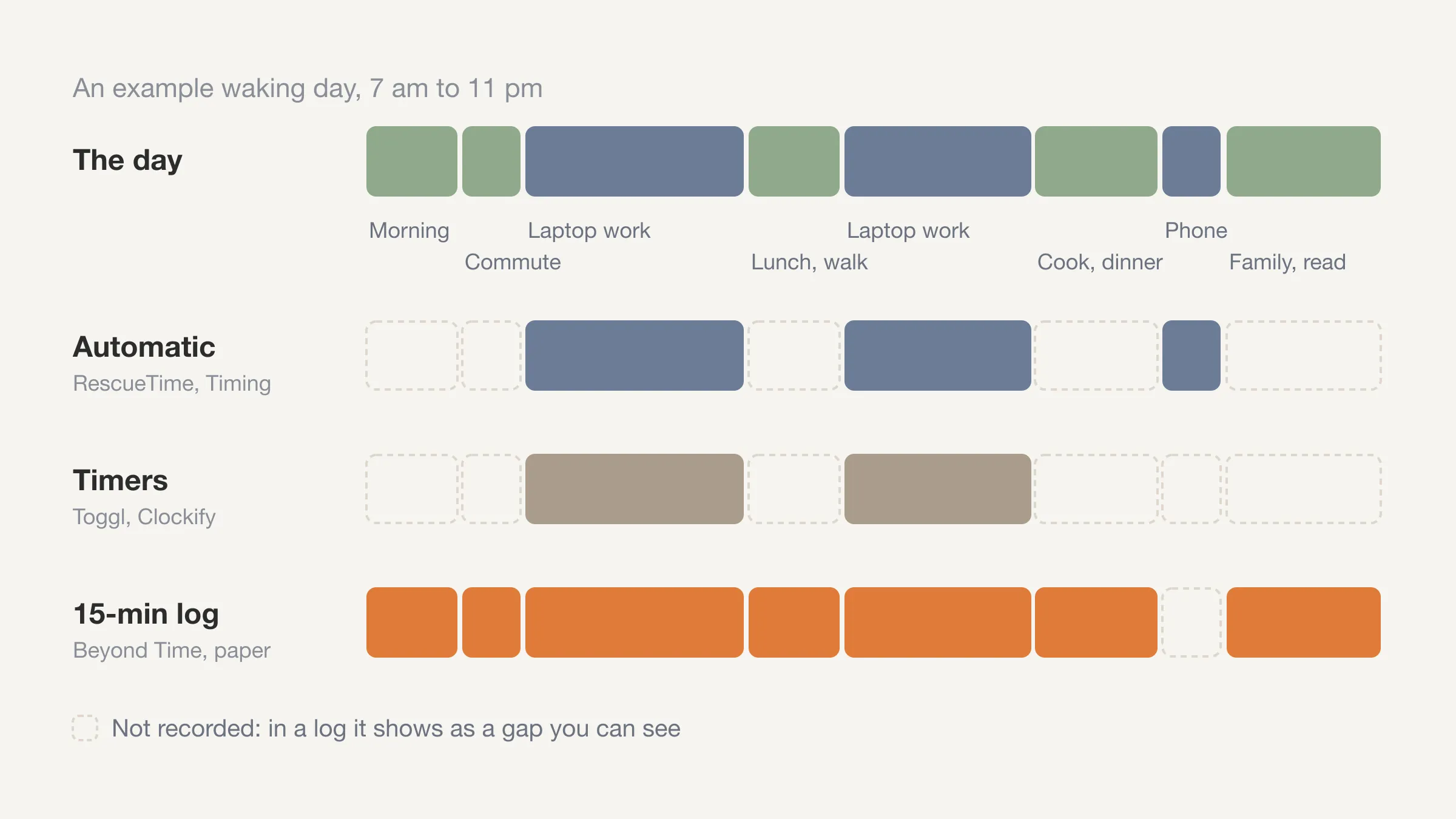
- Timers and automatic trackers miss different parts of a day. Timers need you to remember to start them. Automatic trackers only see the screen.
- Logging in 15-minute blocks is a middle path: about two minutes in the morning and two at night, and nothing about your day is invisible.
- The right choice depends on one question: do you want to count hours for a client, or understand a life?
Why look for a Toggl alternative for personal time tracking?
Toggl's own site describes Track as time tracking for freelancers and solo users, agencies, software and IT teams, law firms, accounting teams and larger organizations. Its feature list centers on billable rates, revenue and profitability reports, and billable hours with invoicing. That is a strong fit for a consultant who bills by the hour.
For personal use, the same design can get in the way. Entries are organized by project and client, not by the parts of a life. A timer that you start and stop works well when you sit down to a task. It works badly for a day made of short, mixed activities: cooking, a call, a commute, a gap you cannot account for.
Toggl does offer a free plan. At the time of writing its pricing page lists a Free plan for up to three users that includes manual and real-time timers, calendar integrations and personal-level reports, while billable rates, tags and team reports are on paid plans. If your needs are small, you may not need to switch at all. The reasons people do switch tend to be the ones below.
- You are not billing anyone. Rates, invoices and client reports are clutter.
- You forget to start the timer. A day with gaps is hard to read afterward.
- You want life categories, such as health, work and rest, rather than projects.
- You want the whole day, including the hours when nothing was open on a screen.
Our guide to time tracking for beginners covers how to start without burning out. The rest of this post is about picking the tool. If you want a broader life-design app built around a few life areas, see our list of Existence app alternatives.
What should you look for in a personal time tracker?
Before comparing apps, decide what you are measuring. Five questions sort most of the choices.
- Automatic or manual? Automatic trackers record the apps and sites you use without effort. Manual trackers need a tap, but they can capture anything you do away from a screen.
- How fine-grained is the record? A timer gives you exact start and stop times. A grid of 15-minute blocks gives you a rougher but complete picture. Our post on the 15-minute time block method explains why that resolution is enough for most people.
- Does it cover the whole day? Sleep, meals, family and exercise rarely happen on a laptop.
- Is it built for one person? Tools made for teams add approvals, rates and permissions you will never use.
- What do you get back? A chart of hours is a start. Something that helps you decide what to change is better.
Keep these in mind as you read. No tool wins on all five, which is why the best option depends on you.
Track your own day, not a project
Beyond Time shows your day as 15-minute blocks. Two minutes in the morning, two at night.
Try Beyond Time freeWhich Toggl alternatives are best for tracking your own life?
Here are seven, in no particular order of merit. Each entry says what it is, what it does well, and who it suits.
Clockify: the closest free swap
Clockify is a time tracking and timesheet app. Its site lists a timer, a weekly timesheet, an auto tracker that records the apps and websites you use, a calendar, and reports. It runs on Mac, Windows and Linux, in the browser, and on iPhone and Android.
At the time of writing, Clockify's pricing page describes a free plan with unlimited projects and unlimited tracking. It limits some things, such as a one-month date range on reports, so check that against how far back you want to look.
Best for: people who like Toggl's model of timers and timesheets but want a generous free plan. It is also strong if you sometimes track for a team or client. Its site aims at teams and businesses, so expect more settings than a personal tracker needs.
aTimeLogger: made for personal activities
aTimeLogger describes itself as a personal time tracker for work, study, sleep and everyday activities. You start tracking by tapping an activity icon. It runs on iOS, Android and Mac, with Apple Watch and Wear OS apps, plus a web app with its paid sync option.
The app is free to start. Per its site, features like unlimited categories, goals and reports sit behind one-time upgrades, and syncing across devices and the web app is an optional subscription.
Best for: people who want a simple tap-to-start timer for everyday life, with categories that are not tied to clients. It is a good choice if you prefer a one-time purchase to a subscription for the core features.
RescueTime: automatic tracking of your devices
RescueTime tracks time on apps and websites automatically, then adds Focus Sessions that block distracting sites, plus goals, alerts and reports. It also offers a Timesheets product for logging time by client and project. The desktop app runs in the background, and there are iOS and Android apps.
One detail matters for iPhone users. RescueTime's help center says iOS activity appears only in the app's Mobile tab, because Apple keeps Screen Time data on the device. It does not show up in the website reports or merge with desktop time. At the time of writing, RescueTime's pricing page lists a free plan called Lite that accounts fall back to, and a 14-day trial of paid plans. Check what Lite includes before relying on it.
Best for: people whose time disappears into a computer and who want an honest, effortless mirror of it. Our post on Beyond Time vs. RescueTime goes deeper on how the two differ.
ActivityWatch: free, open source and private
ActivityWatch is a free, open-source app that tracks how you spend time on your devices automatically. Its site lists support for Windows, macOS, Linux and Android. It records the active application and window title by default, and optional browser extensions and editor plugins extend that.
The site says data is stored locally and does not leave your device, and that there are no feature gates, usage limits or ads. It also says syncing activity between devices is still in progress. Expect to do some setup: after installing, you open the interface at a local address in your browser.
Best for: technical users who want automatic tracking with full control over their data, and who are fine with a more hands-on tool.
Timing: automatic tracking for Mac
Timing is a native Mac time tracker that records your time automatically, so you do not start and stop timers. It logs the apps, websites and documents you use, lets you sort them into projects with rules, and can import iPhone and iPad app usage from Apple's Screen Time. Its site offers a 30-day free trial and lists reports that can round hours to 6 or 15 minutes for billing.
Best for: Mac users who work mostly at the computer and want automatic tracking with good project sorting. It is Mac-only for the main app, so it will not follow you across Windows or Android.
Harvest: when the point is invoicing
Harvest is a time tracking and invoicing platform for professional teams. Its site covers timers, timesheets, expenses, budgets, invoices with online payments, and reports on profitability and team utilization. It has apps for macOS, Windows, iOS and Android, and offers a 30-day free trial.
Best for: freelancers and agencies who bill clients and need the time to turn into an invoice. If that is you, stay with a billing tool. A personal tracker will not replace it.
Beyond Time: the whole day in 15-minute blocks
Beyond Time is an iOS and web app that shows you where your time goes. You log the day as 96 fifteen-minute blocks: pick a block, pick what you were doing. Routines are grouped into Health, Life, Work and Sleep, and blocks you have not logged show up as gaps. The usual rhythm is two minutes in the morning to start the day and two at night to log it and rate how health, life and work felt.
It also has an AI reflection that reads the logged day: what went where you meant it to, where time leaked, and one or two changes for tomorrow. It is not an automatic tracker and it is not a billing tool. It does not run on Android. There is a two-week free trial with everything unlocked; after that, pricing at the time of writing is monthly, yearly or lifetime.
Best for: people who want to see their whole life, including the off-screen hours, and would trade a little manual effort for a complete picture. Not for you if you need invoices, team reports or hands-off tracking.
How do the alternatives compare?
This table summarizes what each company's site says. "Free option or trial" lists a free plan or a free trial, as each site describes it at the time of writing. Details vary, so treat it as a starting point.
| Tool | Capture method | Platforms | Free option or trial | Built for |
|---|---|---|---|---|
| Toggl Track | Timers, manual entry | Web, desktop, iOS, Android | Free plan (up to 3 users) | Work, billing, teams |
| Clockify | Timer, timesheet, auto tracker | Web, desktop, iPhone, Android | Yes | Teams and businesses |
| aTimeLogger | Tap-to-start activity timer | iOS, Android, Mac, web (sync) | Free to start, paid upgrades | Personal activities |
| RescueTime | Automatic | Desktop, iOS, Android | Lite plan, 14-day trial | Screen time, focus |
| ActivityWatch | Automatic | Windows, macOS, Linux, Android | Free, open source | Privacy-minded technical users |
| Timing | Automatic | Mac (web app for timers) | 30-day trial | Mac work, projects |
| Harvest | Timers, timesheets | Web, desktop, iOS, Android | 30-day trial | Invoicing, teams |
| Beyond Time | Manual, 15-minute blocks | iOS, web | Two-week trial | Whole-life view |
How do you choose between them?
Match the tool to the problem you actually have.
- "I want to know where my computer time goes." Use an automatic tracker: RescueTime, ActivityWatch or Timing, depending on your platform and how much you care about privacy.
- "I want to log activities quickly on my phone." Try aTimeLogger.
- "I like Toggl but want something free." Try Clockify, or check whether Toggl's free plan is enough.
- "I bill clients." Stay with Toggl Track or Harvest.
- "I want to see my whole day and work out where it leaked." Try Beyond Time, or log by hand first with the daily time log template.
You can also combine them. An automatic tracker covers the screen. A manual log covers the rest. If you run both, you get a more honest picture than either gives alone. And if what you really want to count is habits rather than hours, see our comparison of habit tracker apps. The hard part is not the app; it is looking at the result. Our guide to the time audit walks through what to look for.
Can you track personal time without any app?
Yes. A paper or spreadsheet log works, and it is a good way to find out whether you will keep the habit before you pick a tool. Divide a day into 15-minute rows, fill it in at lunch and at bedtime, and add up the categories at the end of the week.
The time blocking template gives you the grid, and the weekly schedule template lays out the week. The weak point of paper is the sum. It takes effort to add up a week by hand, which is where an app earns its place.
If you wonder whether the effort pays off, read what the research says in is time tracking worth it.
Start with one honest day
Log today in 15-minute blocks and see the gaps. Free for two weeks, everything unlocked.
Try Beyond Time freeHow do you start tracking in the first week?
Whatever you choose, keep the first week small. Tracking everything on day one is how most attempts end.
- Day 1: Log only the morning and the evening. Notice which blocks you cannot remember.
- Days 2 to 3: Log the whole day in rough categories. Accept that some blocks will be guesses.
- Days 4 to 7: Look at the totals at the end of each day. Ask one question: did the hours go where I meant them to?
- End of week 1: Pick one leak and one thing that went well. Change one thing for the next week.
A weekday has 24 hours. If you sleep eight, that leaves 16 waking hours, or 64 fifteen-minute blocks. That is the number you are accounting for. A tool is good if you can fill it in without dreading it.
Frequently Asked Questions
What is the best Toggl alternative for personal use?
It depends on how you want to capture time. Clockify is the closest like-for-like swap with a free plan, aTimeLogger is built for personal activities on a phone, and RescueTime or ActivityWatch record screen time automatically. If you want a whole-day view in 15-minute blocks on iPhone or the web, Beyond Time is built for that.
Is Toggl Track free?
Toggl Track has a free plan at the time of writing, listed on its pricing page for up to three users. It includes manual and real-time timers and personal-level reports, while features such as billable rates and team reports are on paid plans. Plans change, so check the pricing page.
Is there a free personal time tracking app?
Yes, several. ActivityWatch is free and open source, Clockify has a free plan, and aTimeLogger is free to start with paid upgrades for features like goals and reports. A paper log or spreadsheet also costs nothing.
Is automatic or manual time tracking better?
Neither is better in general. Automatic tracking is effortless but only sees the screen, and RescueTime's own site describes tracking apps and websites. Manual tracking takes a couple of minutes but can capture sleep, meals, exercise and time with other people.
Can I use Toggl for personal time tracking?
Yes. Many people do, using projects as life categories. It works best if you are comfortable starting timers throughout the day and do not need the billing features.
Does Beyond Time replace Toggl?
Not for billing. Beyond Time is a personal tool for seeing where your day goes, with no invoicing, rates or team reports. If you bill clients, keep a billing tool and use Beyond Time for the rest of your life.
The bottom line on Toggl alternatives for personal time tracking
The best Toggl alternative for personal time tracking is the one you will still open in week three. Clockify, aTimeLogger, RescueTime, ActivityWatch, Timing and Harvest each win in a particular situation, and so does staying with Toggl if you bill by the hour.
Your time is limited. The first step is to see where it goes. Pick a tool, log one day, and look at the gaps. If you want the whole day in 15-minute blocks, you can try Beyond Time free for two weeks.
Put this into practice
Free tools that match this article.
Life Audit Tool
Score your life in 6 key areas and get a personalized action plan to create balance and fulfillment.
Try Life AuditPersonal DevelopmentPersonal Development Plan Generator
Generate a personalized development plan with quarterly milestones, skill gaps, and daily habits tailored to your goals.
Try Development PlanLife Planning5-Year Plan Generator
Build your 5-year life vision with year-by-year milestones, domain goals, and a Q1 action plan — powered by AI.
Try 5-Year PlannerTime ManagementWeekly Schedule Template
Plan your week with a free printable weekly schedule template for goals, routines, and focus blocks.
Try Schedule TemplateKeep exploring this topic
Best goal tracking apps
Compare tools for goals, habits, and progress tracking.
Best habit tracker apps
Compare habit apps by use case, depth, and daily workflow.
Time blocking guide
Turn priorities into protected calendar blocks.
Life audit guide
Review the areas of life that need more attention and intention.
Related Articles
RescueTime Alternatives: Automatic vs Manual Tracking
Looking for a RescueTime alternative? Compare automatic screen time trackers with manual tools that see the off-screen half of your day, and who each suits.
Beyond Time vs. RescueTime: Why Time Mastery Beats Time Tracking
RescueTime shows where your time went. Beyond Time masters where it goes. Discover why passive tracking falls short and how goal-connected time management wins.
Is Rob Dyrdek's Existence App Worth Waiting For? Honest 2026 Take
Is Existence app worth the wait? Honest 2026 take on Rob Dyrdek's app, the real cost of waiting six months, and what to do today instead. Decide right now.
7 Existence App Alternatives You Can Use Today
Looking for Existence app alternatives you can actually use today? Compare 7 tools that honor Rob Dyrdek's four-pillar philosophy and ship now.
Rob Dyrdek's Existence App Review (2026): Everything We Know So Far
Rob Dyrdek Existence app review for 2026: features, four-pillar method, launch timing, and the alternative you can use today. Read the full breakdown.
12 Best Goal Setting Apps in 2026: Find Your Perfect Match
Compare the 12 best goal setting apps for 2026. See features, pricing, and real pros and cons to find the right app for your goals. Templates and examples.