Time Log Template: A Free Daily 15-Minute Log to Copy
Copy this free time log template: a daily log in 15-minute blocks to paste into any doc or print. Learn how to fill it fast and what to check after 3 days.
A good time log template is a grid of 15-minute blocks, one for every quarter-hour of your waking day, with a short code in each block for what you were doing. That is all it takes. The template below is a markdown table you can copy into any document, spreadsheet or note, or print and keep on a clipboard.
A daily time log answers one question that memory can't: where did the day go? Ask yourself about last Tuesday and you will reconstruct a story. Fill in a log as the day happens and you get a record. The two rarely match, and the difference is the useful part.
This guide gives you the template, shows how to fill it in with minimal effort, and explains what to look for after three days and after two weeks.
Key takeaways
- A waking day of 7 am to 11 pm is 64 fifteen-minute blocks. A log with that many cells is detailed enough to catch small leaks and short enough to finish in about two minutes, twice a day.
- Use a few broad categories (Health, Life, Work, Sleep) plus one code for "not logged". Too many categories is the main reason logs get abandoned.
- Fill the log at two fixed moments: a quick pass in the morning and a longer one at night. Do not try to log in real time.
- Look at totals after three days. Look at patterns after two weeks. Change one thing at a time.
What is a daily time log, and what is it for?
A daily time log (also called an activity log) is a written record of what you did and when you did it. Each entry is a stretch of time and a label. It is the opposite of a to-do list. A to-do list says what you intend to do. A time log says what happened.
People use logs for different reasons. Some want to bill clients. Others want to understand why a day with nothing scheduled still felt full. This template is built for the second group: anyone who wants to see their own life, not just their work.
The log is not a verdict on you. It is a measurement. You will likely find a mix: some time goes where you meant it to, some goes to things you would choose if asked, and a chunk goes nowhere in particular. Seeing that chunk in black and white is the first step to deciding what to do about it.
If you want a deeper walkthrough of the whole process, from planning the audit to acting on it, see our complete guide to doing a time audit. This post focuses on the template itself.
Why use 15-minute blocks?
Fifteen minutes is the smallest unit that still feels worth writing down. A day has 24 hours, which is 96 blocks. If you sleep for 8 hours (32 blocks), you are left with 64 waking blocks on a 7 am to 11 pm day. Over a week that is 448 blocks.
Hourly logs are too coarse. One hour labeled "work" can hide 20 minutes of focus, 15 minutes of messages and 25 minutes of drifting. Five-minute logs go the other way: you spend so long logging that the log becomes the day. Fifteen minutes sits in the middle. It is fine enough to show that a "quick check" of your phone ate two blocks, and coarse enough that you can fill a whole day from memory in a couple of minutes.
We cover the reasoning in more detail in the 15-minute time block method. The short version: precision beats estimation, and 15 minutes is precise enough without being a chore.
Skip the table, keep the log
Beyond Time shows your day as 96 fifteen-minute blocks. Pick a block, pick what you were doing. Not logged blocks show the gaps.
Try Beyond Time freeWhat does a good time log template look like?
Here is a template you can copy. Each row is an hour. Each column is a quarter-hour inside that hour. Write one code per cell.
Use these four category codes, plus one for gaps:
| Code | Category | What goes here |
|---|---|---|
| H | Health | Exercise, meals, cooking for yourself, medical appointments, time outdoors, anything that looks after your body |
| L | Life | Family, friends, errands, chores, commuting, hobbies, rest, reading for pleasure, scrolling you chose to do |
| W | Work | Paid work, study, deep focus, meetings, email, career or business projects |
| S | Sleep | Sleep, naps, lying in bed trying to sleep |
| ? | Not logged | You can't remember. Leave it. The gaps are data too |
The copyable 15-minute daily log
Copy everything below into a document, a spreadsheet or a notes app. The hours run from 6 am to 11 pm. Add rows for the early hours if you wake earlier, or for the late hours if you stay up.
**Date:** ____________   **Woke at:** ______   **Sleep (1-10):** ____

**Goals that matter today (1 to 3):**
1. ____________________
2. ____________________
3. ____________________

| Hour  | :00 | :15 | :30 | :45 | Notes |
|-------|-----|-----|-----|-----|-------|
| 6 am  |     |     |     |     |       |
| 7 am  |     |     |     |     |       |
| 8 am  |     |     |     |     |       |
| 9 am  |     |     |     |     |       |
| 10 am |     |     |     |     |       |
| 11 am |     |     |     |     |       |
| 12 pm |     |     |     |     |       |
| 1 pm  |     |     |     |     |       |
| 2 pm  |     |     |     |     |       |
| 3 pm  |     |     |     |     |       |
| 4 pm  |     |     |     |     |       |
| 5 pm  |     |     |     |     |       |
| 6 pm  |     |     |     |     |       |
| 7 pm  |     |     |     |     |       |
| 8 pm  |     |     |     |     |       |
| 9 pm  |     |     |     |     |       |
| 10 pm |     |     |     |     |       |
| 11 pm |     |     |     |     |       |

**Codes:** H = Health   L = Life   W = Work   S = Sleep   ? = not logged

**Totals (count blocks):**  H ____   L ____   W ____   S ____   ? ____

**How did the day feel? (1-10)**  Health ____   Life ____   Work ____

**One line about today:** ______________________________
Two small additions are worth the space. The goals line at the top gives the day a point of comparison: at night you can ask whether the blocks went anywhere near those goals. The how did it feel line at the bottom keeps you honest about the difference between a day that was busy and a day that was good.
A filled-in example
This is an illustrative example, not real data. It shows a plain weekday morning.
| Hour | :00 | :15 | :30 | :45 | Notes |
|---|---|---|---|---|---|
| 7 am | L | L | H | H | Got up, shower, breakfast |
| 8 am | L | L | L | W | Commute, started work late |
| 9 am | W | W | W | W | Report draft |
| 10 am | W | W | ? | ? | Not sure. Messages? |
| 11 am | W | W | W | W | Meeting |
In that single morning there are 2 Life blocks and 2 Health blocks before the commute, 3 blocks of commuting, a late start at work, and two blocks you can't account for. That is already more information than "I was busy this morning."
How do you fill in a time log with minimal effort?
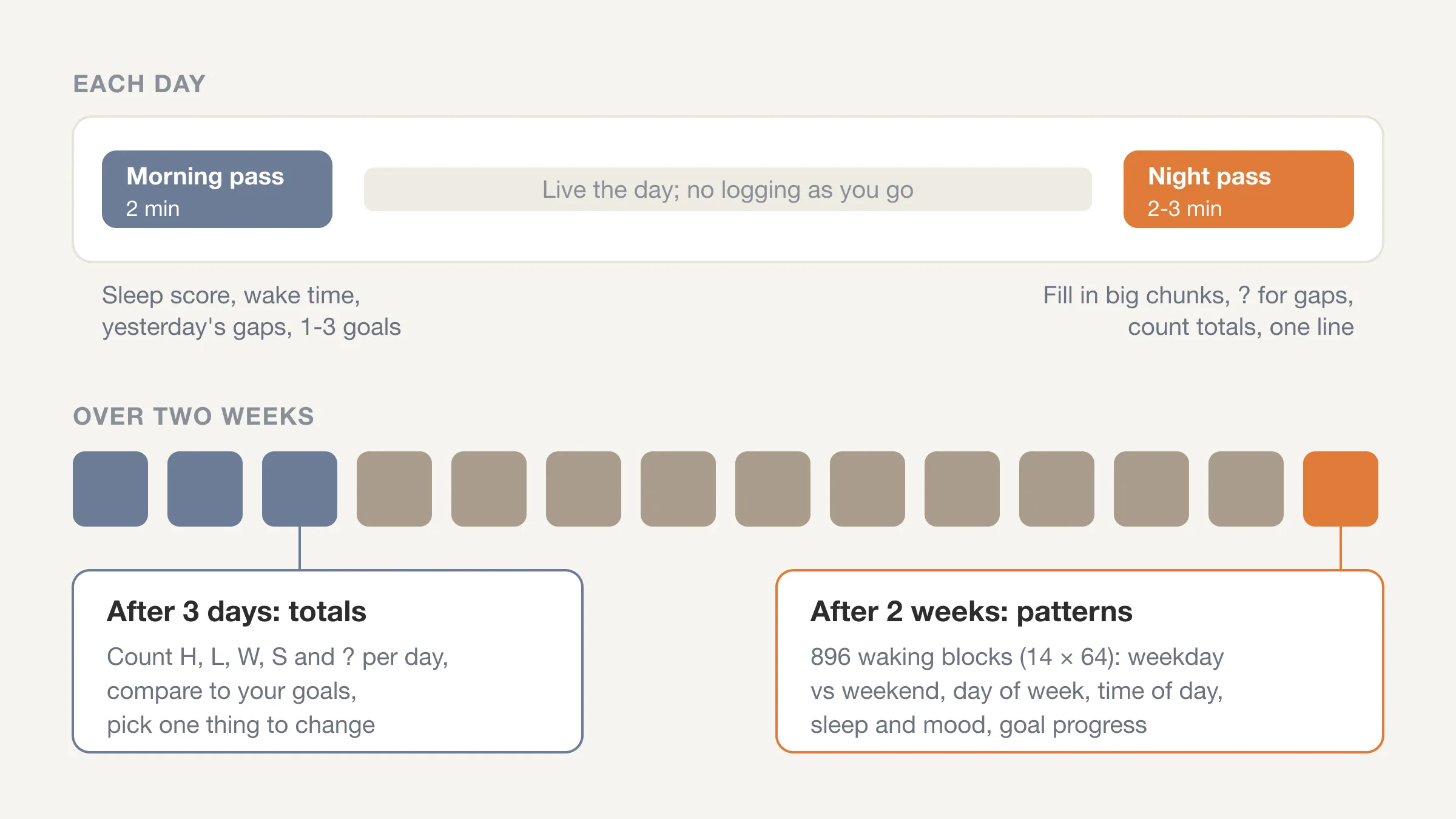
The trick is to stop trying to log in real time. Logging as you go interrupts what you are doing, and you will quit by Wednesday. Instead, use two short sittings.
The two-minute morning pass
Right after you get up or when you sit down with coffee, fill in yesterday's gaps and plan the day.
- Note when you woke and rate last night's sleep from 1 to 10.
- Fill any blocks you left empty last night. You will remember most of them.
- Write one to three goals that matter today. One is fine.
This takes about two minutes. The sleep score matters more than it looks: over a couple of weeks it shows how sleep and the rest of your day move together.
The two-minute night pass
Before bed, run through the day in order. Start at the time you woke up and scroll forward.
- Fill the blocks in big chunks. "9 to 12 was work" is three hours, or twelve blocks, written in one go.
- Do not agonize. If you can't remember a block, write ?.
- Count the totals for each code, rate how the day felt, and add one line.
The night pass can take longer than two minutes at first. Expect it to speed up by the third day.
Tricks that make logging stick
- Log in chunks, not cells. You do not need to write 12 separate W's. Fill a range.
- Use landmarks. Wake time, meals, your commute and your first meeting give you anchors to build the rest around. Calendar entries and message timestamps are free memory aids.
- Accept rough edges. If a block is half one thing and half another, pick the larger part. Over hundreds of blocks the error evens out.
- Keep the sheet where you will see it. A printed page on your desk beats a file you have to open.
If you tend to quit trackers after a few days, our guide to time tracking for beginners covers how to start small and avoid the burnout trap.
How should you choose categories?
Pick fewer categories than you think you need. Four is a good number because it forces the question that matters: is this block about looking after myself, living my life, doing my work, or sleeping?
The set used in the template is Health, Life, Work, Sleep. It is the same split Beyond Time uses for routines, so a paper log and the app line up if you ever switch.
What if "Life" is too broad?
It is broad on purpose. If after a week Life is half your waking time and you want to see inside it, split it then, with sub-codes such as LF for family or LC for chores. Start broad and refine where the data says detail is worth having.
Where do the in-between blocks go?
Commutes, waiting and transitions are real time. Log them under Life unless they are part of your paid work. Six ten-minute transitions a day add up to an hour, and an hour a day is 365 hours a year.
What counts as "not logged"?
A block you can't recall. Many people feel they must fill every cell. Don't. A ? is honest. When you see six of them in a row on the same afternoon every day, you have found something worth paying attention to.
What should you look for after 3 days?
Three days is enough to see your totals, though not yet your patterns. Pick up the three logs and count.
Step 1: Total each code. For each day, count H, L, W, S and ?. A waking day has 64 blocks if you are up 7 am to 11 pm, so use that as your frame.
| Check | What it tells you |
|---|---|
| Blocks in ? per day | How much of your day you can't account for. Fewer is better, but zero is not the goal |
| W blocks vs what you said you work | Whether "I work 9 hours" matches the grid |
| H blocks | How much time actually goes to looking after yourself |
| S blocks | Whether sleep is as long as you believe (32 blocks is 8 hours) |
| Longest unbroken run of W | Your real focus stretch, which is often shorter than the meeting-free window you imagined |
Step 2: Compare to your goals. For each day, look at the goals you wrote. How many blocks went anywhere near them? If the answer is zero for three days in a row, the goal needs a time slot, not more willpower.
Step 3: Pick one thing. Not five. One leak or one mismatch. Write it at the top of day four's sheet.
What should you look for after 2 weeks?
Two weeks is 896 waking blocks (14 days of 64) and it shows patterns that three days can't. Lay the sheets out side by side or paste the counts into a spreadsheet.
- Weekday vs weekend shape. Do your weekends recover you, or do they just move work into the evenings?
- Day-of-week effects. Is every Wednesday a leak? A single bad day, repeated, is a pattern you can fix.
- Time-of-day patterns. Which part of the day carries the most W blocks, and which part is mostly ? or L?
- Sleep and mood. Compare the sleep scores to the "how did the day feel" ratings. If your worst days follow your worst nights, you have a clue worth acting on before any productivity trick.
- Goal progress. Add up the blocks you spent on each goal. A goal that got 3 blocks in two weeks is not being pursued. It is being hoped about.
Now ask the planning question, which is the core of this whole exercise: where did I want my time to go, and where did it go? The gap between the two is your most useful number. For a longer look at why the gap matters, read planned vs actual: the most powerful metric nobody tracks.
See where today goes
Log your day in 15-minute blocks. Two minutes in the morning, two at night.
Try Beyond Time freePaper, spreadsheet or app: which should you use?
Any of them works. What matters is that you fill it in tomorrow.
| Format | Strengths | Weak spots |
|---|---|---|
| Paper | No setup. Easy to leave out where you will see it. Nothing to open | You must count totals yourself. Hard to compare weeks |
| Spreadsheet | Easy to total and chart. Free | Opening it takes effort, so it gets skipped |
| Notes app / doc | Paste the table above and go. Works on any device | Totals are manual, and old entries get buried |
| App | Totals, weekly view and trends happen for you | Needs an install. Costs money in some cases |
Start with whichever has the least friction. A sensible plan is to begin on paper for three days, then move to a tool once you know the habit sticks.
How does Beyond Time handle the daily log?
Beyond Time is built around this same loop, so the table you just copied maps onto it.
- Start your day: score your sleep, note when you woke, and pick the one to three goals that matter today. That is the top of the template.
- Log time: the day shows as 96 fifteen-minute blocks. Pick a block, pick what you were doing. Routines are grouped into Health, Life, Work and Sleep, and blocks you didn't log show as gaps.
- End your day: rate how health, life and work felt from 1 to 10, and add a line if you want. That is the bottom of the template.
- See your week: every hour of the week split by category, the trend across days, and the share you logged.
- AI reflection: the app reads the logged day and tells you what went where you meant it to, where time leaked, and one or two changes worth making for tomorrow. If you use Claude, the same data feeds a 5-minute daily review.
You don't need the app to get value from a time log. The template above works on its own. The app removes the counting and the comparing, which are the parts most people drop first.
Frequently Asked Questions
What is a time log template?
A time log template is a pre-made grid for recording what you do across the day, usually in fixed blocks such as 15 minutes. You fill in a short code or label per block, then total the codes to see where your time went.
How long should I keep a daily time log?
Keep it for at least three days to see your totals and for two weeks to see patterns. After that, many people keep logging because the habit takes only a few minutes a day, but you can stop once you've made the change you wanted.
How long does it take to fill in a daily time log?
About two minutes in the morning and two to three minutes at night once you are practiced. The key is logging in big chunks rather than cell by cell, and using landmarks such as wake time, meals and meetings.
Is a 15-minute log too detailed?
No. Fifteen minutes is detailed enough to show short leaks and coarse enough to fill quickly. A 7 am to 11 pm day is 64 blocks, and because you fill ranges at once, it is far fewer than 64 entries.
What is the difference between a time log and a time audit?
A time log is the record. A time audit is the whole process: log your time, review it, and decide what to change. The log is the data collection step of an audit.
Should I log sleep too?
Yes. Logging sleep as its own category shows how sleep length and quality connect to the rest of your day. Rate how well you slept from 1 to 10 each morning and compare it to your ratings of the day.
Can I use this template in Excel or Google Sheets?
Yes. Paste the table into a sheet, one code per cell, and use COUNTIF to total each code per day.
The short version
A time log template that works is small: 15-minute blocks, four categories, one code for gaps, and two short sittings a day. Copy the template, fill it for three days, and compare what happened to what you meant to happen. After two weeks you will know where your time really goes, and which single change is worth making first.
Your time is limited. Seeing where it goes is the first step to spending it on purpose. If you want the counting and comparing done for you, try Beyond Time free and log your first day in about two minutes.
Put this into practice
Free tools that match this article.
Weekly Schedule Template
Plan your week with a free printable weekly schedule template for goals, routines, and focus blocks.
Try Schedule TemplateTime ManagementTime Blocking Template
Map your day into focused time blocks with a free printable time blocking template.
Try Time BlockingTime ManagementWeekly Schedule Optimizer
Generate an optimized weekly schedule with AI-powered time blocking for maximum productivity.
Try Schedule OptimizerFocusFocus Session Planner
Create AI-optimized focus sessions with structured work blocks and refreshing breaks.
Try Focus PlannerRelated Articles
The 15-Minute Time Block Method: Why Precision Beats Estimation
Stop guessing where your time goes. The 15-minute block method reveals exactly how you spend each day and helps you plan with surgical accuracy.

How Many Minutes in a Week? 10,080, and Where They Go
How many minutes in a week? 10,080, or 6,720 waking minutes at 8 hours of sleep. See the minutes in each activity for an average week and how many are left.
Daily Goals: How to Set 1-3 That Get Done (With Examples)
Daily goals work when you set one to three and size them in 15-minute blocks. See examples, how to link them to weekly goals, and a two-minute check at night.

Bucket List Ideas: 100 Ideas Grouped by Theme and Lead Time
100 bucket list ideas grouped by theme and tagged by lead time: now, this year, or years ahead. Count the weeks you have, then pick ten. Start your list today.

How to Stop Doomscrolling: 9 Practical Fixes That Work
How to stop doomscrolling: add friction, swap in better habits and check your Screen Time against a real log of your day. Nine fixes, with sources. Try one.

Life Plan Template: A One-Page Plan With Weekly Costs
A free life plan template you can copy: eight areas of life, one outcome each, and a weekly time cost so your plan fits the 112 waking hours you really have.