How to Track Work Hours: A Practical Guide for 2026
Learn how to track work hours effectively. This guide covers methods, tools, and analysis to boost productivity and connect your time to your biggest goals.
You're probably doing the work. Your calendar is full, your inbox keeps moving, and by the end of the week you still can't answer a simple question: where did the time go?
That's why people search for how to track work hours. Not because they love timesheets. Because they're tired of being busy without proof of progress.
The fix isn't just logging hours. The fix is building a system that shows what you planned to do, what occurred, and whether those hours created movement on the goals that matter.
Table of Contents
- Beyond the Timesheet Why Tracking Hours Is Your Secret Weapon
- Finding Your Flow Choosing the Right Time Tracking Method
- From Tool to Habit Setting Up Your System for Success
- Stop Guessing Start Knowing Analyzing Planned-vs-Actual Time
- Connect Your Time to Your Ambitions Integrating Tracking with Goals
- The Practicalities Privacy Payroll and Team Implementation
Beyond the Timesheet Why Tracking Hours Is Your Secret Weapon
A lot of people think time tracking is an admin task. That mindset is exactly why they quit after three days.
When done well, tracking work hours gives you operational truth. It shows where your attention leaks, which projects consume more than expected, and whether your week reflects your priorities or just your interruptions. If you've ever finished a long day and felt oddly empty, this is the missing layer.

The stakes are bigger than personal organization. The U.S. economy loses approximately 50 million hours of productivity per day, which translates to roughly $7.4 billion daily, largely because work goes unrecorded or gets tracked through manual and outdated systems, according to Factorial's roundup of time tracking statistics.
Tracking gives you clarity, not just records
Many do not need another productivity hack. They need evidence.
If you track hours consistently, you can answer practical questions fast:
- Where does deep work happen: Morning, afternoon, or never?
- Which clients or projects expand without notice: The ones that look profitable often aren't.
- What drains your week: Meetings, revisions, admin, context switching, or reactive communication.
- What deserves protection: Time blocks that reliably produce meaningful output.
Practical rule: If your system can't tell you why a week felt unproductive, it's a logging system, not a decision system.
For freelancers and service teams, this is also where better billing discipline starts. If you need a practical example of how teams automate billable time tracking, it helps to study workflows that reduce manual capture and connect time directly to client work.
Why this matters for goals
Time is your most honest performance data. It doesn't care what was on your to-do list or what you hoped to finish. It records what got your attention.
That's why learning what time tracking is and how it works in practice matters less for compliance than for self-mastery. Once you stop treating hours as payroll input and start treating them as behavioral feedback, your calendar becomes a mirror. You can finally see the gap between intention and execution, then do something about it.
Finding Your Flow Choosing the Right Time Tracking Method
There isn't one perfect method for how to track work hours. There's a best-fit method for your job, your environment, and your tolerance for friction.
Some people need near-zero setup. Others need automatic capture because they switch contexts all day. A freelancer billing clients has different needs than a founder managing strategy, hiring, and product work in the same afternoon.
What manual tracking still does well
Manual tracking works when simplicity matters more than precision. A notebook, spreadsheet, or end-of-block log can be enough if your days are stable and your work categories are obvious.
The problem is that manual systems rely on memory, and memory is biased. Employees who manually track their hours are 15% less productive than those using automated tools, and office workers average only 2 hours and 53 minutes of actual productivity in an 8-hour workday, according to Breeze's time tracking statistics roundup.
That doesn't mean manual entry is useless. It means manual entry breaks down when your days are fragmented.
Where automated tracking changes the game
Automatic tracking removes the burden of remembering. That matters more than is generally appreciated.
If you work across Slack, Google Calendar, Zoom, email, docs, and project tools, your day gets chopped into tiny pieces. In that environment, a timer or passive tracker often beats a manual timesheet because it reduces the need to reconstruct the day later.
A good rule of thumb:
- Use manual logs if your work comes in clear blocks and you're mostly tracking for awareness.
- Use timers if you need precision for client billing or focused sessions.
- Use calendar-based tracking if meetings dominate your week.
- Use automated or hybrid tools if your work is fast-moving, remote, or spread across multiple systems.
If you're comparing options, this guide to productivity tracking software is useful because the right tool depends less on features and more on what friction you can realistically sustain.
Comparison of Work Hour Tracking Methods
| Method | How It Works | Pros | Cons | Best For |
|---|---|---|---|---|
| Manual timesheet | You write hours after each task or at day end | Simple, cheap, low setup | Easy to forget, weak accuracy, hard to analyze | Solo workers with stable schedules |
| Start-stop timer | You begin and end sessions manually | Stronger precision, useful for billing | Requires discipline, easy to leave running | Freelancers, consultants, focused project work |
| Calendar-based tracking | You review meetings and planned blocks | Good for reconstructing structured days | Misses hidden admin and unscheduled work | Managers, meeting-heavy professionals |
| Automated or hybrid tracker | Software captures time signals and allows edits | Lower friction, richer data, better review | Requires setup and thoughtful privacy boundaries | Founders, hybrid teams, complex workflows |
The best method is the one you'll still be using a month from now.
One more trade-off matters in flexible work. Many guides assume a rigid day with clean punch-ins and punch-outs. Real knowledge work rarely looks like that. Remote and hybrid schedules often include uneven bursts of concentrated work, then periods of communication, review, or planning. In those cases, hybrid tracking usually wins because it captures the day without pretending the day is tidy.
From Tool to Habit Setting Up Your System for Success
Most tracking systems fail for one reason. They ask for too much behavior change all at once.
If you want this to last, don't build a heroic system. Build a system that's hard to forget and easy to restart after a messy day.
Build the smallest system that works
Start with a narrow scope. Track only your working hours and a handful of categories for the first week.
That usually means categories such as deep work, meetings, admin, client work, and personal development. If you create too many tags too early, you'll spend more time labeling work than understanding it.
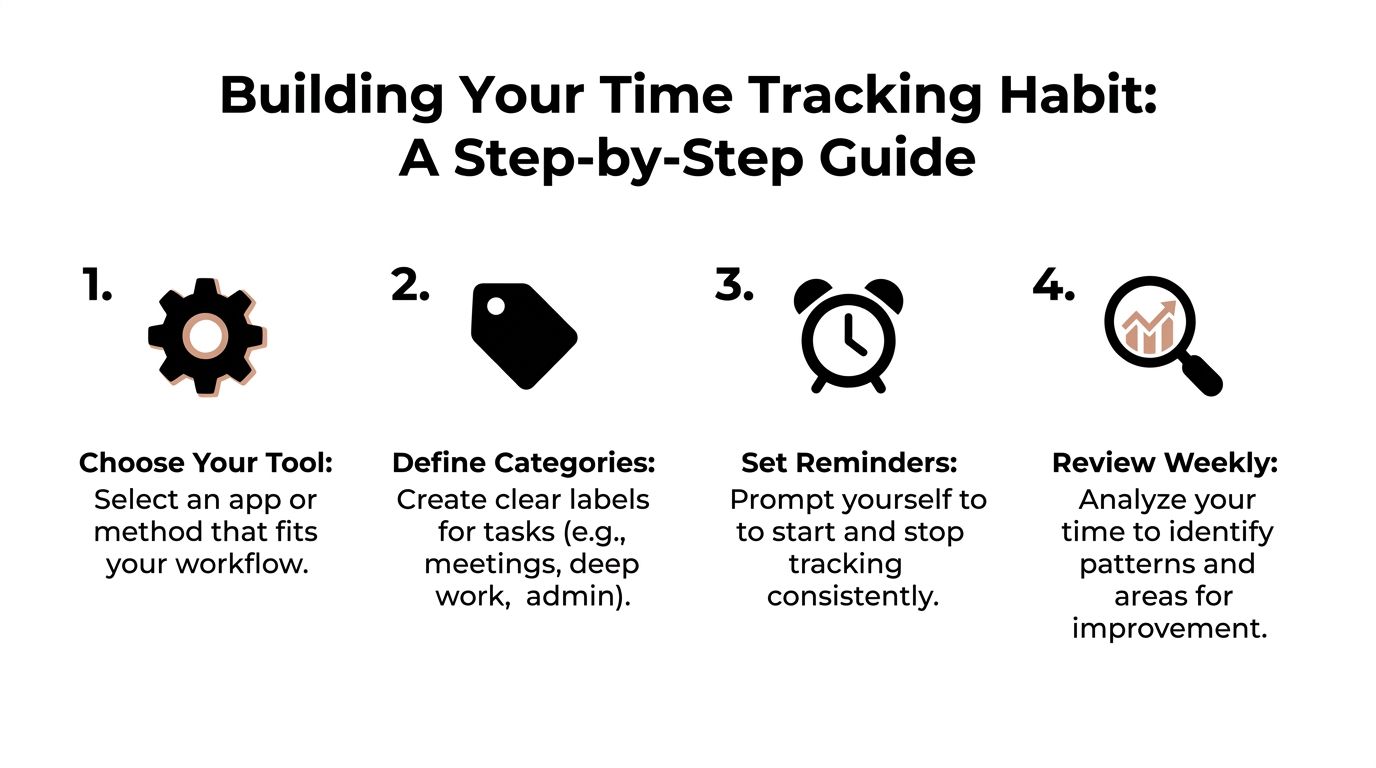
A practical setup has three parts:
A capture point
Pick one place where time gets recorded. That might be Toggl Track, Clockify, a notes app, Google Sheets, or a calendar-linked tracker.A category structure
Use labels you can understand at a glance. If “Ops Misc” appears everywhere, your categories are too vague.A review rhythm
Without review, tracking becomes digital hoarding. The calendar fills up. The reports pile up. Nothing changes.
Here's a short walkthrough that helps many people get started:
A setup checklist that sticks
Use this checklist when you first set up your workflow:
- Choose one primary tool: Don't test five apps at once. Pick one and commit for long enough to learn its weak spots.
- Create clear work categories: Separate focused output from maintenance work. That distinction matters later during analysis.
- Add integrations carefully: Connect your calendar or project tools only if they reduce effort. More data isn't always better data.
- Set two reminders: One near the start of the day, one near the end. The first starts the system. The second closes the loop.
- Review every week: Look for patterns, not perfection. You're trying to understand behavior, not produce a flawless record.
A missed day isn't a failed system. A system that's too annoying to resume is the failed system.
The habit sticks when the process feels lighter than the cost of not knowing.
Stop Guessing Start Knowing Analyzing Planned-vs-Actual Time
The time log itself isn't the prize. The prize is what the log reveals when you compare it to what you intended to do.
That's where the typical approach stops too early. They collect hours, maybe sort them by project, then call it a productivity practice. It isn't. It's bookkeeping unless you compare plan against reality.
The log is not the insight
A founder might believe product work consumes most of the week because that's the most mentally important category. But when the tracker is reviewed against the original plan, the week often tells a different story. Meetings, hiring, support, and reactive communication can dominate.
That's why planned-vs-actual analysis matters. It forces you to ask three questions:
- What did I intend to spend time on?
- What work received time?
- Did that time create meaningful progress or just motion?
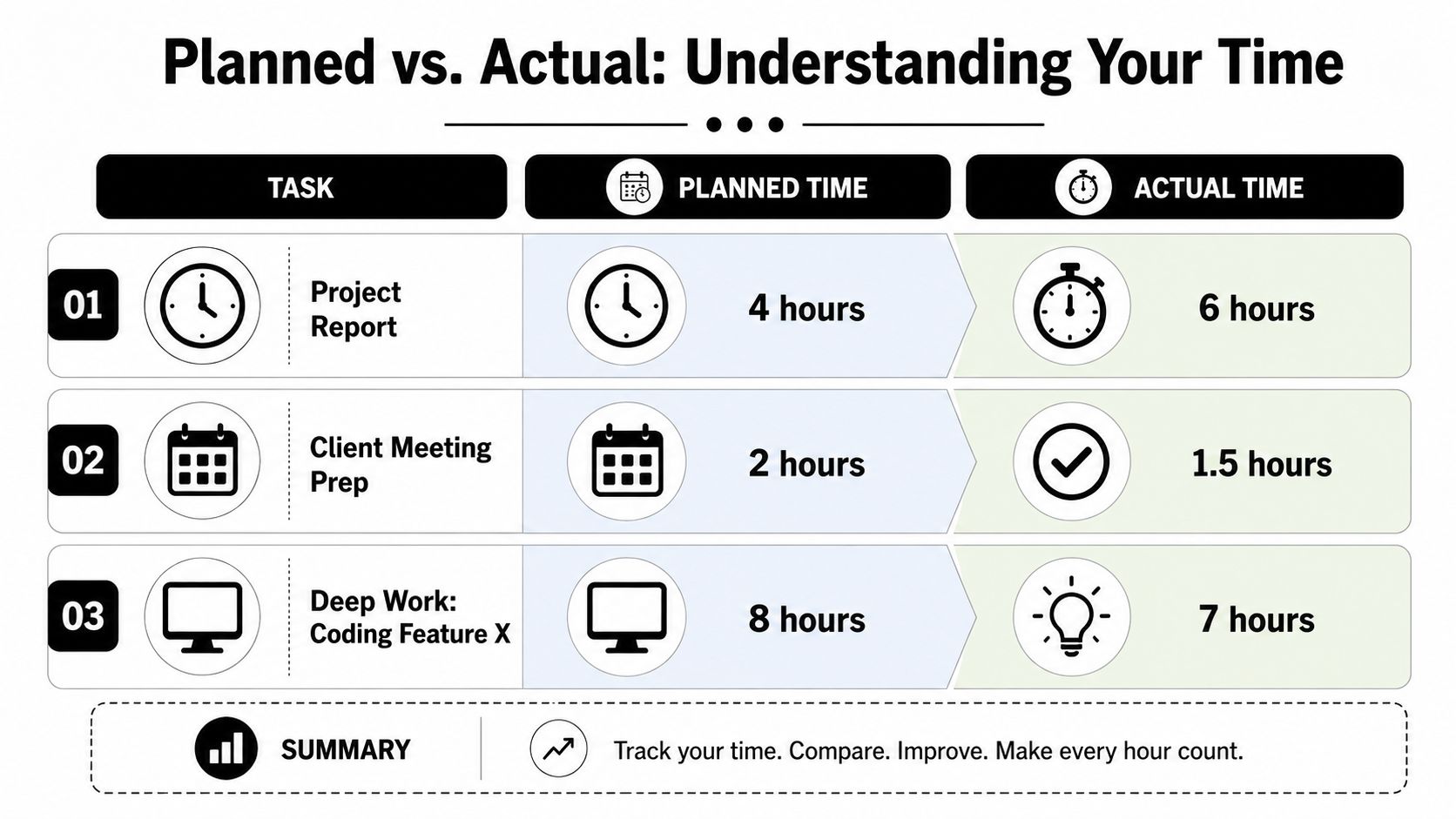
The underserved issue in time tracking isn't logging. It's validation. Many people track faithfully and still feel stuck because their system doesn't distinguish between valuable effort and low-value activity. That's where AI-driven critique can help. Not by replacing judgment, but by highlighting where your actual time keeps drifting away from the work that moves goals forward.
How to run a planned-vs-actual review
You don't need a complex dashboard to do this well. You need a weekly comparison ritual.
Try this review structure:
| Planned item | Planned time | Actual time | What changed | Action for next week |
|---|---|---|---|---|
| Product design | Calendar block or estimate | Tracked hours | Meetings took over | Protect morning blocks |
| Client delivery | Estimate before start | Tracked hours | Revisions expanded | Tighten project scope |
| Admin | Rough allowance | Tracked hours | Email scattered across day | Batch twice daily |
Keep the review practical:
- Check overages first: These usually reveal poor scope, hidden dependencies, or interruption problems.
- Look at underused priority work: If your priorities consistently get less time than planned, your schedule is lying to you.
- Separate value from effort: A long task isn't always a useful task.
- Note repeated drift: One bad week is noise. The same mismatch over several weeks is a systems problem.
If your planned priorities and actual hours keep disagreeing, believe the hours.
This is also where modern tools can do more than report. AI critique can examine your variance patterns and surface the most impactful adjustment. That might be reducing meeting prep, cutting context switching, or protecting a specific time block. The point isn't more analysis. The point is better correction.
Connect Your Time to Your Ambitions Integrating Tracking with Goals
Time tracking becomes powerful when it stops asking, “Where did the hours go?” and starts asking, “Did those hours move a meaningful outcome?”
That shift changes everything. General categories such as “marketing” or “operations” are useful, but they don't prove progress. Goals do.
Track milestones, not just categories
One of the strongest methods I've seen is the Milestone-Weighted Protocol. Instead of logging time only against broad projects, you log it against a specific completed milestone such as “draft approved,” “design reviewed,” or “feature merged.”
This approach reduces retroactive estimation error by 68% compared with end-of-day logging and can increase accurate billable utilization by 42%, based on the benchmark data provided in the verified research for this article.
Why it works is straightforward. Milestones force specificity. They anchor time to output, not just activity.
What a goal-linked time system looks like
A goal-linked system usually has four layers:
- Goal level: The objective you care about, such as shipping a product release or improving client delivery.
- Milestone level: The concrete checkpoints that prove progress.
- Work session level: The actual time spent pushing a milestone forward.
- Review level: The place where you compare effort to progress and decide what to change.
That creates a much tighter feedback loop than ordinary project tracking. If a milestone keeps absorbing time without getting completed, you can spot the issue early. If an objective receives almost no time in practice, your priorities need to be renegotiated, not just restated.
A useful complement here is learning from established goal-setting frameworks that connect measurable outcomes to daily execution. The best time systems don't sit beside your goals. They feed them.
Track completed movement, not just occupied time.
When people learn how to track work hours this way, they stop treating time logs as evidence of effort. They start using them as proof of alignment.
The Practicalities Privacy Payroll and Team Implementation
A time tracking system can be technically excellent and still fail if people don't trust it.
That's why the practical questions matter. What gets collected? Who can see it? How is it used? And does the process help people work better, or just make them feel watched?
Privacy first, not surveillance first
For personal use, privacy is simple. Collect only what helps you decide better.
For teams, it needs a written standard. Spell out what data is captured, what isn't, how long it's stored, and who has access. If you want a plain-language example of how organizations communicate data handling expectations, a public document like the Coachful privacy policy is a useful reference point for structure and clarity.
Avoid turning time tracking into behavioral policing. Knowledge workers don't produce their best work under suspicion.
Payroll, billing, and compliance realities
There are environments where precision matters beyond self-awareness. Payroll, contractor billing, labor compliance, and field operations all need stronger evidence than memory.
In those cases, Biometric-Geofenced Passive Logging can achieve 94% accuracy in logged hours, compared with 72% for manual entry, based on the benchmark data provided in the verified research for this article. The practical advantage isn't only accuracy. It's the ability to support payroll records and reduce disputes in settings where location, presence, and work validation matter.
Still, that method has trade-offs. It's more defensible in regulated or location-bound work than in creative knowledge work. A consulting firm, warehouse, or field service team may accept it. A small startup with senior autonomous staff might not.
How managers roll this out without breaking trust
Managers usually make one of two mistakes. They either spring a tool on the team with no context, or they overexplain compliance and forget to explain the employee benefit.
A better rollout looks like this:
- Explain the purpose clearly: Tie tracking to better planning, accurate pay, workload visibility, or client transparency.
- Set boundaries in writing: Define what won't be monitored.
- Use team-level insights first: Look for overload, estimation issues, and process bottlenecks before zooming into individuals.
- Review with employees, not at them: The goal is shared visibility.
If people believe the data will be used to punish them, they'll game it. If they believe it will help them protect focus, estimate better, and get paid correctly, they'll usually engage honestly.
If you want a system that goes beyond simple logging and helps turn goals into milestones, routines, and measurable daily progress, Tribble Software Private Limited offers Beyond Time, an AI-powered goal achievement platform built for planned-vs-actual accountability. It's designed for people who don't just want to track hours, but want those hours to lead somewhere.
Put this into practice
Free tools that match this article.
Time Blocking Template
Map your day into focused time blocks with a free printable time blocking template.
Try Time BlockingTime ManagementWeekly Schedule Optimizer
Generate an optimized weekly schedule with AI-powered time blocking for maximum productivity.
Try Schedule OptimizerGoal SettingGoal Setting Worksheet
Turn a vague goal into milestones, habits, blockers, and a weekly review plan.
Try Goal WorksheetTime ManagementWeekly Schedule Template
Plan your week with a free printable weekly schedule template for goals, routines, and focus blocks.
Try Schedule TemplateKeep exploring this topic
Goal setting guide
Start with the fundamentals of setting goals that turn into action.
Time blocking guide
Turn priorities into protected calendar blocks.
Best goal tracking apps
Compare tools for goals, habits, and progress tracking.
Goal frameworks compared
Choose between SMART goals, OKRs, BHAGs, and 12-week goals.
Related Articles

How to Track Multiple Goals Without Getting Overwhelmed
Learn a proven system for managing multiple goals simultaneously without losing focus or burning out. Practical frameworks for tracking 3-5 goals at once.
Accountability Partner Guide: Achieve Goals Faster
Learn how to find, structure, and get the most from an accountability partner. Research shows accountability can boost goal achievement by up to 95%.
Work-Life Balance Goal Setting: A Framework That Actually Works
Learn how to set goals across work and life without sacrificing one for the other. A practical framework for balancing ambition with wellbeing.
Why New Year's Resolutions Fail (And Goal Setting That Works)
Discover why 80% of New Year's resolutions fail by February and learn a science-backed goal-setting system that creates lasting change all year round.
The Perfect Morning Routine: 2026 Template
Build a morning routine backed by research. Get a proven template with habits, time blocks, and actionable tips to start every day with energy and focus.
SMART vs OKR vs BHAG: Which Goal Setting Framework Works Best?
Compare SMART goals, OKRs, BHAGs, and 12-week goals side by side. Find the right goal setting framework for your situation with our honest breakdown.