Productivity Tracking Software: Your Complete 2026 Guide
Discover what productivity tracking software is, how to choose the right tool, and how to use it to achieve real goals. A complete guide for 2026.
You sit down to work with a decent plan. Then the day happens. Slack pings. Email piles up. A meeting runs long. You switch tabs to find one file and end up answering three unrelated messages. By late afternoon, you've been active nonstop, but the one thing that mattered most still isn't done.
That gap between being busy and making progress is where individuals often get stuck. They don't need more motivation. They need better feedback. They need a way to see where their attention went, which habits supported real output, and what kept pulling them off course.
That's where productivity tracking software can help. Used badly, it becomes a digital stopwatch with a judgment problem. Used well, it works more like a mirror. It shows patterns you can't reliably remember after the fact, especially when your day is fragmented.
Productivity tracking tools are no longer niche, having become part of everyday operations in many organizations, particularly as remote work expanded. Apploye cites estimates that 96% of companies use time-tracking software, and that the employee-monitoring market is projected to reach $6.9 billion by 2030 in Workstatus's overview of productivity tracking software.
Table of Contents
- The End of Busywork Why Productivity Needs a System
- What Is Productivity Tracking Software
- Core Features and Critical Metrics to Know
- How to Choose the Right Software for You
- Building Productive Workflows Beyond Simple Tracking
- Connect Tracking to Achievement with Beyond Time
- Frequently Asked Questions About Productivity Tracking
The End of Busywork Why Productivity Needs a System
A lot of capable people are running on effort alone. They carry long task lists, work across multiple apps, and end the week with the strange feeling that they were constantly in motion but rarely in control.
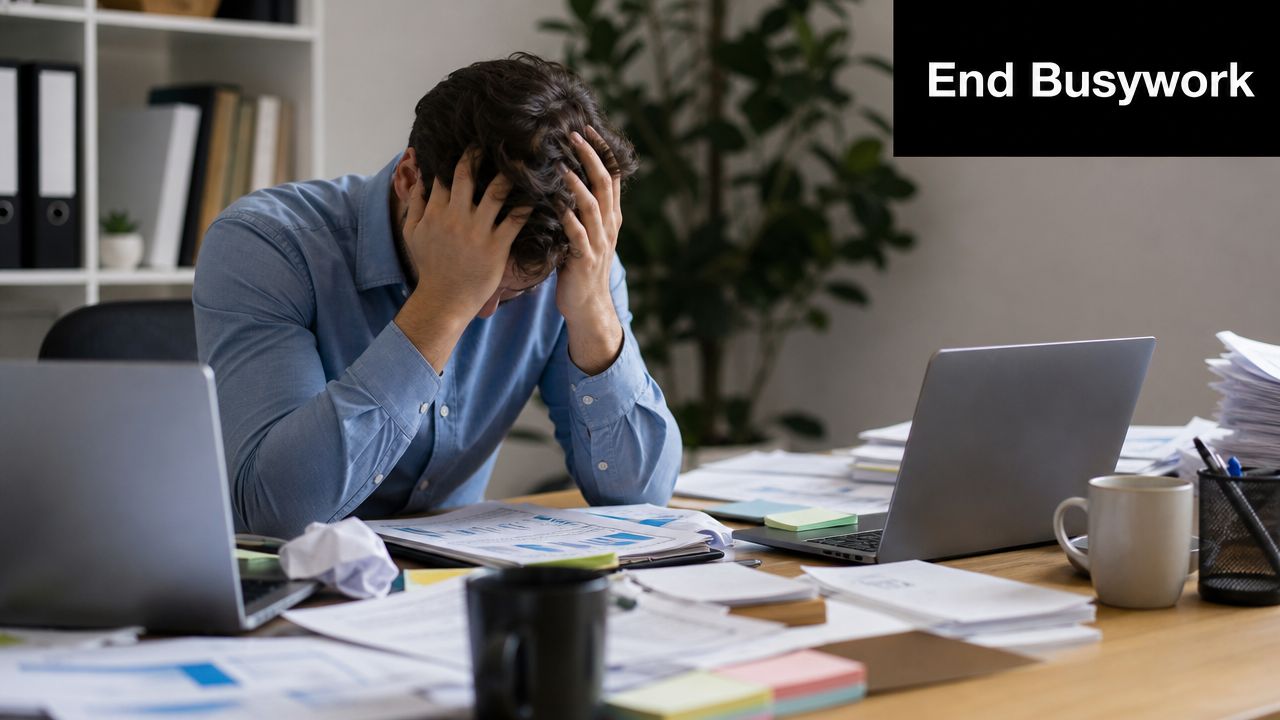
A founder spends the morning in hiring calls, the afternoon in customer support, and the evening trying to write product strategy. A student opens a laptop to study, then spends half the session bouncing between lecture notes, YouTube explainers, and messages. A manager clears inboxes all day and still can't point to one meaningful deliverable.
The common problem isn't laziness. It's lack of visibility.
Why effort alone isn't enough
Judging productivity by memory is unreliable. Memory exaggerates effort, underestimates interruptions, and blurs together shallow tasks with important work. If you don't have a system, you can't tell the difference between a day full of movement and a day that advanced a goal.
Practical rule: If you can't see how your time connects to your priorities, you're managing stress, not productivity.
Productivity tracking software helps by creating a record of what your workday looked like. Not what you intended. Not what you vaguely remember. What happened.
That record can be humbling. It can also be a relief. Once you stop guessing, you can start adjusting.
A dashboard for focus, not a verdict on your worth
The healthiest way to use these tools is as a feedback system. Think dashboard, not scoreboard. The point isn't to prove you were active every minute. The point is to notice patterns like these:
- Fragmented mornings that destroy deep work before it starts
- Meetings that spill into your best focus hours
- Admin creep that slowly consumes creative time
- Task switching that makes easy work feel exhausting
If busywork has taken over, it helps to first reclaim creative time by removing low-value tasks and protecting real thinking time. Tracking works best when it supports that shift.
The key win isn't more data. It's more honest data. Once you have that, you can shape your day around outcomes that matter.
What Is Productivity Tracking Software
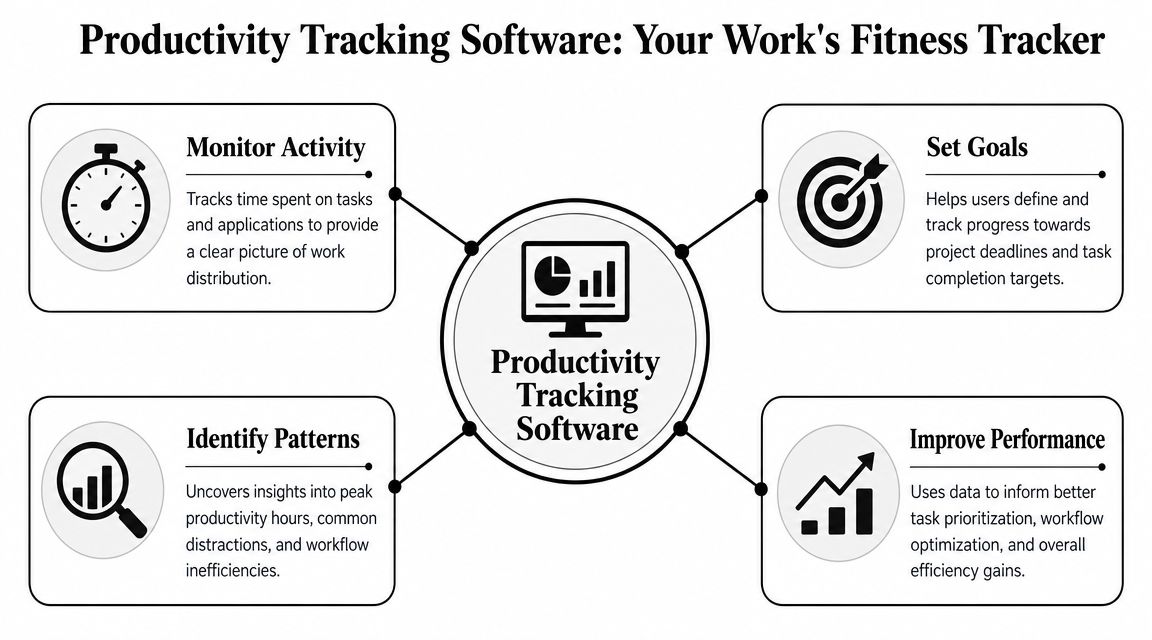
The simplest way to understand productivity tracking software is this. It's a fitness tracker for your work.
A fitness tracker doesn't make you healthy by itself. It records signals such as movement, effort, and consistency so you can adjust your behavior. Productivity tracking software does something similar for your digital workday. It helps you see where time went, where focus broke down, and where routines support progress.
Think of it as a fitness tracker for work
Older systems mostly answered one question. Was the person on the clock?
Modern tools answer a broader set of questions. Which apps got most of your attention? When were you active? When did idle periods show up? Which sites or programs were linked to productive work, and which ones repeatedly interrupted it?
CurrentWare describes this shift clearly. Modern employee productivity tools collect device activity such as application usage, website visits, and idle time, then turn that information into insights on a centralized dashboard in its employee productivity monitoring overview.
That change matters because it moves the conversation from attendance to patterns.
What modern tools actually watch
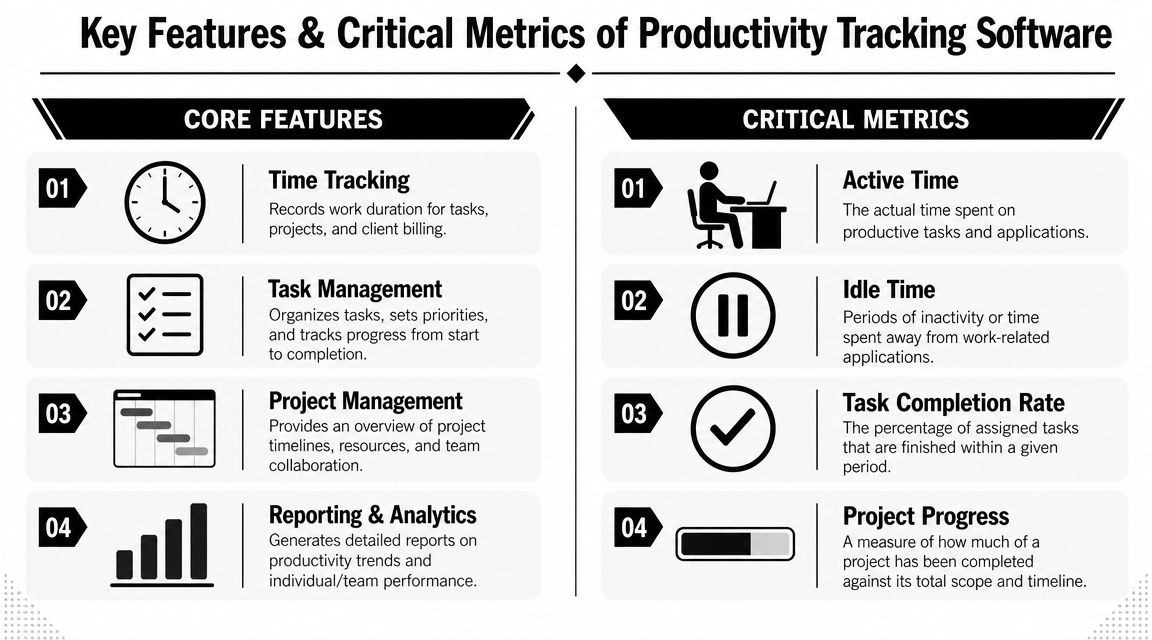
Different tools collect different signals, but many now track things like:
- Time by task or project so you can see where effort is going
- Application and website usage to reveal attention patterns
- Active and idle periods that show rhythm, breaks, and drift
- Reports and dashboards that summarize trends over time
Some tools are designed for individual awareness. Others are built for teams, managers, or compliance-heavy environments. That's where confusion starts. People hear “tracking” and assume every tool is invasive.
It doesn't have to work that way.
A personal time tracker can be lightweight and private. A team analytics product may provide broader visibility. A goal-centered system connects time use to milestones rather than just collecting activity logs. If you're still sorting out the basics, this guide on what time tracking is gives a useful foundation.
Here's a good mental model:
Productivity tracking software should help you answer, “What kind of work fills my day, and does it match what I'm trying to achieve?”
That's very different from asking, “Was I visibly active enough?”
A short walkthrough can make that distinction easier to grasp:
When readers get uneasy about this category, it's usually because they're mixing together three separate ideas: timekeeping, monitoring, and coaching. Good software can include parts of all three, but the healthiest implementations put the emphasis on coaching. Data is useful when it helps you work better.
Core Features and Critical Metrics to Know
Once you start comparing tools, the feature lists can blur together. Every product promises visibility, reports, and efficiency. The useful question is more specific. What exactly is being captured, and what can you do with it?
Three types of tracking systems
Most productivity tracking software falls into one of these buckets.
| Type | How it works | Best fit | Main limitation |
|---|---|---|---|
| Manual timers | You start and stop a timer yourself | Freelancers, simple billing, basic awareness | Easy to forget, weak for pattern analysis |
| Automated trackers | The app records activity in the background | People who want an accurate record of digital work | Can create lots of noise without context |
| Goal-integrated systems | Time data connects to tasks, milestones, or goals | Founders, professionals, students, creators | Requires thoughtful setup |
Manual systems are easy to understand. You click start, do the task, click stop. That's fine for billing or rough estimates, but it depends on your memory and discipline.
Automated systems reduce that friction. They log activity as it happens. That gives you a more realistic picture of your day, especially when context switching is constant.
Goal-integrated systems go one step further. They connect your hours to something concrete, such as a milestone, project phase, or weekly objective. That's where tracking starts becoming useful for improvement rather than recordkeeping alone.
Metrics that help and metrics that mislead
Many dashboards include terms that sound precise but often confuse first-time users.
- Active time means periods when input or device activity suggests you were engaged.
- Idle time marks periods of inactivity or time away from the keyboard.
- App and website categories sort tools into productive or unproductive buckets.
- Task or project time shows how long work streams consumed.
- Trend reports help you compare today with last week or this week with last month.
The dangerous mistake is treating every metric as proof of value.
A person can spend hours in a document and produce weak thinking. Another person can take a long walk, sketch ideas on paper, return, and solve the problem in twenty minutes. Screen activity is a signal. It isn't the whole story.
A useful metric points toward a better decision. A noisy metric only increases self-consciousness.
That's why interpretation matters as much as collection. For example, “idle time” might mean distraction. It might also mean reading, thinking, or discussing a problem away from the screen.
When you review features, look for software that helps you analyze patterns instead of just exporting logs. Reporting should answer questions, not create more admin. This breakdown of productivity measurement is helpful if you want to distinguish operational metrics from meaningful progress indicators.
A good rule is to treat metrics in layers:
- Behavioral signals such as app use and activity
- Work allocation across tasks, projects, or clients
- Outcome signals such as completion, momentum, or milestones reached
The higher you can move in that stack, the more useful the software becomes.
How to Choose the Right Software for You
People often choose productivity tracking software by shopping for features. That's backwards. Start with the pressure point in your life or work. Then find the tool that helps you see and change that pattern.
Match the tool to the goal
If you're a founder, your main need might be workload visibility. You may want to know whether your own time is disappearing into reactive tasks, or whether your team is overloaded in one area and underused in another. In that case, dashboards, project grouping, and trend views matter more than a simple timer.
If you're a working professional, the better question might be, “Where does my best attention go?” You likely need focus reports, task-level organization, and some way to compare planned work with actual work.
Students often need a different kind of help. They don't need heavy management software. They need a tool that makes study sessions visible, highlights distraction patterns, and helps them review consistency across the week.
Creators and knowledge workers usually need protection for deep work. They benefit from software that shows when creative work gets interrupted, how much time goes to admin, and whether production happens in blocks or fragments.
What to avoid when comparing options
The strongest systems combine automated time logging with analytics and feedback loops. Desklog's review notes that automation reduces human error from manual timesheets, while AI-driven insights and goal tracking help users adjust focus patterns in its overview of productivity tracking software features.
That principle leads to a few practical buying rules:
- Skip tools that only count hours. If a product can log time but can't help you interpret it, you'll outgrow it quickly.
- Be careful with intrusive features. More surveillance doesn't automatically create better decisions.
- Choose visible feedback. Daily summaries, trend reviews, and gentle prompts matter more than giant monthly reports.
- Prefer flexible structure. You should be able to map time to projects, goals, or meaningful categories.
Here's a quick way to test a tool before committing:
- Track a normal week.
- Review whether the data surprised you.
- Ask if the reports changed any decision about your schedule, task planning, or focus habits.
- If the answer is no, the software may be collecting information without creating value.
The right tool doesn't just record your day. It helps you redesign the next one.
That's the standard worth using. Not the longest feature list. Not the most intimidating dashboard. The software that gives you clearer choices is the software you'll benefit from.
Building Productive Workflows Beyond Simple Tracking
Tracking becomes powerful when it changes behavior. Until then, it's just observation.
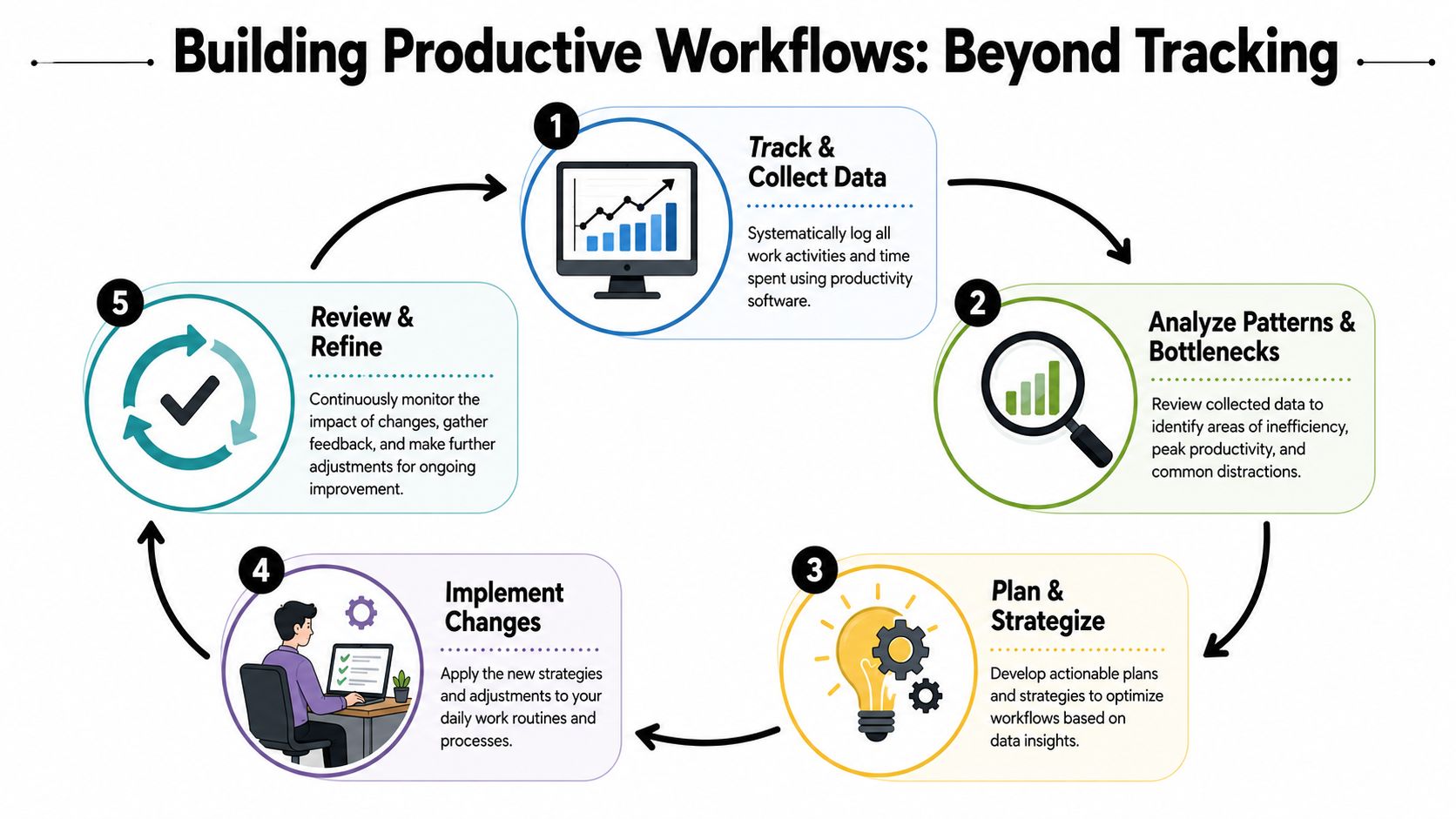
A common mistake is using productivity tracking software like a rearview mirror only. You look back, notice the mess, feel guilty, and move on. A better approach is to use the data to build workflows that make good days easier to repeat.
USFCA's guidance on employee monitoring makes an important point in its article on balancing the need for monitoring with privacy and transparency. The challenge isn't just collecting visible activity. It's making sure the software helps measure meaningful output, because deep work, planning, and mentoring often don't show up neatly in screen-based metrics.
Ask your data better questions
Raw logs are rarely insightful on their own. Better questions turn them into coaching.
Try prompts like these during a weekly review:
- When did I do my clearest thinking and what conditions supported it?
- Which tasks consistently expanded beyond the time I expected?
- What apps or sites kept appearing during periods of drift?
- Did I spend enough time on work that compounds, such as writing, studying, designing, or planning?
- Which recurring tasks should become routines instead of decisions?
Those questions move you from activity to pattern recognition.
Turn observations into repeatable routines
Once you notice a pattern, build a response around it. Keep the change small and testable.
For example:
- A student notices that “study time” often includes scattered browser hopping. The fix might be a dedicated study block with only course tabs open and a short review after each session.
- A manager sees that mornings vanish into messaging. The response might be moving decision-heavy work to a protected block before team chat opens.
- A creator realizes editing work goes well in the afternoon, but drafting only works early. That becomes a schedule rule.
One useful support for this kind of consistency is an external habit system. If you're trying to reinforce sleep, start times, or shutdown routines alongside work tracking, a simple resource like the SleepHabits habit tracking tool can complement your workflow review.
If you want a broader framework for making these routines stick, this guide to personal productivity systems is worth reading.
Track behavior to improve decisions. Build routines to reduce decision load.
That's the effective sequence. The software shows you where your days leak energy. Your workflow design closes those leaks.
Used this way, productivity tracking software stops feeling like surveillance. It becomes a practice of self-observation, adjustment, and follow-through. That's where ambitious goals stop being abstract and start becoming scheduled, protected work.
Connect Tracking to Achievement with Beyond Time
Most tools stop at measurement. They tell you where time went. They don't do much to help you connect that time to a bigger objective.
That's the gap many people feel after using basic tracking apps for a while. They have cleaner logs, but they still don't know whether those hours are moving them toward something important.
How the system closes the loop
Tribble Software Private Limited builds Beyond Time around a different model. Instead of treating tracking as a separate utility, it connects goals, milestones, routines, habits, and time use in one system.
The web app is free for goal and milestone management. It uses an OKR-based approach to turn an objective into sequenced, measurable milestones. The iOS app adds 15-minute time tracking, planned-versus-actual analysis, daily scoring across Health, Life, and Work, and an AI critique that highlights the most effective focus for the day. It also offers a two-week free trial, then paid plans afterward.
That structure matters because it solves a common problem with productivity tracking software. Hours alone can't tell you whether you're advancing. But hours linked to milestones can.
Here's the practical difference:
| Basic tracker | Goal-connected tracker |
|---|---|
| Records time spent | Records time against meaningful milestones |
| Shows activity | Shows alignment between activity and priorities |
| Creates logs | Creates accountability loops |
| Often reviewed late | Can guide daily decisions |
A simple way to get started
If you want to try this style of tracking, keep the first setup narrow.
- Pick one major goal you care about now.
- Break it into milestones or let the system generate them.
- Track your day in short blocks so you can compare intention with reality.
- Review the daily feedback and make one adjustment at a time.
A founder might track product strategy, recruiting, and customer work against a quarterly objective. A student might tie time blocks to exam prep milestones. A professional could connect deep work sessions to a writing, promotion, or certification goal.
Ultimately, the useful question becomes: “Did my time support the result I say I want?”
That's much more constructive than asking whether you looked busy enough.
Frequently Asked Questions About Productivity Tracking
Does productivity tracking software only work for office jobs
No. It works best when the tracked signals match the work. Screen activity is more useful for digital roles, but students, creators, consultants, and founders can all benefit if they connect tracked time to projects, sessions, or milestones rather than just keyboard movement.
Is productivity tracking bad for morale
It can be if it's implemented as surveillance. There's a real tension here. Hubstaff notes that 68% of employers report increased productivity from monitoring, while 56% of monitored employees feel stressed or anxious in its discussion of the effects of productivity tracking on employees. That's why trust, transparency, and proportional use matter.
Can creative work be tracked fairly
Partly. Creative work often includes thinking, sketching, reading, and revising. Those don't always appear as obvious “productive activity” on a dashboard. The fair approach is to track time spent on creative projects and review output over time, not judge every quiet minute as waste.
What should I look at first in my data
Start with patterns, not scores. Look for repeated distractions, your strongest focus windows, and whether important work gets protected time. You don't need perfect data. You need data clear enough to help you make one better decision tomorrow.
Keep going with Beyond Time
Beyond Time connects your goals, routines, and time in one place — explore what that looks like.
- Time Blocking Template — Schedule deep work around goals, not noise.
- Beyond Time vs RescueTime — See how goal-linked tracking beats passive monitoring.
- Time Tracking for Beginners — Start tracking without overwhelming yourself.
- Goal Prioritization Matrix — Clarify what to track before you track anything.
If you want a more practical way to connect goals, daily time use, and follow-through, explore Beyond Time by Tribble Software Private Limited. It gives you a free web app for goals and milestones, plus iOS time tracking with planned-versus-actual review and daily AI feedback so your tracking supports achievement, not just observation.
Put this into practice
Free tools that match this article.
Goal Setting Worksheet
Turn a vague goal into milestones, habits, blockers, and a weekly review plan.
Try Goal WorksheetGoal SettingSMART Goal Validator
Instantly validate your goals against the SMART framework and get actionable improvement suggestions.
Try SMART ValidatorGoal SettingAI Milestone Generator
Turn your biggest goals into an actionable step-by-step plan in seconds with AI.
Try Milestone GeneratorTime ManagementTime Blocking Template
Map your day into focused time blocks with a free printable time blocking template.
Try Time BlockingKeep exploring this topic
Goal setting guide
Start with the fundamentals of setting goals that turn into action.
Best goal tracking apps
Compare tools for goals, habits, and progress tracking.
Goal frameworks compared
Choose between SMART goals, OKRs, BHAGs, and 12-week goals.
Best habit tracker apps
Compare habit apps by use case, depth, and daily workflow.
Related Articles
AI Accountability Partner: Smarter Goal Setting
Tired of missed goals? An AI accountability partner provides the structure & feedback you need. Explore benefits, workflows, and tools.
10 Actionable Affirmations for Success in 2026
Unlock your potential with these 10 powerful affirmations for success. Learn how to integrate them into your goal-setting workflow for radical accountability.
Performance Metrics Software: A 2026 Guide to What Matters
Unlock your potential with the right performance metrics software. Our 2026 guide covers features, selection, and how to measure what truly matters.
Progress Tracking Software: A Guide to Achieving Your Goals
Discover how progress tracking software can turn your goals into achievements. This guide covers features, use cases, and how to choose the right tool for you.
The Force of Habit: Master Your Autopilot for Success
Learn what the force of habit is and how to use its power. This guide explains the neuroscience and gives you evidence-based strategies to build good habits.
How to Be Efficient and Productive: A 2026 System
Stop being busy and start being efficient and productive. Learn a practical, AI-enhanced system to set goals, track progress, and build unstoppable momentum.