Hourly Planner: How to Use One + Free Template to Copy
An hourly planner turns your day into 16 slots. Copy the free hour-by-hour template, learn how to fill it, and why logging the real day beside it makes it work.
An hourly planner is a daily page divided into hour-long slots, so you decide in advance what each hour is for. A 6 am to 10 pm planner has 16 slots. Each one gets a task, a meeting, a meal, a break or a deliberate blank. That is the whole idea, and it is a good one: a day you can see is easier to steer than a day you hold in your head.
The catch is that plans and days drift apart. A planner shows you what you meant to do. It cannot tell you what happened. This guide covers how to use an hourly planner well, gives you a copyable hour-by-hour template, and explains why adding a second column for the real day is what makes the planner get better over time.
Key takeaways
- An hourly planner works best with 16 slots, not 24: plan your waking hours and leave sleep alone.
- Plan fewer hours than you have. Fill about two-thirds of the slots and leave buffer, because many tasks take longer than you expect.
- Add an Actual column next to the Plan column. The gap between them is the most useful information on the page.
- Hours are a coarse tool. If a day keeps going sideways, log it in 15-minute blocks for a few days to see why.
What is an hourly planner?
An hourly planner (also called an hour-by-hour schedule or a daily hourly planner) lays out your day from morning to night in one-hour rows. You write what you will do in each row. Some planners show half-hours too. The format has three advantages:
- It makes time visible. Seeing 16 rows makes it obvious that you cannot fit 22 hours of tasks into them.
- It forces choices. Each row can hold one main thing. To add something, something else has to move or go.
- It lowers the decision load. Once the plan exists, the day's question is "what is the next row?" instead of "what should I do now?"
It is closely related to time blocking, which assigns blocks of time to tasks. An hourly planner is time blocking with the block size fixed at one hour. If you want a more flexible version with different block sizes, try our free time blocking template.
Why do hour-by-hour schedules fall apart?
Many people who have tried an hourly planner have had the same afternoon. The plan said 2 to 3 pm was a report. At 2:40 you were still answering messages. By 4 the whole afternoon had slid one slot to the right and the last two items never happened.
There are three common reasons.
You plan the best case
People tend to estimate how long a task will take by imagining it going smoothly. This is known as the planning fallacy, a pattern described by psychologists Daniel Kahneman and Amos Tversky in the late 1970s. The fix is not more optimism. It is leaving room, and measuring how long things actually take.
Interruptions are not in the plan
A planner shows tasks. It does not show the colleague who stops by, the call that runs over, the ten minutes you spend finding a file or the quick check of your phone that becomes three. Those minutes are real. If they are not planned for, they come out of the next slot.
Transitions cost time
Switching from one thing to another is not free. You need a few minutes to close one task, find the next and get started. Back-to-back hour slots pretend that these minutes do not exist.
None of this means hourly planning is a bad idea. It means a plan alone is a hypothesis. To test it, you need the other half: what actually happened.
See where today goes
Plan the day, then log it in 15-minute blocks. Two minutes in the morning, two at night. Beyond Time shows where the plan and the day parted ways.
Try Beyond Time freeHow do you use an hourly planner step by step?
Here is a simple routine that takes about ten minutes the evening before, or five in the morning.
1. Choose your waking window
Decide when your day starts and ends. If you wake at 6 and go to bed at 10, that is 16 hours, or 16 rows. Sleep does not need a row. If you want to protect it, put a bedtime marker at the bottom.
2. Pin the fixed things first
Write in everything that cannot move: meetings, appointments, school or work start times, the commute, a standing call. These are your anchors. Everything else flexes around them.
3. Add the one to three things that matter today
Before anything else goes in, choose your goals for the day. One is fine. Three is the maximum. Place each in the best slot you have, which is usually when you have the most energy and the fewest interruptions.
4. Add the basics
Meals, movement, a break, a wind-down. These tend to be the first casualties of a busy plan, so give them rows. A plan that ignores lunch is a plan that will fail around 1 pm.
5. Leave buffer
Aim to plan about two-thirds of your slots and leave the rest open. An open row is not wasted. It is where overruns, interruptions and the unplanned-but-necessary live. If your day is already full of meetings, plan even less.
6. Check against a minimum
Ask which items you would still be happy to have done if the day fell apart. Mark them. That is your floor. Our guide to the minimum viable day shows how to build one so that bad days don't wreck good plans.
Hourly planner template (copy and paste)
The template below has a Plan column and an Actual column. Fill in Plan in the evening or morning. Fill in Actual at night. The third column is a one-letter category so you can count at the end.
Category codes: H Health, L Life, W Work, S Sleep (use it for naps or an early bedtime).
**Date:** ____________

**Today's one to three goals:**
1. ____________________
2. ____________________
3. ____________________

| Hour  | Plan | Actual | Cat | Notes |
|-------|------|--------|-----|-------|
| 6 am  |      |        |     |       |
| 7 am  |      |        |     |       |
| 8 am  |      |        |     |       |
| 9 am  |      |        |     |       |
| 10 am |      |        |     |       |
| 11 am |      |        |     |       |
| 12 pm |      |        |     |       |
| 1 pm  |      |        |     |       |
| 2 pm  |      |        |     |       |
| 3 pm  |      |        |     |       |
| 4 pm  |      |        |     |       |
| 5 pm  |      |        |     |       |
| 6 pm  |      |        |     |       |
| 7 pm  |      |        |     |       |
| 8 pm  |      |        |     |       |
| 9 pm  |      |        |     |       |

**Hours that went to plan:** ____ of 16
**Biggest gap (which hour, and why):** ______________________
**One change for tomorrow:** ______________________
How to read the template at night
When the day is over, count the rows where Actual matches Plan. This is not a score to be proud or ashamed of. It is a measurement. Then find the single biggest gap and write one sentence about why it happened. Over a week, the reasons repeat.
A filled-in example
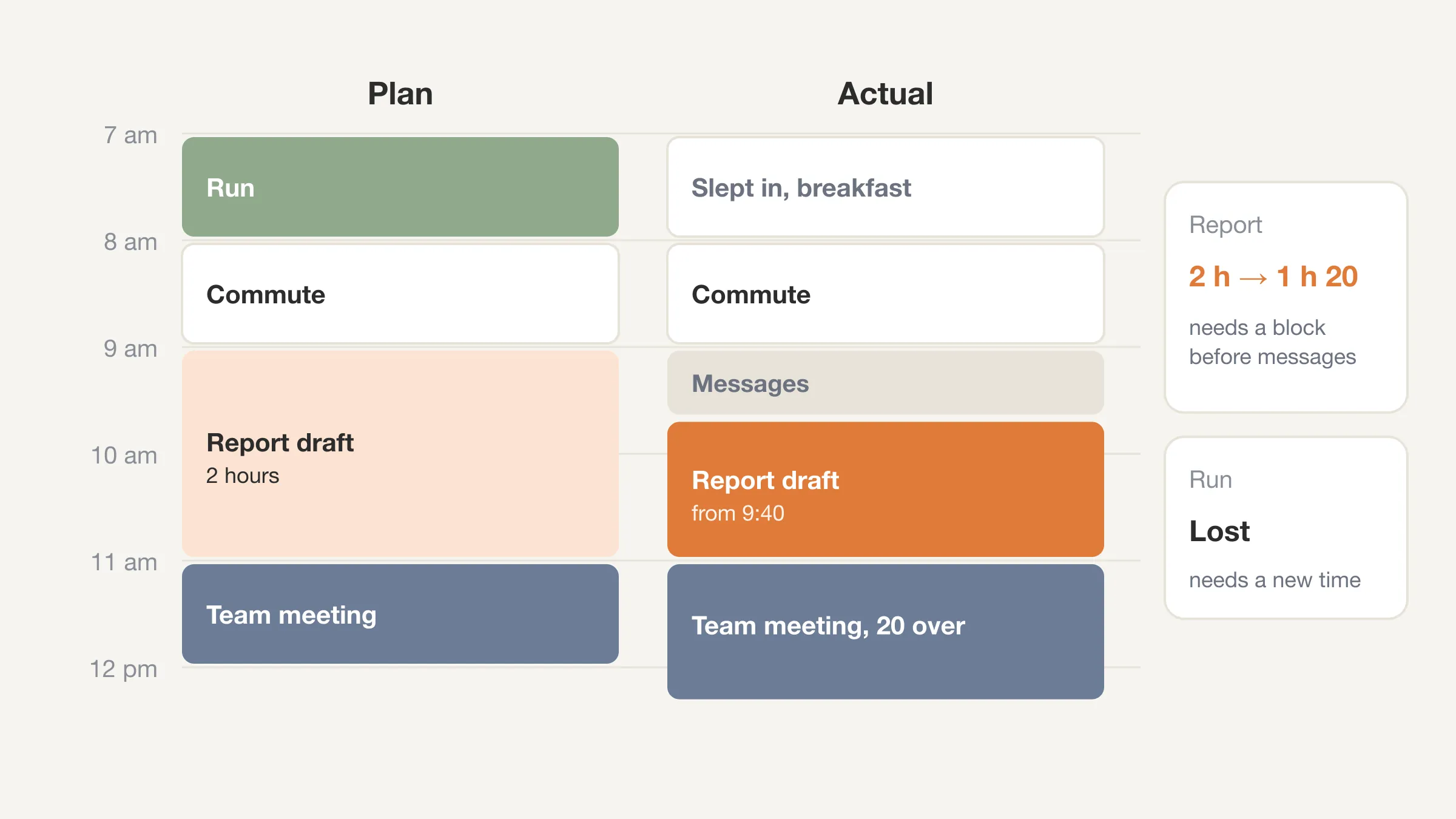
This is an illustrative example of one weekday morning, not real data.
| Hour | Plan | Actual | Cat | Notes |
|---|---|---|---|---|
| 7 am | Run | Slept in, breakfast | L | Alarm off at 6:40 |
| 8 am | Commute | Commute | L | |
| 9 am | Report draft | Messages, then report | W | Started report at 9:40 |
| 10 am | Report draft | Report draft | W | Good stretch |
| 11 am | Team meeting | Team meeting, ran 20 over | W | Pushed lunch |
The plan had two hours for the report. The day gave it an hour and twenty minutes (20 minutes after 9:40, then the full 10 am hour) and lost the run entirely. That is useful. It says: the morning run needs a different time, and the report needs a block that starts before the messages.
If you prefer to plan the whole week on one page, our weekly schedule template lays out seven days at once.
Why does the planned vs actual gap matter?
The gap between what you meant to do and what you did is the thing you can actually improve. A planner without an Actual column keeps repeating the same guesses. With one, each day corrects the next day's plan.
Here is how it works in practice.
- You learn your real task lengths. If the report always takes 75 minutes, plan 75 minutes.
- You see your real interruptions. If messages take the first 40 minutes of every day, that stops being a surprise and becomes a slot you can plan around, or defend.
- You find the leaks. Hours that vanish into "not sure" are the ones worth examining.
- You stop blaming yourself. A gap that shows up every day is a planning error, not a character flaw.
We wrote about this at length in planned vs actual: the most powerful metric nobody tracks. The short version is that the number most planners never collect is the one that makes planning work.
Are hours the right size for planning?
Hours are a good size for planning and a poor size for recording. A plan wants to be rough: "report, then lunch, then meeting." What happened wants to be precise, because one hour often holds three or four different things.
If your Actual column starts to look like "a bit of everything," switch to 15-minute blocks for the log while keeping the hourly plan. A waking day of 16 hours is 64 blocks, and filling them takes about two minutes at night. Read why 15-minute blocks beat estimates for how that works, and use a time audit if you want to run it as a structured two-week exercise.
| Block size | Good for | Weak spot |
|---|---|---|
| 1 hour | Planning the shape of a day | Too coarse to record what happened |
| 30 minutes | Planning with meetings | Still hides short interruptions |
| 15 minutes | Recording the real day | Too fussy for the plan itself |
A practical split: plan in hours, log in quarters. The same choice of size comes up at longer horizons too, which is the trade-off in quarterly vs monthly planning.
What are the best habits for a daily hourly planner?
Plan at the same time every day
Pick the evening before or the first five minutes of the morning. A plan made calmly the evening before is often saner than one made at 9 am under pressure.
Put the hardest thing in your best slot
Notice when you have the most energy and schedule your most important task there. If you do not know when that is, the Actual column will tell you after a week.
Name the break
Give breaks and meals their own rows. A named break is easier to protect than an unnamed one.
Review before you replan
Before you write tomorrow's plan, spend two minutes on today's gaps. The plan will be better for it.
Keep it light
If planning takes longer than 10 minutes, it has stopped being a planner and started being a hobby. Trim it.
Plan the day, then see what happened
Beyond Time logs the day as 96 fifteen-minute blocks and shows the gaps. Pick the day's goals in the morning, rate it at night.
Try Beyond Time freeHow does Beyond Time fit with an hourly planner?
Keep your hourly planner for planning. Use Beyond Time for the half a planner can't do: seeing what happened.
- Start your day: score your sleep, note when you woke, and pick the one to three goals that matter today. That is the goals box at the top of the template.
- Log time: the day appears as 96 fifteen-minute blocks. Pick a block, pick what you were doing. Routines are grouped into Health, Life, Work and Sleep, and the blocks you skipped show as gaps.
- End your day: rate how health, life and work felt from 1 to 10, and add a line if you want.
- See your week: every hour of the week split by category, the trend across days, and how much of it you logged.
- AI reflection: what went where you meant it to, where time leaked and how often, and one or two changes for tomorrow. In effect it does the "biggest gap" step of the template for you.
The app is optional. The template works on paper. If you like both, plan on paper and log in the app, or the reverse.
Frequently Asked Questions
What is an hourly planner?
An hourly planner is a daily schedule split into one-hour rows from morning to night. You write what you will do in each hour so that the day is visible and every slot has a purpose.
How many hours should I plan in a day?
Plan about two-thirds of your waking hours and leave the rest as buffer. For a 16-hour waking day, that is around 10 or 11 planned hours. The open rows absorb overruns and interruptions.
Should I plan every hour of the day?
No. A fully packed plan breaks at the first overrun and everything slides. Leave open slots, and name your breaks and meals so they get protected too.
What is the difference between an hourly planner and time blocking?
Time blocking assigns blocks of time of any length to tasks. An hourly planner is time blocking with every block fixed at one hour. Hourly planners are simpler. Time blocking is more flexible.
Why do my hourly plans never work?
Usually because the plan assumes every task goes smoothly, leaves no room for interruptions, and ignores transition time. Adding an Actual column shows you exactly where each day broke from the plan, and the gaps repeat.
Is a paper or digital hourly planner better?
Either works. Paper is quick and visible. A digital planner is easier to edit and move. What matters is the habit: plan once, log the real day, and compare.
Can I use this hourly planner template in Google Docs or Excel?
Yes. Paste the markdown table into a document or spreadsheet. You can add or delete rows to match your waking hours.
The short version
An hourly planner is a simple, useful tool: 16 rows, a few anchors, one to three goals, a bit of buffer. It gets much better when you add an Actual column and compare it with the Plan, because the gap shows you how long things really take.
Your time is limited. Planning it is half the job and seeing where it went is the other half. Copy the template above, use it for three days, and see where the plan and the day parted ways. If you want the logging and comparing done for you, try Beyond Time free.
Put this into practice
Free tools that match this article.
Weekly Schedule Template
Plan your week with a free printable weekly schedule template for goals, routines, and focus blocks.
Try Schedule TemplateTime ManagementTime Blocking Template
Map your day into focused time blocks with a free printable time blocking template.
Try Time BlockingTime ManagementWeekly Schedule Optimizer
Generate an optimized weekly schedule with AI-powered time blocking for maximum productivity.
Try Schedule OptimizerFocusFocus Session Planner
Create AI-optimized focus sessions with structured work blocks and refreshing breaks.
Try Focus PlannerRelated Articles
How to Plan Your Day in 5 Minutes (Then Check It at Night)
How to plan your day in five minutes: choose 1 to 3 goals, block the fixed things, leave slack, then check the plan at night. Includes a worked example.
Daily Planner Template: Free One-Page and 15-Minute Versions
A free daily planner template to copy: a one-page version and a 15-minute schedule grid, with a plan-vs-actual column so you can see where your day really went.

The 15-Minute Time Block Method: Why Precision Beats Estimation
Stop guessing where your time goes. The 15-minute block method reveals exactly how you spend each day and helps you plan with surgical accuracy.

Time Blocking: The Elite Performer's Method
Learn how elite performers use time blocking to reclaim their schedules. Discover the step-by-step system to allocate hours intentionally. Templates and.

How Many Minutes in a Week? 10,080, and Where They Go
How many minutes in a week? 10,080, or 6,720 waking minutes at 8 hours of sleep. See the minutes in each activity for an average week and how many are left.
Daily Goals: How to Set 1-3 That Get Done (With Examples)
Daily goals work when you set one to three and size them in 15-minute blocks. See examples, how to link them to weekly goals, and a two-minute check at night.