Daily Planner Template: Free One-Page and 15-Minute Versions
A free daily planner template to copy: a one-page version and a 15-minute schedule grid, with a plan-vs-actual column so you can see where your day really went.
A daily planner template gives one day a page: your goals, your fixed commitments, a place for the plan and a place for what happened. Below are two versions you can copy and paste. The first is a one-page daily planner for any day. The second is a daily schedule template in 15-minute blocks, for days that need more precision.
Both have a column that most planners leave out: Actual. A plan is a guess about the day. The Actual column records the result, and the gap between the two is what makes tomorrow's plan better. A waking day of 16 hours holds 64 fifteen-minute blocks, and these templates help you see all of them.
Key takeaways
- Use the one-page template for most days and the 15-minute grid when a day keeps going sideways.
- Plan one to three goals and fill about two-thirds of the day. Leave the rest as slack.
- Fill in Plan in the morning (or the night before) and Actual at night. Two minutes each.
- The gap between Plan and Actual is the most useful number on the page.
What should a daily planner template include?
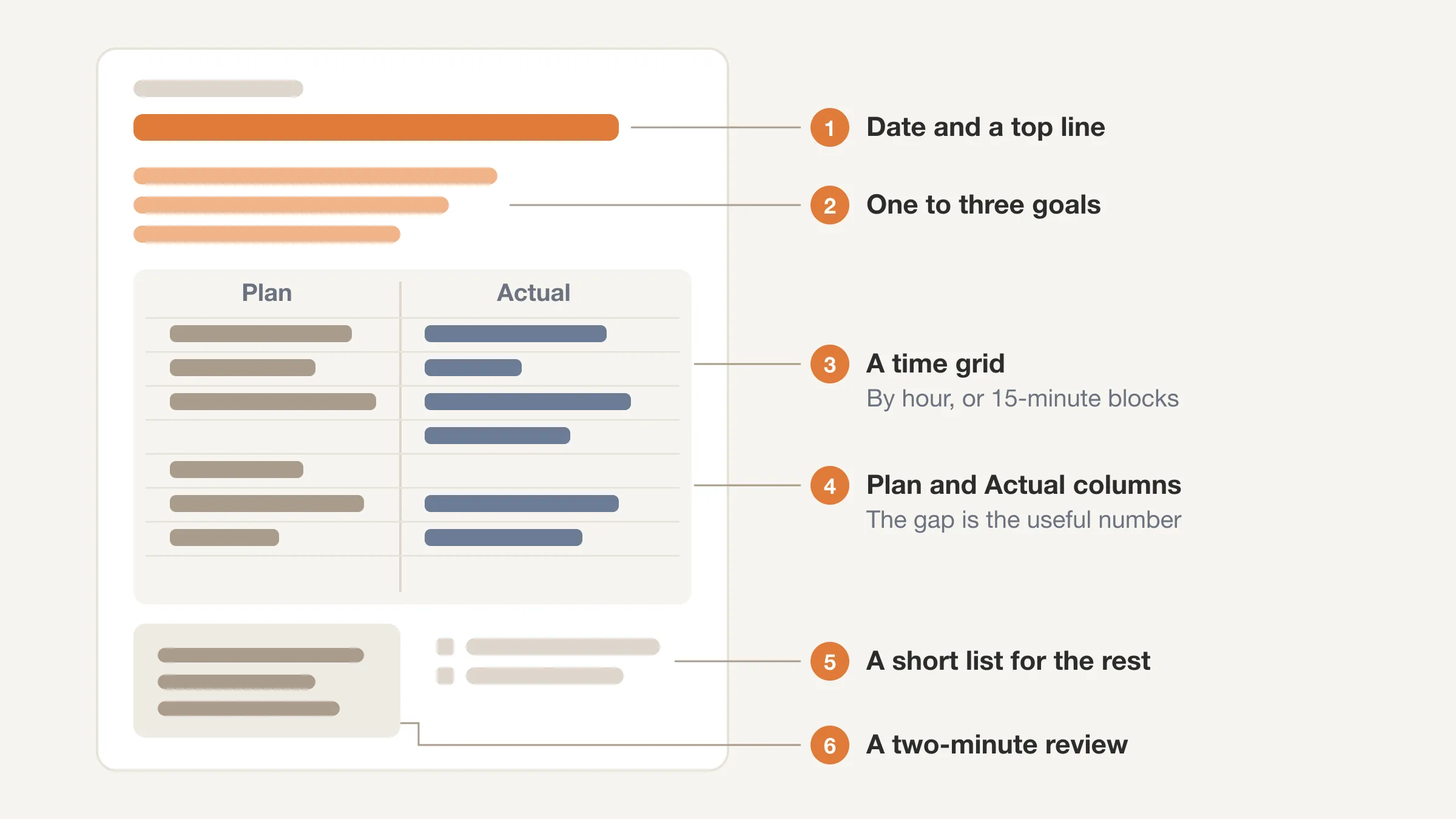
A good template has few parts and each one has a job. Too many boxes and the planner becomes a chore you stop doing. These six parts cover nearly everything.
- Date and a top line. Which day is it, and what is the one thing that makes it a good day?
- One to three goals. Not a to-do list, just the things that matter today.
- A time grid. The day laid out by hour or by 15-minute block, with the fixed things in first.
- A Plan and an Actual column. What you meant to do, and what happened.
- A short list for everything else. A small place to park errands and loose tasks so they do not clutter the grid.
- A two-minute review. The biggest gap, and one change for tomorrow.
If you have not planned a day this way before, start with our short guide on how to plan your day in five minutes. It walks through the same steps these templates are built on.
Daily planner template: one-page version (copy and paste)
This is the everyday version. It uses hours rather than blocks, so it is quick to fill. Copy it into a notes app, a document, or print it. The category codes are H Health, L Life, W Work and S Sleep (use S for naps or an early bedtime).
DAILY PLANNER
Date: ____________      Day: ____________

THE ONE THING THAT MAKES TODAY A GOOD DAY:
______________________________________

TODAY'S GOALS (1 to 3)
1. ____________________
2. ____________________
3. ____________________

FLOOR (what I will still have done if the day falls apart):
______________________________________

| Hour  | Plan | Actual | Cat |
|-------|------|--------|-----|
| 6 am  |      |        |     |
| 7 am  |      |        |     |
| 8 am  |      |        |     |
| 9 am  |      |        |     |
| 10 am |      |        |     |
| 11 am |      |        |     |
| 12 pm |      |        |     |
| 1 pm  |      |        |     |
| 2 pm  |      |        |     |
| 3 pm  |      |        |     |
| 4 pm  |      |        |     |
| 5 pm  |      |        |     |
| 6 pm  |      |        |     |
| 7 pm  |      |        |     |
| 8 pm  |      |        |     |
| 9 pm  |      |        |     |

OTHER (errands, calls, loose tasks)
[ ] ____________________
[ ] ____________________
[ ] ____________________
[ ] ____________________

HABITS TODAY
[ ] ____________   [ ] ____________   [ ] ____________

END OF DAY (2 minutes)
Goals done: ____ of ____       Floor done?  Yes / No
Hours that matched the plan: ____ of 16
Biggest gap (which hour, and why): ______________________
One change for tomorrow: ______________________
How did today feel (1-10)?  Health ___  Life ___  Work ___
How to use the one-page template
- Morning or night before (about five minutes). Write the one thing, the goals and the floor. Fill in the fixed commitments in the Plan column first, then place your goals in the best open slots, then add meals, movement and a break.
- During the day. Glance at it. Do not rewrite it. The plan is only a guide.
- At night (about two minutes). Fill in the Actual column from memory, mark the category, and answer the end-of-day lines.
If you want to change the hours, edit the first column. A day that starts at 5 and ends at 9 has 16 rows too. Do not add more rows than you have waking hours.
Daily schedule template: 15-minute version (copy and paste)
An hour is a good size for planning and a poor size for recording, because one hour often holds three or four different things. This version splits each hour into four 15-minute blocks, so the day's small leaks become visible. A 6 am to 10 pm day has 64 blocks, and you can fill the grid in about two minutes.
Write a short label in each cell for what you did: "email," "walk," "meeting," "phone," "lunch." Leave a cell empty if you do not know. Empty cells are information.
15-MINUTE DAILY SCHEDULE
Date: ____________

GOALS: 1. ____________  2. ____________  3. ____________

| Hour  | :00   | :15   | :30   | :45   |
|-------|-------|-------|-------|-------|
| 6 am  |       |       |       |       |
| 7 am  |       |       |       |       |
| 8 am  |       |       |       |       |
| 9 am  |       |       |       |       |
| 10 am |       |       |       |       |
| 11 am |       |       |       |       |
| 12 pm |       |       |       |       |
| 1 pm  |       |       |       |       |
| 2 pm  |       |       |       |       |
| 3 pm  |       |       |       |       |
| 4 pm  |       |       |       |       |
| 5 pm  |       |       |       |       |
| 6 pm  |       |       |       |       |
| 7 pm  |       |       |       |       |
| 8 pm  |       |       |       |       |
| 9 pm  |       |       |       |       |

Count at the end of the day:
Blocks logged: ____ of 64
Blocks on my goals: ____
Blocks with no label ("not sure"): ____
Biggest leak (what and how many blocks): ______________________
One change for tomorrow: ______________________
How to use the 15-minute template
Fill the grid for the plan in one color or pencil, then fill what happened in another, or use two copies side by side. If you prefer a single grid, use it as a log and keep the plan in the one-page version.
When the day is done, add up three numbers:
- Blocks logged. How much of the day can you account for? If you cannot remember what 20 blocks were, that is a finding.
- Blocks on goals. A block is 15 minutes, so 4 blocks is one hour. If your goal got 2 blocks, it got 30 minutes.
- Blocks you cannot label. These are the ones to look at. Time that disappears without a label is often small interruptions and phone checks.
For a deeper look at why this block size works, see the 15-minute time block method.
Skip the paper, keep the blocks
Beyond Time shows your day as 96 fifteen-minute blocks. Pick a block, pick what you were doing, and the gaps show up as Not logged.
Try Beyond Time freeWhat does a filled-in daily planner look like?
This is an illustrative example of one weekday, not real data. The goals were a proposal draft, a walk and a call with a friend.
| Hour | Plan | Actual | Cat |
|---|---|---|---|
| 7 am | Wake, breakfast | Slept in 20 min, breakfast | L |
| 8 am | Commute | Commute | L |
| 9 am | Proposal | Messages, then proposal from 9:40 | W |
| 10 am | Proposal | Proposal | W |
| 11 am | Team meeting | Meeting, ran 20 min over | W |
| 12 pm | Lunch and walk | Lunch at desk, no walk | L |
| 1 pm | Open | Messages and a call | W |
| 2 pm | Proposal, second pass | Proposal | W |
| 3 pm | Open | Open, then email | W |
| 6 pm | Dinner | Dinner | L |
| 7 pm | Call a friend | Call a friend | L |
At the bottom: Goals done 2 of 3. Floor done: yes. Hours that matched the plan: 5 of 11 filled. Biggest gap: the walk, which lost to the meeting running over. Change for tomorrow: put the walk before lunch, not after.
Two things stand out. The gap was not "I was lazy." It was a meeting that ran over and a walk with no protection. And the proposal still got done, because it was planned in two places. That is how a plan survives a messy day.
How is a daily planner different from an hourly planner?
They are close cousins. An hourly planner is a daily planner that is only a time grid. A daily planner adds the goals, the floor, the other list, the habits and the review. If you want the hour-by-hour version on its own, with a full walkthrough, see our hourly planner guide.
| Format | Best for | Weak spot |
|---|---|---|
| One-page daily planner | Most days: goals, grid, review | Hours hide short interruptions |
| 15-minute schedule | Seeing leaks and real task lengths | Too fussy to use every day |
| Hourly planner only | Planning the shape of a day | Does not hold goals or a review |
A practical pattern: use the one-page version most days, and switch to the 15-minute grid for a week whenever the days keep drifting from the plan. After that week, you will know why, and you can go back to the lighter version. Students can use the same idea in a study schedule template with a log column for each session.
How do you stick with a daily planner?
A planner is easy to drop. These habits make it easier to keep.
- Plan at the same time every day. The night before or the first five minutes of the morning. Pick one.
- Keep it under ten minutes. If planning takes longer, you are over-planning. Cut the grid down to the fixed things and the goals.
- Plan fewer hours than you have. Fill about two-thirds. Open rows are for overruns.
- Name the break. A break or meal with its own row is easier to protect.
- Review before you replan. Two minutes on today's gap makes tomorrow's plan better.
- Use the floor. A planner with a fallback survives a bad day. A planner without one gets abandoned.
If you want to fix the whole week at once, you can plan it with our free weekly schedule template or try the time blocking template for flexible block sizes. A weekly planner template is a good companion to the daily page.
What is the best format: paper, spreadsheet or app?
The best format is the one you will open every day. Some trade-offs:
- Paper. Fast and free of distractions. Good for the plan, harder to total at the end of the week.
- A notes app or document. Easy to copy from this page. Searchable, but easy to forget.
- A spreadsheet. Good for totals. Paste the grid, add a column for the day, and use a formula to count labels.
- An app. Beyond Time connects the day's goals, the 15-minute log and the end-of-day check, then the AI reflection reads the logged day and tells you what went where you meant it to, where time leaked and one or two changes for tomorrow.
None of these is better than the habit of looking back. A paper planner you check every night beats an app you open on Sundays.
If you are not sure which one to use, try this: print the one-page template for a week. After seven days, you will know whether you want the 15-minute version, a spreadsheet or an app.
Try the day, not just the plan
Start your day, log it in 15-minute blocks, and let the AI reflection show where the plan and the day parted ways. Free for two weeks.
Try Beyond Time freeFrequently Asked Questions
What is a daily planner template?
A daily planner template is a blank page for one day, with space for goals, a time grid, a plan and what actually happened. You copy it, fill it in and keep it daily. The versions above also include a floor and a two-minute review at the end of the day.
What is a good daily schedule template?
A good daily schedule template covers your waking hours, fits on one page and has a Plan and an Actual column. Use hourly rows for everyday planning and a 15-minute grid when you want to see where time leaks. A 16-hour day has 16 hourly rows or 64 blocks.
How do I make a daily planner?
List the date, one to three goals, a time grid for your waking hours, and a short place for loose tasks. Add a Plan and an Actual column and a two-minute review. You can copy the template above or build one in a spreadsheet in about ten minutes.
How many hours should a daily planner cover?
Cover your waking hours, usually 15 to 17. A 6 am to 10 pm day is 16 hours or 64 blocks. Sleep does not need a row. If you want to protect it, add a bedtime marker at the bottom of the page.
Should I plan every hour of my day?
No. Plan about two-thirds of your waking hours and leave the rest open. People tend to underestimate how long tasks take, so open rows absorb overruns and interruptions. A full plan usually fails by mid-afternoon.
What is the difference between a daily planner and a schedule?
A schedule lists times. A daily planner adds the reason: your goals, your floor, loose tasks and a review of what happened. A schedule says when. A planner says what matters today and checks how it went.
Can I use these templates for free?
Yes. Copy and paste them into any notes app, document or spreadsheet, or print them. There is nothing to sign up for. If you want your day logged in 15-minute blocks without the paper, Beyond Time is free to try for two weeks.
The short version
A daily planner template works when it is short, has a Plan and an Actual column and ends with a two-minute review. Use the one-page version for most days and the 15-minute grid when a day keeps going sideways. Your day holds about 64 waking blocks, and a planner is how you decide what they are for.
Copy a template tonight, plan tomorrow in five minutes, and look back at the end of the day. To see the whole picture without the paper, try Beyond Time free.
Put this into practice
Free tools that match this article.
Weekly Schedule Template
Plan your week with a free printable weekly schedule template for goals, routines, and focus blocks.
Try Schedule TemplateTime ManagementTime Blocking Template
Map your day into focused time blocks with a free printable time blocking template.
Try Time BlockingTime ManagementWeekly Schedule Optimizer
Generate an optimized weekly schedule with AI-powered time blocking for maximum productivity.
Try Schedule OptimizerFocusFocus Session Planner
Create AI-optimized focus sessions with structured work blocks and refreshing breaks.
Try Focus PlannerKeep exploring this topic
Related Articles
How to Plan Your Day in 5 Minutes (Then Check It at Night)
How to plan your day in five minutes: choose 1 to 3 goals, block the fixed things, leave slack, then check the plan at night. Includes a worked example.

How Many Minutes in a Week? 10,080, and Where They Go
How many minutes in a week? 10,080, or 6,720 waking minutes at 8 hours of sleep. See the minutes in each activity for an average week and how many are left.
Daily Goals: How to Set 1-3 That Get Done (With Examples)
Daily goals work when you set one to three and size them in 15-minute blocks. See examples, how to link them to weekly goals, and a two-minute check at night.

Bucket List Ideas: 100 Ideas Grouped by Theme and Lead Time
100 bucket list ideas grouped by theme and tagged by lead time: now, this year, or years ahead. Count the weeks you have, then pick ten. Start your list today.

How to Stop Doomscrolling: 9 Practical Fixes That Work
How to stop doomscrolling: add friction, swap in better habits and check your Screen Time against a real log of your day. Nine fixes, with sources. Try one.

Life Plan Template: A One-Page Plan With Weekly Costs
A free life plan template you can copy: eight areas of life, one outcome each, and a weekly time cost so your plan fits the 112 waking hours you really have.