Weekly Planner Template: Free, Copyable, Plan vs Actual
Copy this free weekly planner template: three goals, fixed blocks, three priorities a day and a plan vs actual row. Learn how to fill it in under 20 minutes.
A weekly planner template is a one-page layout for the next seven days: what you want to get done, what is already fixed, and what you will do each day. The version below fits on a single page, takes about 15 minutes to fill in, and has one row most planners skip: a plan vs actual row that you fill in at the end of the week. You can copy it straight into a doc, a spreadsheet or a notes app, or print it.
A week has 168 hours. About 56 go to sleep, which leaves roughly 112 waking hours, or 448 blocks of 15 minutes. That is the whole budget. A planner is only useful if it respects that number, and a planner with no way to check itself afterward cannot teach you how much of the budget you really had.
Key takeaways
- A good weekly planner has five parts: three outcomes for the week, fixed blocks, three priorities per day, slack, and a plan vs actual review.
- You have about 112 waking hours a week. Fixed commitments usually take more of them than you expect, so subtract them first.
- Plan about two-thirds of your free hours. Leave the rest as slack, because something always runs over.
- The plan vs actual row is what makes next week's plan better than this week's.
What should a weekly planner template include?
Most weekly planners are a grid of seven boxes. That is a calendar, not a plan. A planner earns its place when it forces four decisions before the week starts:
- What are the three things that would make this week a good one? Not twelve. Three.
- What is already spoken for? Work hours, school, commutes, appointments, meals, sleep.
- What will you do on each day, in order of importance? Up to three priorities per day, not a to-do list.
- What is left over, and how much of it will you leave empty? Slack is part of the plan, not a failure of it.
Then it needs a fifth part that most templates leave out: a place to write down what actually happened. Without it, you plan next week from the same optimistic guess you used this week. With it, you plan from evidence. The research on why this matters is the planning fallacy: people consistently expect tasks to take less time than they do, even when they have done the same task before.
Where is the free weekly planner template?
Copy everything in the box below. It is written as a plain-text table that pastes cleanly into Google Docs, Notion, Apple Notes, Word or a spreadsheet. Replace the examples in brackets with your own.
WEEKLY PLANNER
Week of: [Monday date] to [Sunday date]

1. THREE OUTCOMES FOR THIS WEEK
   a. [One outcome that matters most]
   b. [A second outcome]
   c. [A third, smaller outcome]

2. FIXED BLOCKS (hours already spoken for)
| Fixed block              | Days       | Hours per day | Weekly hours |
|--------------------------|------------|---------------|--------------|
| Work or school           | [Mon-Fri]  | [8]           | [40]         |
| Commute                  | [Mon-Fri]  | [1]           | [5]          |
| Sleep                    | [Every day]| [8]           | [56]         |
| Meals, chores, errands   | [Every day]| [2]           | [14]         |
| Appointments / events    | [list]     | [ ]           | [ ]          |
| TOTAL FIXED              |            |               | [ ]          |

   Free hours = 168 - total fixed = [ ]
   Plan to use about two-thirds of the free hours: [ ]
   Leave the rest as slack: [ ]

3. DAILY PRIORITIES
| Day | Priority 1 | Priority 2 | Priority 3 | Slack (hours left empty) |
|-----|------------|------------|------------|--------------------------|
| Mon |            |            |            |                          |
| Tue |            |            |            |                          |
| Wed |            |            |            |                          |
| Thu |            |            |            |                          |
| Fri |            |            |            |                          |
| Sat |            |            |            |                          |
| Sun |            |            |            |                          |

4. PLAN VS ACTUAL (fill in at the end of the week)
| Area   | Planned hours | Actual hours | Gap | Why? |
|--------|---------------|--------------|-----|------|
| Health |               |              |     |      |
| Life   |               |              |     |      |
| Work   |               |              |     |      |
| Sleep  |               |              |     |      |
| Not accounted for |    |              |     |      |

5. REVIEW (5 minutes)
   One thing that went where I meant it to: [ ]
   One place time leaked: [ ]
   One change for next week: [ ]
If you prefer something you can click through, the free weekly schedule template builds a printable grid for you, and the time blocking template does the same for a single day.
See where your week actually goes
Log your day in 15-minute blocks. Two minutes in the morning, two at night. Your week fills in the Actual column for you.
Try Beyond Time freeHow do you fill in the weekly planner step by step?
Set a timer for 15 minutes. Do the parts in order. The order matters, because each part constrains the next.
Step 1: Subtract the fixed blocks first (5 minutes)
Start with section 2, not with your wish list. Fill in work or school, commuting, sleep, meals and anything with a time attached. Add them up and subtract from 168.
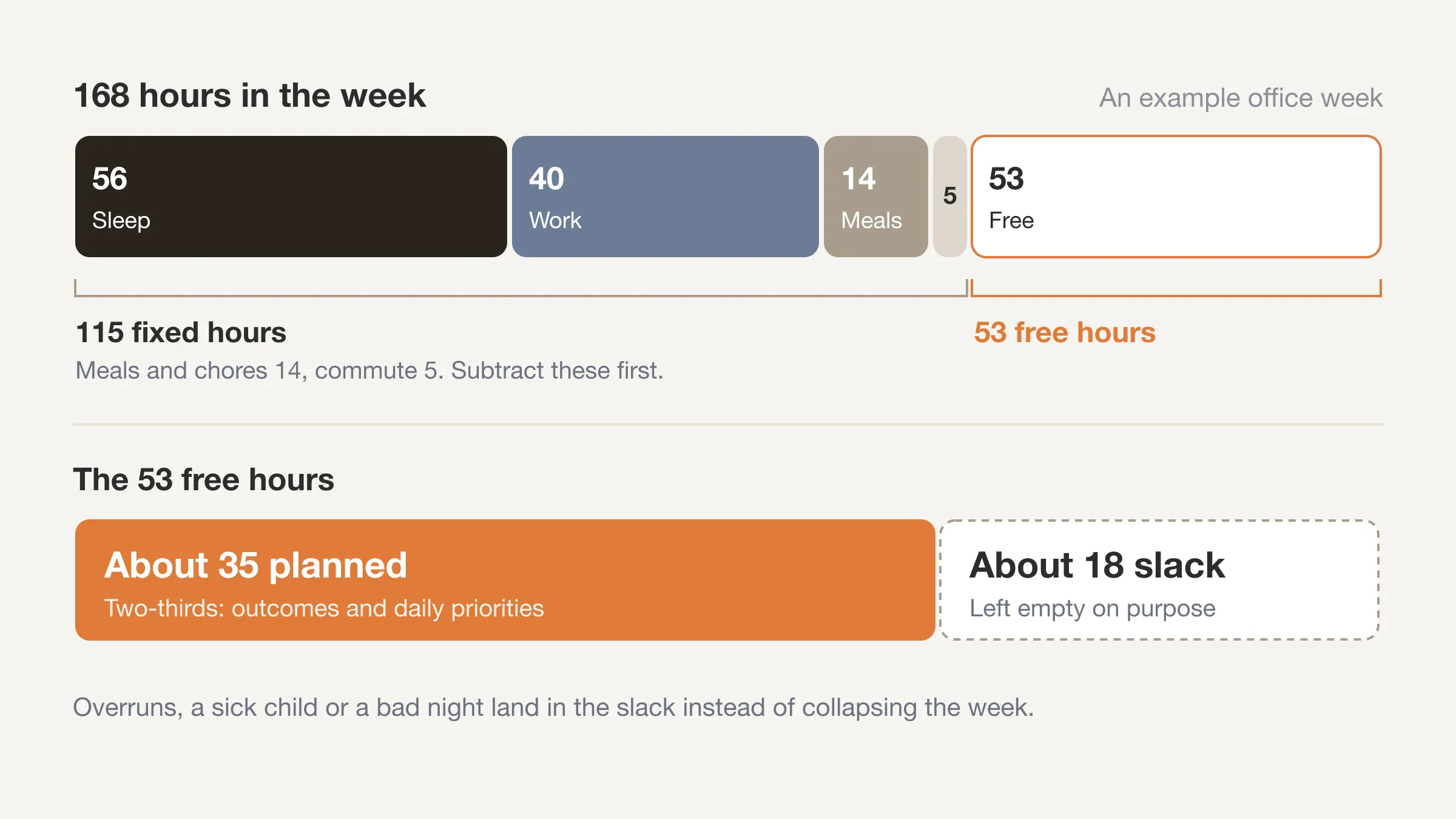
Take a typical office week as an example. Work at 40 hours, a commute of 5 hours, sleep at 56, and two hours a day for meals and household chores (14). That is 115 fixed hours, which leaves 53 free hours for everything else: exercise, friends, family, hobbies, side projects, rest. Fifty-three is not 168, and it is much less than most people assume when they sit down to plan a week.
That is a labeled example, not a statistic. Your own numbers will differ. The point is the method: the free-hours number is the real size of your week, and it is almost always smaller than the number in your head.
Step 2: Choose three outcomes (3 minutes)
An outcome is a result, not an activity. "Finish the draft of the proposal" is an outcome. "Work on the proposal" is an activity. Pick one that matters most, one that supports it, and one smaller thing that keeps life running. If your goals are scattered across too many areas, this setup guide for focused goals helps you narrow them first.
Three is a limit, not a suggestion. If you list seven outcomes, you have written a to-do list, and a to-do list does not tell you what to drop when Wednesday goes wrong. Three tells you.
Step 3: Set the daily priorities (4 minutes)
For each day, write up to three priorities, in order. Start with the days that are already heaviest and put only one priority on them. A day with a 10-hour work shift does not get three.
Add the Slack column last. Slack is the number of hours you are deliberately leaving empty. Aim for roughly a third of your free hours. If you have 53 free hours, plan about 35 and keep about 18 open. That sounds like waste. It is what lets a meeting that ran long, a sick child or a bad night's sleep absorb into the week instead of collapsing it.
Step 4: Leave the plan vs actual row blank
You will not fill in section 4 now. It is there so that on Sunday you have a place to put the answer to the only question that improves a plan: what really happened?
How do you fill in the plan vs actual row?
This is the part that turns the template from a wish into a feedback loop. There are two ways to do it, depending on how much effort you want to spend.
The light version: estimate at the end of the week
On Sunday evening, go through each day and estimate how many hours went to each area. Health covers exercise, medical care and anything that looks after your body. Life covers family, friends, errands, hobbies and rest. Work covers paid work and study. Sleep is sleep. Write the totals in the Actual column.
This is quick and better than nothing. Its weakness is memory. By Sunday, Tuesday afternoon has blurred. People tend to remember the big events and forget the in-between hours, so the Not accounted for row will usually be bigger than you expect. That is useful information on its own: it is the share of the week you could not account for.
The accurate version: log the day as you go
The sturdier option is to keep a short log during the week. Write down what you did in 15-minute blocks, filling in the day at lunch and again at night. The daily time log template gives you a copyable sheet for this. A day has 96 blocks, and a waking day has about 64. You are not recording every one in the moment. You are filling in the gaps twice a day.
At the end of the week, the Actual column becomes addition rather than guessing. The same log works for the 15-minute time block method if you want to go deeper into why this size of block works.
How big should the gap be?
There is no good or bad number. A gap of a few hours between planned and actual in a single area is normal. What you are looking for is a pattern across two or three weeks: the same area running short, or the same hours going missing. One bad week is an event. Three similar weeks is information.
Why do most weekly plans fail by Wednesday?
Almost every weekly plan that breaks does so for one of four reasons. Each has a fix built into the template.
- The plan used all 168 hours. Nobody has 168 hours. Section 2 shows the free number, so the plan starts from a smaller and truer figure.
- Every day had too many priorities. Three per day is the cap, and heavy days get fewer.
- There was no slack. One overrun cascades through the week. The slack column makes the spare hours explicit.
- Nobody checked. The plan was written on Sunday and never compared with Friday. The plan vs actual row fixes this.
A fifth reason is less obvious: the plan was fine, but you could not tell it was working. When you see no evidence either way, motivation drops. A visible record of where the hours went gives you something to react to, good or bad.
How is a weekly planner different from a calendar or a to-do list?
A calendar holds commitments that have a start time. A to-do list holds tasks that do not. A weekly planner sits between them. It decides which tasks get the free hours the calendar leaves open, and how many hours you are willing to spend.
| Tool | What it answers | What it misses |
|---|---|---|
| Calendar | When are my commitments? | What I do in the unscheduled hours |
| To-do list | What needs doing? | How many hours I really have for it |
| Weekly planner | What gets my free hours this week? | What actually happened, unless it has an Actual column |
| Time log | What did I do with the hours? | What I meant to do, unless it sits beside a plan |
You need the last two together. The planner is the intention. The log is the result. The distance between them is where the learning is, which is why planned vs actual is the one number worth tracking.
What are three ways to adapt the template?
For a working week with a fixed schedule
Keep the template as is. Your fixed blocks are large and mostly constant, so the first time you fill in section 2, save a copy. Next week, you only change what is different. The planning takes five minutes. If you want a ready-made shape for each day, these daily routine examples can fill the fixed blocks.
For students
Replace "Work or school" with a row each for classes, study and a part-time job if you have one. Add a deadline line under section 1 for anything due this week. Because study hours are flexible, the Actual column is especially useful: study is the area where planned and actual diverge most for many students.
For variable schedules and shift work
Fill in section 2 for the specific days you are working this week, not an average. For the daily priorities, plan only the days you control. If your hours change each week, the plan vs actual row is even more valuable, because you cannot rely on a routine to tell you where time goes.
How do you use a weekly planner with a 15-minute log?
The pair works well because they answer different questions on different days. The planner is a Sunday or Monday job and takes about 15 minutes. The log is a daily job and takes about two minutes in the morning and two at night.
A simple rhythm:
- Sunday or Monday morning: fill in sections 1 to 3. Fifteen minutes.
- Each morning: look at today's row and decide what the three priorities are. Two minutes.
- Each night: fill in the day's blocks from memory, while it is fresh. Two minutes.
- End of the week: total the log into section 4 and fill in the review. Ten minutes.
Beyond Time is built for the daily half of that rhythm. You score your sleep and pick the one to three goals that matter today with Start your day, log time in 15-minute blocks, and rate how health, life and work felt with End your day. The week view then splits every hour of the week by category, so the Actual column fills itself in, and the AI reflection points to where time went where you meant it to and where it leaked. You do not need the app to use the template. If you want the log to be easier than a spreadsheet, it helps.
Fill in the Actual column automatically
Beyond Time splits every hour of your week by Health, Life, Work and Sleep, then explains the gap between your plan and your week.
Try Beyond Time freeHow do you review the week without it taking an hour?
The review in section 5 is three lines on purpose. Long reviews do not happen. Short ones do.
- What went where I meant it to? Name it. This is not politeness. Knowing what worked tells you what to repeat.
- Where did the time leak? Look at the Not accounted for row and the largest gap. One answer is enough.
- What is the one change for next week? A concrete one: "Move the gym to Tuesday morning" beats "exercise more."
If you want a longer review, the complete guide to weekly reviews covers a 30-minute version with more prompts. For most weeks, the three lines above are enough.
Frequently Asked Questions
What is a weekly planner template?
A weekly planner template is a one-page layout for planning seven days at once. A good one includes your weekly outcomes, your fixed commitments, daily priorities, some deliberate slack, and a place to compare plan with what actually happened.
How many hours are there in a week to plan?
There are 168 hours in a week. After about 56 hours of sleep, you have roughly 112 waking hours, or 448 fifteen-minute blocks. Work, commuting and chores usually take most of those, so the hours free for planning are fewer than they look.
How many priorities should I plan each day?
Plan up to three priorities per day, and fewer on days that are already heavy. Three gives you a clear order of importance. More than that turns the planner into a to-do list that tells you nothing about what to drop.
When is the best time to fill in a weekly planner?
Sunday evening or Monday morning works for most people. Pick a time you can repeat, and keep it under 15 minutes. The best time is the one you will still be doing in a month.
What is the difference between a weekly planner and a weekly schedule?
A weekly schedule lists when things happen. A weekly planner decides what you will do with the free hours and how many of them you will fill. The planner covers priorities and slack. The schedule covers time slots.
Should I plan every hour of the week?
No. Plan about two-thirds of your free hours and leave the rest as slack. A plan with no gaps breaks on the first overrun, and something will always overrun.
How do I know if my weekly plan is working?
Compare the plan with what happened. Total the real hours by area in the Actual column and look at the gap. If the same area runs short for two or three weeks in a row, the plan is too big or the priorities need to change.
Plan the week, then see where it went
A weekly planner template gives your week a shape: three outcomes, fixed blocks first, three priorities a day, and slack on purpose. The plan vs actual row is what turns it from a hopeful page into a tool. Copy the template, fill in the first half in 15 minutes, and fill in the second half on Sunday.
Your time is limited, and a week is the smallest unit big enough to see a pattern. Plan it, then see where it goes. If you want a lighter way to do the logging half, Beyond Time turns the day into 15-minute blocks and shows the week by category.
Put this into practice
Free tools that match this article.
Weekly Schedule Template
Plan your week with a free printable weekly schedule template for goals, routines, and focus blocks.
Try Schedule TemplateTime ManagementTime Blocking Template
Map your day into focused time blocks with a free printable time blocking template.
Try Time BlockingTime ManagementWeekly Schedule Optimizer
Generate an optimized weekly schedule with AI-powered time blocking for maximum productivity.
Try Schedule OptimizerFocusFocus Session Planner
Create AI-optimized focus sessions with structured work blocks and refreshing breaks.
Try Focus PlannerKeep exploring this topic
Goal setting guide
Start with the fundamentals of setting goals that turn into action.
Time blocking guide
Turn priorities into protected calendar blocks.
Life audit guide
Review the areas of life that need more attention and intention.
Goal frameworks compared
Choose between SMART goals, OKRs, BHAGs, and 12-week goals.
Related Articles

How Many Minutes in a Week? 10,080, and Where They Go
How many minutes in a week? 10,080, or 6,720 waking minutes at 8 hours of sleep. See the minutes in each activity for an average week and how many are left.

Bucket List Ideas: 100 Ideas Grouped by Theme and Lead Time
100 bucket list ideas grouped by theme and tagged by lead time: now, this year, or years ahead. Count the weeks you have, then pick ten. Start your list today.

How to Stop Doomscrolling: 9 Practical Fixes That Work
How to stop doomscrolling: add friction, swap in better habits and check your Screen Time against a real log of your day. Nine fixes, with sources. Try one.

Life Plan Template: A One-Page Plan With Weekly Costs
A free life plan template you can copy: eight areas of life, one outcome each, and a weekly time cost so your plan fits the 112 waking hours you really have.

How Many Work Weeks in a Year? 52 Minus Your Time Off
How many work weeks in a year? 52 on paper, usually 46 to 50 after holidays and leave. See the table by days off, 2026's count and the weeks left this year.

Second Brain Method Explained: CODE, PARA and Who It Suits
A second brain is a trusted place outside your head for notes and ideas. See how Tiago Forte's CODE and PARA work, who it suits, and what notes can't tell you.