Mastering AI Workflow Automation for Business Success
Transform operations with AI workflow automation. This guide covers concepts, architectures, & implementation for founders, managers, & creators.
Your team probably already has automation. A form submission creates a CRM record. A calendar event triggers a reminder. An invoice gets routed for approval. Yet the work still feels messy because people are stitching together gaps by hand. They copy details from emails into spreadsheets, check whether a lead is serious, summarize meeting notes for someone else, and chase approvals across Slack, inboxes, and project tools.
That's the point where many leaders start shopping for AI tools.
They usually ask the wrong question first. Not “Which tool should we buy?” but “How should this work flow if a machine can read, classify, predict, and draft?” That shift matters because AI workflow automation creates its biggest gains when you redesign the workflow itself, not when you bolt AI onto isolated tasks. MIT Sloan highlights this missed prerequisite directly, noting that AI delivers maximum value when organizations redesign workflows and task sequences, while 78% of current content focuses mostly on tool features instead according to MIT Sloan.
A founder feeling buried in admin work, a manager trying to speed up decisions, and a creator repurposing content all face the same core problem. Their work isn't just a list of tasks. It's a system of handoffs, judgments, exceptions, and follow-ups. If you improve only one task, the bottleneck usually just moves somewhere else.
Table of Contents
- Introduction From Manual Chaos to Intelligent Systems
- What Is AI Workflow Automation Really
- The Strategic Benefits of Intelligent Workflows
- Understanding Common AI Automation Architectures
- Practical Implementation Patterns and Use Cases
- Measuring Success and Avoiding Common Pitfalls
- Your AI Automation Implementation Checklist
- Frequently Asked Questions
Introduction From Manual Chaos to Intelligent Systems
A startup founder starts the day with good intentions. By noon, they're triaging inbox threads, checking whether leads are qualified, nudging a contractor for an update, summarizing a customer complaint for the product team, and rewriting notes from a call into something the rest of the company can act on. None of this work is the business. It's the glue holding the business together.
Many teams treat that glue as unavoidable.
So they add point solutions. One tool for transcription. Another for task routing. Another for CRM updates. Another for chat summaries. The stack grows, but the work still depends on humans deciding what matters, what comes next, and who needs context. That's why the promised productivity boost often feels thinner than expected.
The real design question isn't “What can AI automate?” It's “Where should humans decide, and where should systems decide?”
AI workflow automation is best understood as a redesign of work across a sequence, not a smarter version of one isolated step. If your sales intake process still requires five people to interpret incomplete information, AI won't save much by merely drafting one follow-up email. But if you redesign intake so the system reads messages, enriches context, prioritizes urgency, routes exceptions, and asks a human only for ambiguous cases, the whole process changes shape.
That difference is strategic. You stop thinking in terms of tool features and start thinking in terms of flow design, which means handoffs, confidence thresholds, escalation paths, and feedback loops. The organizations that get real value usually don't have the fanciest stack. They have the clearest operating model for how humans and machines work together.
What Is AI Workflow Automation Really
Traditional automation moves work. AI automation interprets work.
That sounds small, but it changes everything. A conventional workflow tool follows predefined rules. If a customer fills out a form, create a record. If a ticket is marked urgent, notify a manager. If a contract arrives, store it in a folder. Those flows are useful, but they break when practical circumstances get messy.
The metronome versus the conductor
Rule-based automation is like a metronome. It keeps time perfectly, but it can't hear the room. It doesn't know whether the violin came in late, whether the singer skipped a line, or whether the audience is getting restless.
AI workflow automation is closer to an orchestra conductor. It still follows structure, but it can interpret what's happening in real time. It notices patterns, adjusts tempo, and responds to nuance. In business terms, that means the system can read an email, infer intent, summarize a document, prioritize a lead, or decide whether something should go to a human reviewer.
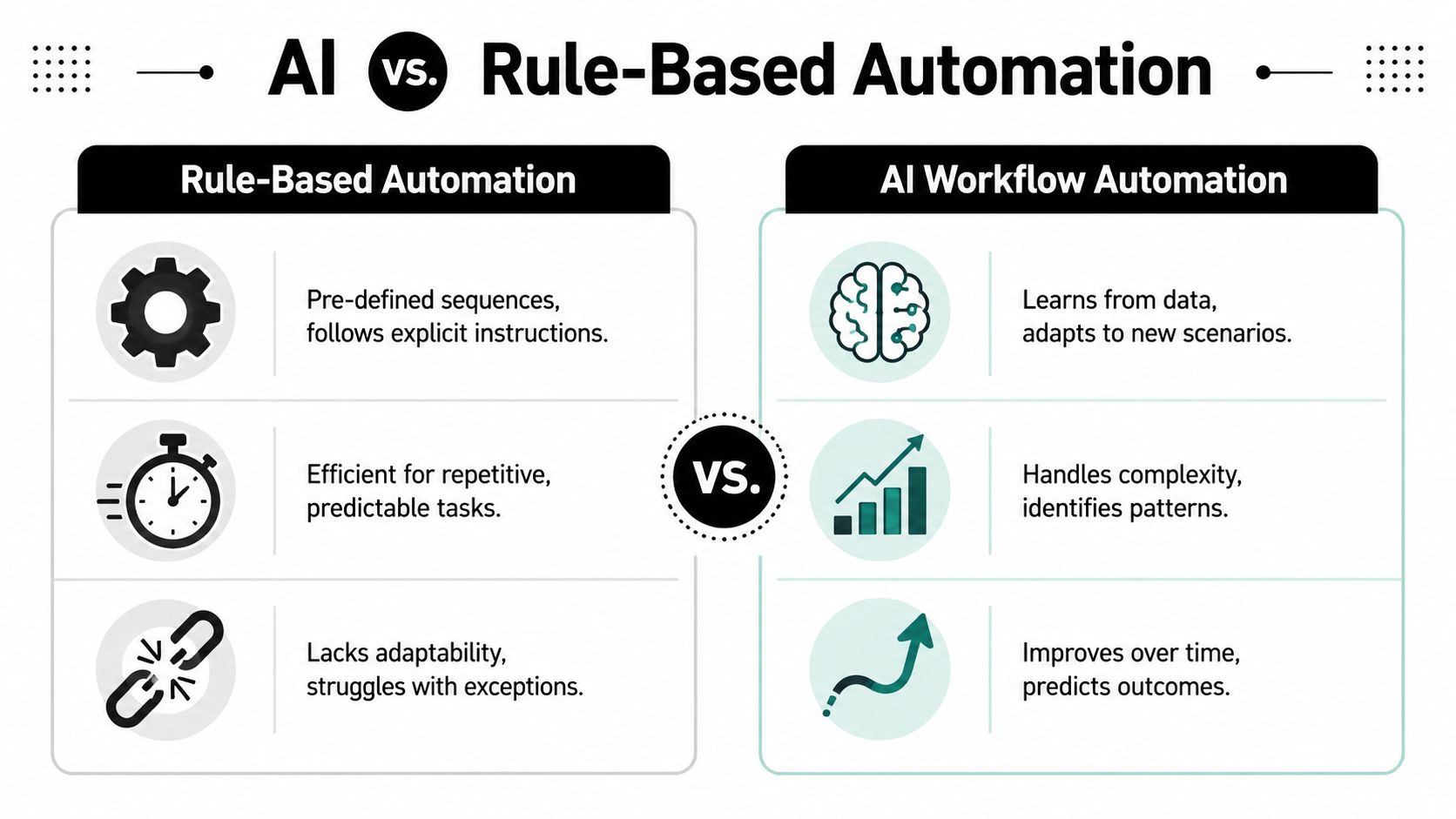
That adaptability matters because much of modern work isn't neatly structured. It lives in call transcripts, PDFs, support threads, meeting notes, and free-form requests. MetaSource notes that AI workflow automation reduces operational errors by 40% to 60% compared with traditional rule-based automation because machine learning models can adapt to new patterns and unstructured inputs as described by MetaSource.
Where the intelligence actually sits
The phrase “AI automation” often gets used loosely, so it helps to break it into parts:
- Input understanding: The system reads messy material such as emails, chats, voice transcripts, forms, and documents.
- Decision logic: It classifies, scores, prioritizes, or recommends an action.
- Orchestration: It passes work to the right person, tool, or next step.
- Learning loop: Teams review outcomes and refine prompts, policies, and thresholds.
Here's a simple example. A rule-based support flow might route any message containing the word “refund” to billing. An AI workflow might read the full message, determine whether the customer is angry, confused, or reporting fraud, pull order context from Shopify or Stripe, draft a response, and send only edge cases to a human.
That's why leaders should evaluate systems, not just apps. Before choosing platforms, it helps to discover professional workflows and study how mature teams structure approvals, enrichment, escalation, and review.
Practical rule: If the work involves judgment, ambiguity, or unstructured input, simple automation usually isn't enough.
The Strategic Benefits of Intelligent Workflows
The business case for AI workflow automation isn't just labor reduction. It's faster decisions, fewer avoidable mistakes, and a workflow that can scale without becoming chaotic.
Why leaders are moving now
This isn't a fringe experiment anymore. In 2023, 35% of companies were already using AI for workflow automation, and 92% planned to increase investment, while generative AI was projected to add $4.4 trillion in global productivity based on the WorldMetrics summary.
Those numbers matter because they signal a change in posture. Teams aren't treating AI as a side project. They're moving it toward core operations.
A useful way to frame the shift is this:
| Old mindset | New mindset |
|---|---|
| Automate repetitive clicks | Redesign how decisions move |
| Save time on one task | Improve throughput across the system |
| Add AI to one app | Build intelligence into the workflow |
| Measure activity | Measure outcomes and flow quality |
What improves beyond labor savings
The first visible gain is usually speed. A system can read, sort, summarize, and route work continuously without waiting for someone to wake up, clear a queue, or context-switch back into the task.
The more durable gain is decision velocity. Managers often think they're buying time savings, but they're really buying a faster path from signal to action. When a system assembles the context before a human sees the issue, people spend less energy hunting for background and more energy making a good call.
Intelligent workflows also help teams in three practical ways:
- They reduce cognitive clutter. People stop doing work that machines handle better, such as first-pass categorization or summarization.
- They improve consistency. The workflow applies the same logic every time, instead of depending on whoever happens to be available.
- They support scale. As volume rises, the process doesn't fall apart in the same way a manual queue does.
Teams don't become more strategic because someone tells them to. They become more strategic when low-value decisions stop consuming the day.
There's also a resilience advantage. Human teams get interrupted, overloaded, or stretched thin. A well-designed AI workflow keeps context moving, maintains service levels, and pushes exceptions into a review lane instead of letting them disappear into inboxes. That makes the organization calmer, not just faster.
Understanding Common AI Automation Architectures
Most leaders don't need to write the code behind an AI workflow. They do need to understand the architecture well enough to make good design choices. The architecture determines where decisions happen, how much autonomy the system gets, and how risk is controlled.
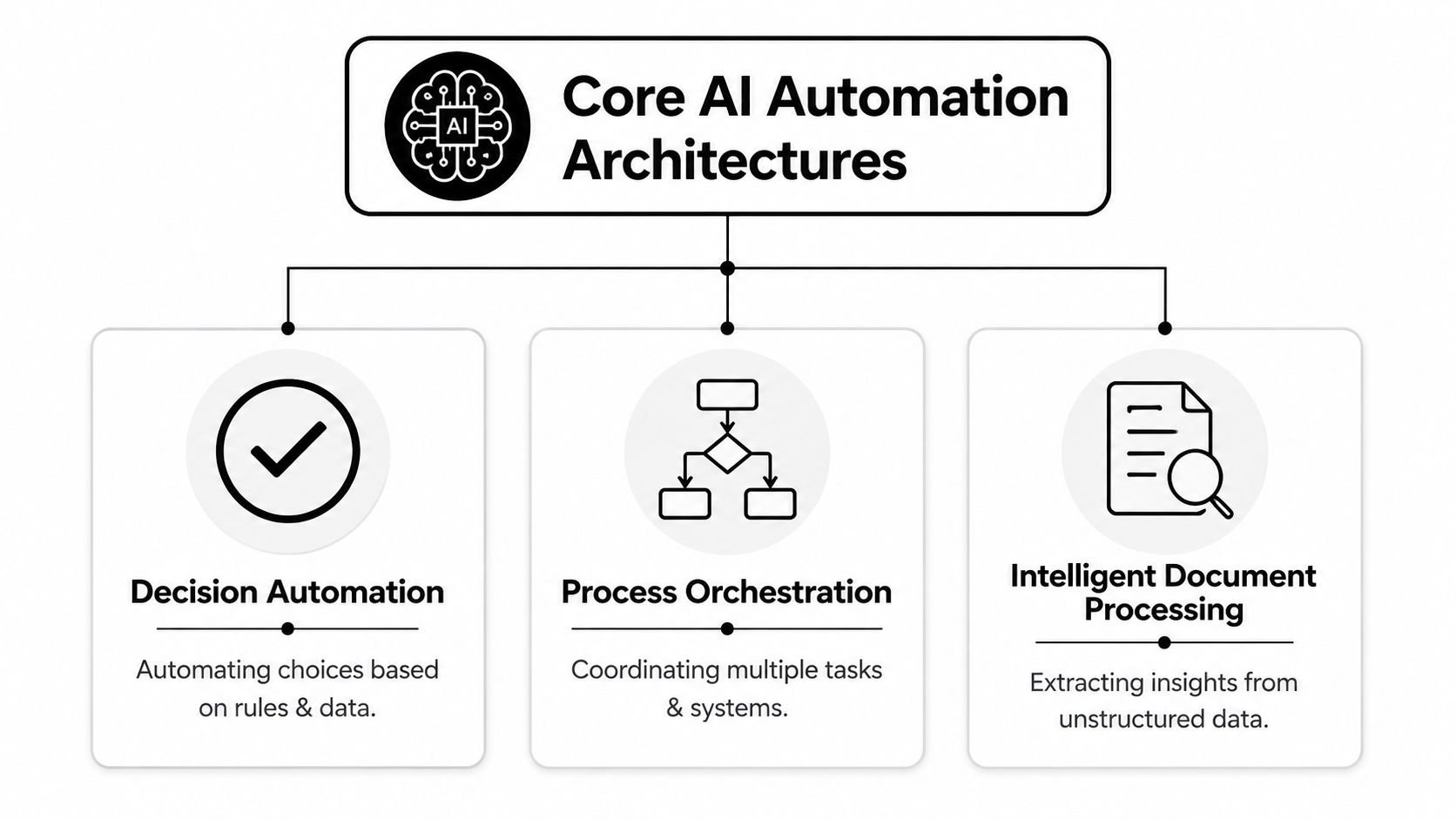
Human in the loop systems
This is the safest starting point for most organizations. The AI gathers information, proposes an action, and presents a recommendation. A person makes the final call on anything meaningful.
That model works well for contract review, hiring screens, compliance-sensitive outreach, medical admin, executive reporting, and customer escalations. The human doesn't do the whole task. The human handles judgment.
The catch is obvious. Review queues can become the new bottleneck. Insight Partners notes that 65% of knowledge workers struggle with AI integration bottlenecks, especially when teams haven't built the right human-in-the-loop scaffolding across data, tools, and runtime as discussed by Insight Partners.
To avoid that trap, the review step needs structure:
- Clear confidence thresholds: low-confidence outputs go to humans, routine ones continue automatically.
- Dense review screens: reviewers should see the source data, recommendation, and reason in one place.
- Action shortcuts: approve, reject, edit, escalate. No hunting across apps.
- Feedback capture: the system should record what the reviewer changed so the workflow gets better.
For teams planning these handoffs across connected systems, guides on model context protocols can help clarify tool access and runtime patterns, such as this walkthrough on connecting MCP to Claude.
Agentic systems
An agentic workflow gets a goal rather than a narrow instruction. Instead of “summarize this note,” it might be told “process this inbound lead, gather context, prioritize it, and prepare the next best action.”
This model shines when the work has many small decisions, multiple systems, and shifting conditions. Sales operations, support triage, research assembly, and internal service desks are good examples.
But autonomy raises the stakes. The more freedom you give the system, the more important it becomes to define boundaries. An agent should know:
- Which tools it can call
- What data it can read
- Which actions require approval
- What counts as success
- When to stop and ask for help
Hybrid systems
Most mature workflows become hybrid. The AI handles interpretation and execution in routine lanes, then routes uncertain, high-risk, or high-value cases to people.
That's usually the sweet spot. You get speed where the process is stable and oversight where the consequences matter. Think of it as lane design. The left lane is autonomous flow. The center lane is assisted review. The right lane is full human handling for exceptions.
Good architecture doesn't remove humans. It places them where their judgment creates the most value.
Practical Implementation Patterns and Use Cases
The easiest way to understand AI workflow automation is to see how redesigned work behaves in real situations. Not abstract diagrams. Daily operating patterns.
A founder workflow
A founder gets inbound leads from a website form, LinkedIn messages, email replies, and webinar signups. In a manual process, someone checks each source, copies information into a CRM, reviews the company website, guesses urgency, and writes follow-ups.
A redesigned AI workflow looks different. The system collects inbound signals, enriches account context from internal records, classifies intent from the message itself, drafts a suggested reply, and creates a task only when the lead is high-value or ambiguous. The founder doesn't review every message. They review the ones where judgment matters.
That changes the operating burden. The process becomes “review decisions” instead of “do admin.”
If you're comparing platforms that support these patterns, a useful starting point is this guide to the best AI workflow automation tools, especially when you're weighing low-code convenience against deeper orchestration.
A manager workflow
A team manager receives updates from Slack, project boards, call notes, customer issues, and ad hoc status pings. The manual version of this workflow is familiar. Every evening, the manager reconstructs the truth from fragments.
With AI workflow automation, the system gathers updates from tools like Asana, Notion, Google Docs, and Slack, extracts blockers, groups work by priority, and produces a daily brief. It can highlight what changed, where deadlines look shaky, and which decisions need attention.
The redesign insight is subtle but important. You don't ask AI to “summarize status.” You redesign the reporting workflow so people submit less manual reporting in the first place, because the system already sees much of the work signal.
Teams doing this well usually pair workflow tools with stronger personal execution systems. If you're exploring that broader layer, this roundup of AI productivity tools can help frame where personal workflows and team workflows meet.
A creator or student workflow
A creator records a long video. A student attends a dense lecture. In both cases, the raw material is valuable but difficult to reuse.
A redesigned workflow can transcribe the source, identify key ideas, group them by theme, draft derivative assets, and ask the human to approve tone, factual interpretation, or final publishing choices. For a creator, that might mean a blog draft, short-form post ideas, and a newsletter outline. For a student, it might mean structured notes, flashcards, and practice questions.
Here's the pattern all three examples share:
- Capture once. Pull in the original source of truth.
- Interpret centrally. Let the system read and structure the material.
- Route intelligently. Send outputs to the right channel or reviewer.
- Learn from edits. Human changes become input for the next run.
That's how AI workflow automation stops being a novelty and becomes an operating system for repetitive knowledge work.
Measuring Success and Avoiding Common Pitfalls
Many teams evaluate automation too loosely. They say it “saved time” or “felt faster.” That's not enough. If you can't tell whether the system is reliable, accurate, and worth the effort, you don't have an asset. You have a demo.
Metrics that tell the truth
Vellum points to a more practical benchmark set. Successful AI workflow automation is measured by time-to-first-value of 3 to 5 days, with weekly run volume and eval pass rates acting as core indicators of model efficacy in Vellum's implementation guidance.
Those metrics are useful because they force operational honesty.
- Time to first value: How quickly can the team get one workflow producing useful output?
- Weekly run volume: Is this automation being used, or is it sitting idle?
- Eval pass rates: Does the system keep producing acceptable outputs as prompts, policies, or models change?
You should also watch qualitative indicators that reveal hidden failure. Are people bypassing the workflow? Are reviewers editing the same issue repeatedly? Are exceptions arriving without enough context to make a fast decision?
A reflective review loop helps here. Teams that document why outputs failed usually improve faster than teams that just tweak prompts at random. A practical mental model for that kind of review is captured in AI reflection practices, where the focus is learning from outputs instead of merely generating more of them.
Failure patterns to catch early
Most AI workflow failures aren't caused by the model alone. They come from bad process design.
Here are the common ones:
- Poor source data: If records are duplicated, incomplete, or contradictory, the system will make weak decisions.
- Messy integration boundaries: If the workflow can't reliably read or write to the right systems, humans will keep patching holes manually.
- No exception design: Teams automate the happy path and forget what should happen when the input is unclear.
- Over-automation too early: Leaders give the system too much authority before they understand failure modes.
- No operational owner: If no person owns accuracy, escalation, and refinement, the workflow decays.
Measure whether the workflow makes better decisions faster. Time savings alone can hide a fragile system.
The strongest teams pilot a narrow workflow, monitor it closely, and expand only after the review loop is stable.
Your AI Automation Implementation Checklist
A strong first project is boring in the best way. It targets a workflow with clear pain, frequent repetition, and enough judgment to benefit from AI, but not so much risk that one mistake creates major damage.
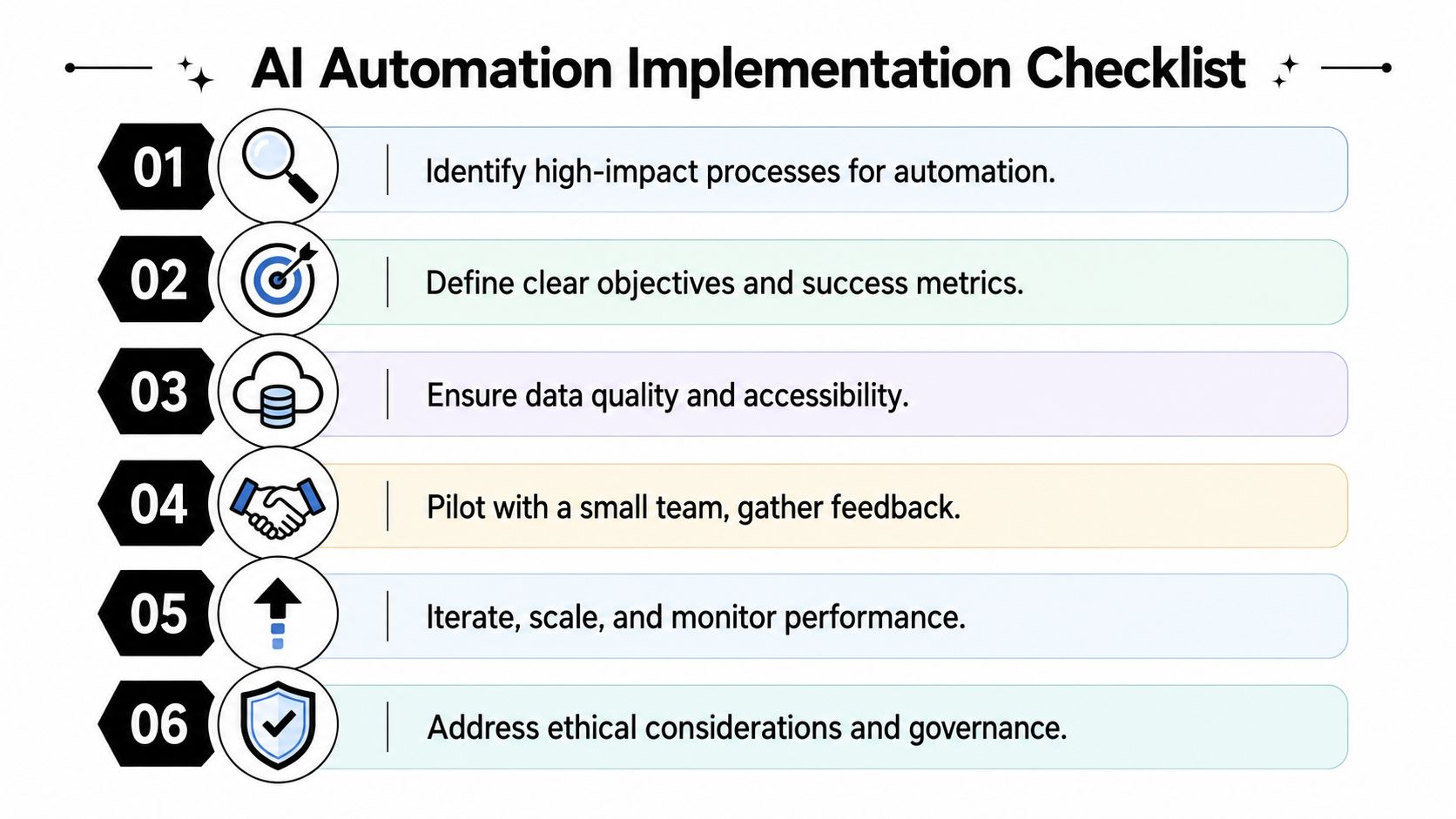
A practical checklist you can use this week
- Choose one workflow, not ten. Pick something high-friction like lead intake, meeting follow-up, support triage, or document review.
- Map the current flow. Write down where work starts, who touches it, what data gets used, and where delays happen.
- Redesign before you automate. Ask which decisions the system should make, which ones it should recommend, and which ones must stay human.
- Define the review rule. Set a simple policy for approval, escalation, and exception handling.
- Connect the minimum viable stack. Start with the tools already used by the team, such as Gmail, Slack, HubSpot, Notion, Asana, Airtable, or a document store.
- Pilot, observe, refine. Watch real runs closely and improve the workflow based on reviewer edits and failure cases.
The video below gives a practical look at implementation thinking in action.
Before and after workflow example
A simple before-and-after table helps clarify what redesign means.
| Stage | Before redesign | After redesign |
|---|---|---|
| Intake | Requests arrive by email and chat | Requests flow into one intake layer |
| Triage | A coordinator reads everything manually | AI classifies, summarizes, and assigns priority |
| Context gathering | Staff chase background across tools | The workflow attaches relevant history automatically |
| Decision | Every case waits for human review | Only unclear or sensitive cases require approval |
| Follow-up | Someone drafts messages from scratch | The system drafts responses for quick review |
| Learning | Errors repeat informally | Reviewer edits shape the next version of the workflow |
The point isn't to remove people. It's to remove wasted motion.
Frequently Asked Questions
Do I need to be technical to use AI workflow automation
No. Many teams start with low-code tools and simple integrations. What matters more than coding is process clarity. If you can map a workflow, identify decision points, and define what good output looks like, you can lead an implementation well.
How is this different from ordinary automation tools
Ordinary automation follows explicit if-this-then-that logic. AI workflow automation can interpret documents, messages, and ambiguous requests, then choose an action or propose one. That makes it better suited for knowledge work where inputs aren't perfectly structured.
Will AI workflow automation replace jobs
Usually, it reshapes jobs before it replaces them. Repetitive coordination work, first-pass triage, summarization, and routine drafting often move to the system. People spend more time on judgment, escalation, relationship management, and exception handling.
What should we automate first
Start with workflows that have frequent repetition, lots of handoffs, and clear pain. Lead routing, support triage, meeting follow-up, and document-heavy approvals are common starting points because the waste is visible and the redesign opportunity is real.
What makes implementations fail most often
Most failures come from weak workflow design, not weak models. Teams skip process mapping, trust messy data, or force humans into clumsy review steps. If the handoffs aren't clear, the automation won't feel intelligent no matter how advanced the model is.
How do we keep human review from becoming a bottleneck
Design review as a fast decision surface, not a second full workflow. Reviewers should see the recommendation, supporting context, and available actions in one place. If people have to reconstruct the case themselves, the automation has only moved work around.
Tribble Software Private Limited builds Beyond Time, an AI-powered goal achievement system for founders, professionals, students, and other knowledge workers who want clearer execution, not just more planning. If you're redesigning work with AI and want a better way to turn goals into measurable milestones, routines, and daily focus, Beyond Time is worth exploring.
Put this into practice
Free tools that match this article.
Career Roadmap Planner
Plan your career progression with AI-powered roadmaps, skill gap analysis, and actionable milestones.
Try Career PlannerAssessmentProductivity Score Calculator
Discover your productivity score and get personalized recommendations to improve.
Try Productivity ScorePersonal DevelopmentPersonal Development Plan Generator
Generate a personalized development plan with quarterly milestones, skill gaps, and daily habits tailored to your goals.
Try Development PlanGoal SettingGoal Setting Worksheet
Turn a vague goal into milestones, habits, blockers, and a weekly review plan.
Try Goal WorksheetKeep exploring this topic
Beyond Time for professionals
Plan career goals, weekly execution, and focused work in one system.
Career roadmap guide
Translate long-term professional growth into concrete milestones.
Guide articles
Explore more guide articles from the Beyond Time blog.
ai workflow automation
Read more articles tagged ai workflow automation.
Related Articles
The 2026 Daily Routine Checklist: 8 Core Systems
Tired of to-do lists? Build a daily routine checklist that drives results. Explore 8 core systems for goal alignment, AI-powered focus, and true accountability.
Master Goal Setting Frameworks for Success
Goal setting frameworks - Explore top goal setting frameworks like SMART & OKRs. Choose the right one to turn plans into daily action and achieve your goals.
How to Track Multiple Goals Without Getting Overwhelmed
Learn a proven system for managing multiple goals simultaneously without losing focus or burning out. Practical frameworks for tracking 3-5 goals at once.
Accountability Partner Guide: Achieve Goals Faster
Learn how to find, structure, and get the most from an accountability partner. Research shows accountability can boost goal achievement by up to 95%.
5-Year Plan Template: Build Your Life Roadmap Step by Step
Build your life with this step-by-step 5 year plan template. Set goals across 5 key life domains and break them into year-by-year milestones you can act on.
How to Set Life Priorities: A Framework for What Matters Most
Learn how to set priorities in life with a proven values-based framework. Discover what matters most and start building goals aligned with your life today.