Craft the Perfect Out Office Message: Templates & Tips 2026
Learn how to write a professional out office message. Get 10+ templates, security tips, and step-by-step guidance to manage expectations while you're away.
You're probably setting this up in a hurry. Calendar blocked, bags half packed, Slack still active, and your inbox is filling with messages that all seem urgent to someone.
That's exactly why most out office message settings fail. People treat the auto-reply like admin. It isn't. It's a boundary, a handoff, and a reputation signal packed into a few lines. Get it wrong and you create confusion, extra follow-ups, and avoidable security exposure. Get it right and people know what to do without chasing you.
A strong out office message should do three things fast: tell people when you're unavailable, route the right issues correctly, and avoid sharing more than an outsider needs to know.
Table of Contents
- Why Your Out Office Message Matters More Than You Think
- The Four Essential Building Blocks of an Effective OOO
- 10+ Out Office Message Templates for Any Situation
- Advanced OOO Tactics for Productivity and Focus
- The Hidden Security Risk in Your Auto-Reply
- Conclusion Automate Your Boundaries for Better Work
Why Your Out Office Message Matters More Than You Think
A bad out office message usually looks harmless. “Away from email with limited access.” No return date. No guidance. No backup path. The sender is left guessing whether to wait, resend, escalate, or message you somewhere else.
That tiny gap creates real operational mess. A client assumes you'll reply tonight. A teammate forwards the same request to three people. An invoice sits. A deadline slips. The auto-reply was supposed to reduce friction, but it did the opposite.
This tool has been doing serious work for longer than commonly understood. The out-of-office message started in Microsoft's late-1980s Xenix email system as “Oof”, and what began as an internal feature now supports modern email volume at massive scale. Microsoft notes that 376 billion daily emails were sent globally in 2025, with 424 billion in 2026 as a projection in its history of the out-of-office message.
A vague auto-reply doesn't save time. It shifts the decision-making burden to everyone else.
That's why I treat the out office message as part of workload design, not etiquette. It belongs in the same category as calendar protection, meeting rules, and response-time norms. If your days already disappear into reactive work, this is one of the smallest fixes with the clearest payoff. The same habits that improve your auto-reply usually improve your broader communication system too, especially if you're already trying to reduce interruptions and reclaim your calendar from meeting overload.
What a strong message changes
A good message doesn't try to sound clever. It reduces uncertainty.
It tells the sender:
- When you're out: exact start and return timing
- What to do if it's urgent: clear criteria, not guesswork
- What to expect: no false promise of an instant catch-up
That's what keeps trust intact. People don't mind that you're unavailable. They mind not knowing what happens next.
The Four Essential Building Blocks of an Effective OOO
The fastest way to write a reliable out office message is to use a fixed structure. Not a creative one. Not a “friendly but flexible” one. A structure that removes ambiguity.
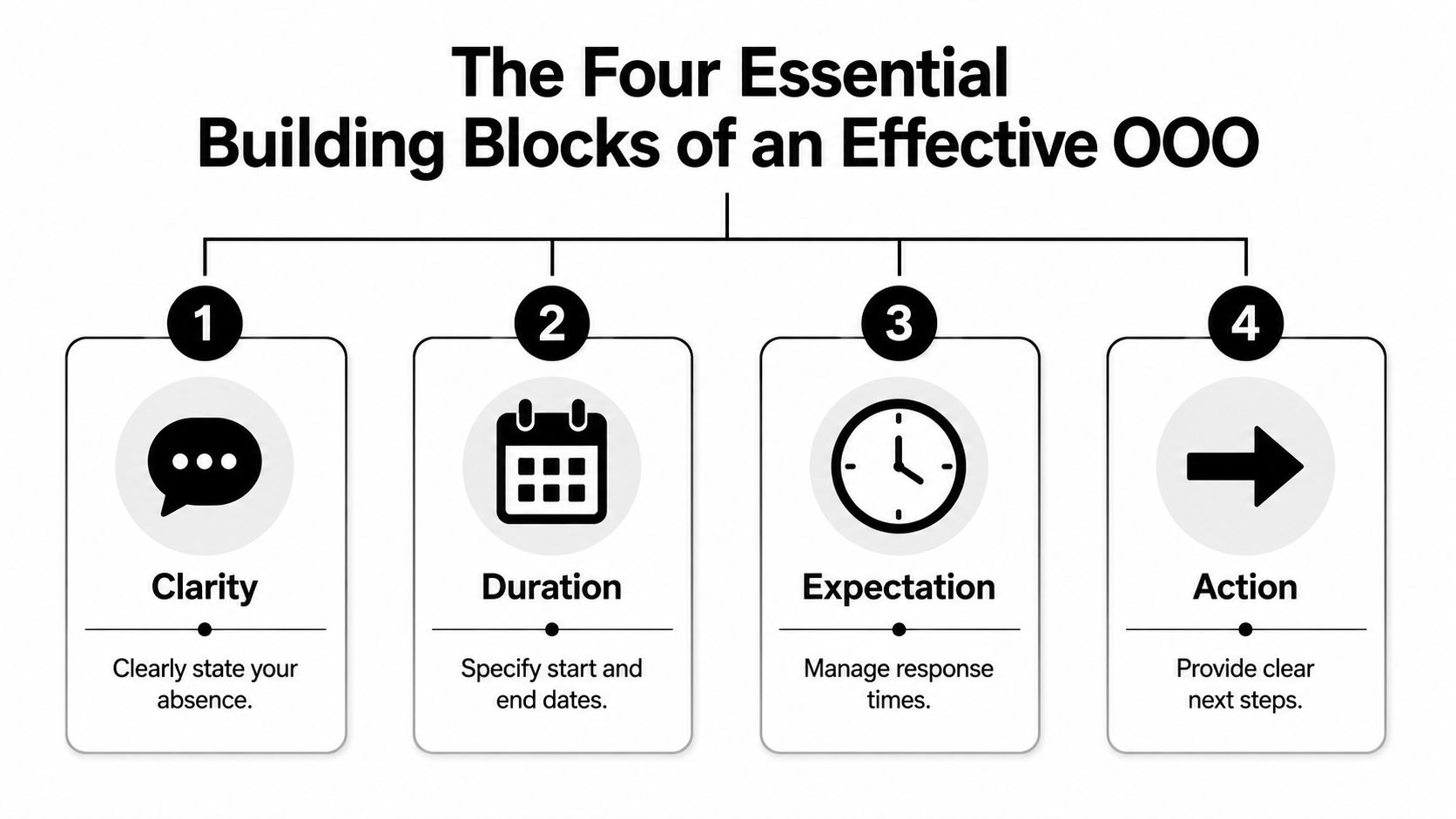
The reason this matters is simple. 94% of professionals consider clear return dates and designated backup contacts the most important success factors in OOO communication, and that clarity can reduce follow-up friction by about 67%. Those are the standards your message should meet.
Start with hard dates
Skip “I'm away this week” or “I'll have limited access.” Those phrases sound polite but they force the sender to interpret your availability.
Use exact dates. If useful, include your return day in plain language.
- Weak: I'm out of office with limited email access.
- Better: I'm out of office through Thursday, January 16, and I'll resume replying on Friday, January 17.
If your company runs across time zones, be extra plain. The sender shouldn't need to inspect your signature to understand when you're back.
Define urgent before someone else does
Many individuals write “for urgent matters, contact…” and stop there. That's incomplete. Everyone thinks their message is urgent.
Give examples of what qualifies. Keep them short.
- Appropriate examples: customer outage, contract requiring same-day review, issue affecting a live launch
- Poor examples: anything important, anything time-sensitive, any immediate need
Practical rule: If you don't define “urgent,” you haven't filtered anything.
Many professionals accidentally create more interruptions in this way. Once you define urgency, fewer people misuse the escalation path.
Promise the response you can actually deliver
Don't write “I'll respond as soon as I return” if you know you'll come back to a crowded inbox. That line trains people to expect immediate turnaround when you're likely triaging.
Use language that reflects reality:
- I'll review messages after I return and respond as soon as I'm able.
- I'll work through email in the order received once I'm back.
- If your issue is time-sensitive, please use the contact path below.
That wording protects trust because it's honest.
Route escalation without creating noise
This final block is where most good messages become useful. Give the sender one next step, not five.
A solid structure looks like this:
| Element | What to include | What to avoid |
|---|---|---|
| Unavailability | Exact dates | “Limited access” |
| Urgency filter | Specific issue types | “If urgent” with no criteria |
| Return expectation | Gradual catch-up language | Instant reply promises |
| Escalation path | One reliable contact route | Multiple names and channels |
If you're coordinating across several calendars, don't improvise this each time. Build a standard format into your workflow so your message matches your actual availability, especially if you already sync calendars across tools and teams.
10+ Out Office Message Templates for Any Situation
Many individuals don't need more advice. They need a clean draft they can paste, edit, and activate. Use these as starting points, then adjust details for role, audience, and risk level.
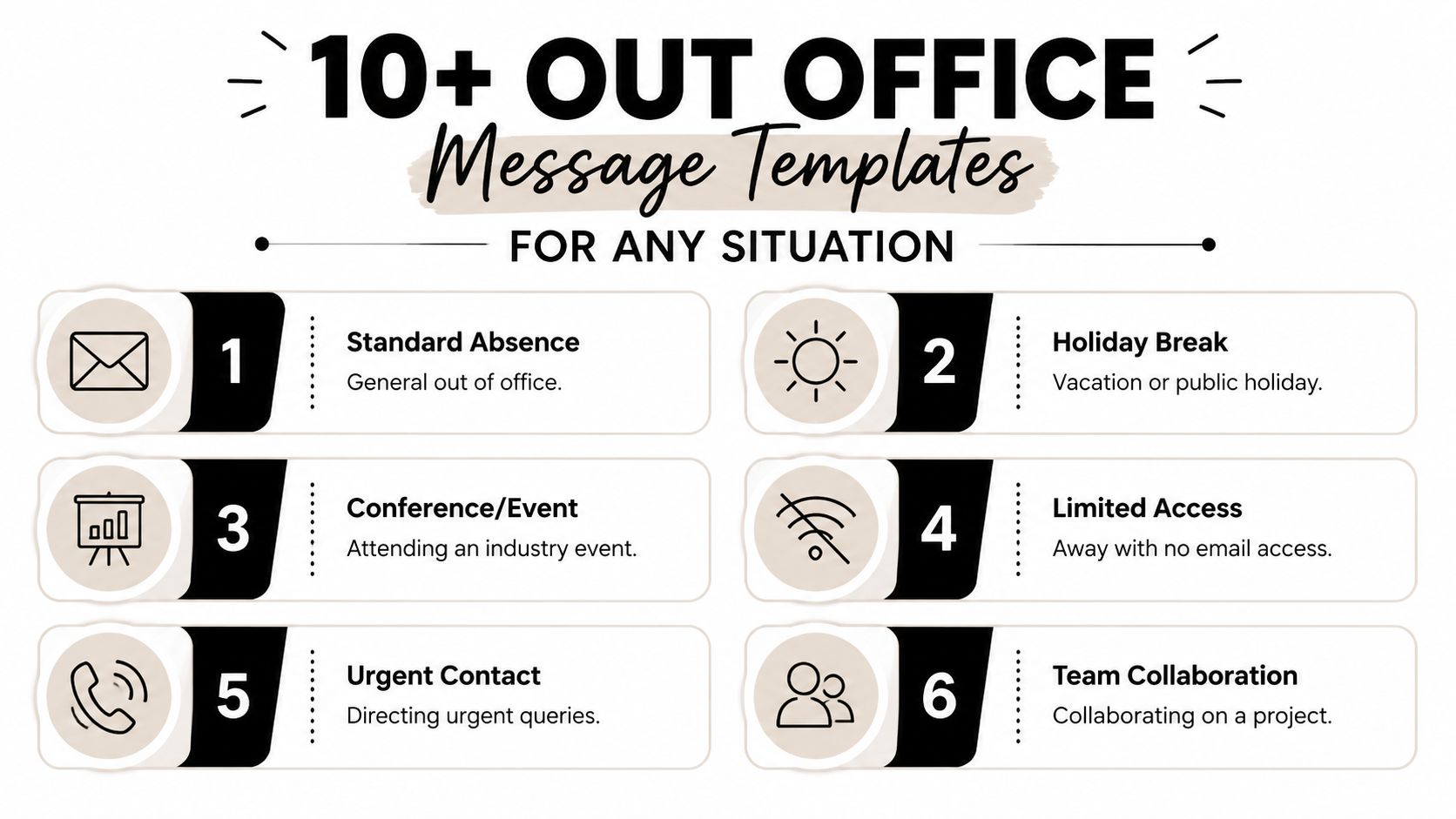
Before you send any of them, check names, dates, and contact details. Benchmark data shows that OOO messages with no spelling errors and a professional tone achieve an 89% higher readability score and a 42% lower rate of misdirected urgent inquiries. If you also need help with the mechanics of setting an auto-reply in Gmail, KeepKnown's guide to auto replies is a useful walkthrough.
Fast templates you can copy and send
1. Standard vacation
Hello, and thanks for your email. I'm out of office until [date] and won't be monitoring email regularly. I'll review messages after I return. If your matter is time-sensitive, please contact [team alias].
Customization rule: Keep the reason general unless your role requires more detail.
2. Short holiday break
Thanks for your message. I'm away for the holiday break and will return on [date]. I'll respond after I'm back. For urgent issues related to [function], please email [team alias].
Customization rule: Match the tone to your company culture, but keep the structure formal.
3. Conference attendance
Thank you for your email. I'm attending a conference through [date] and may be slower to respond than usual. I'll catch up on email after I return. For urgent matters related to [project/client area], please contact [team alias].
Customization rule: Don't list your exact location, hotel, or travel schedule.
4. Deep work block
Thanks for your email. I'm offline from email until [time/date] to focus on planned work and won't be responding during that window. I'll reply once I'm back online. If something requires immediate review, please send it to [team alias].
Customization rule: Use this internally or with known contacts who already understand your response norms.
5. Sick day
Thanks for your message. I'm out today and will respond when I'm back. If your issue can't wait, please contact [team alias].
Customization rule: Keep health details private.
6. Limited-access travel
Hello. I'm traveling until [date] and won't have reliable access to email. I'll respond after I return. For urgent requests involving [specific issue types], please contact [team alias].
Customization rule: Only use “won't have reliable access” if that's true.
7. Parental leave
Thank you for your message. I'm on leave until [date] and won't be responding to email during this period. For assistance, please contact [team alias], where someone can direct your request appropriately.
Customization rule: For longer absences, avoid promising personal follow-up on your return.
8. Internal-only team handoff
I'm out of office until [date]. For approvals related to [area], send requests to [shared inbox]. For active items on [project], update the team channel and tag the on-call lead.
Customization rule: Internal messages can be more operational because the audience already knows the workflow.
9. Client-facing formal version
Thank you for your email. I'm currently out of office and will return on [date]. I'll review your message as soon as possible after my return. If you need immediate assistance, please contact [team alias].
Customization rule: Use the most neutral and polished tone with external senders.
10. End-of-quarter blackout
Thanks for your message. I'm focused on scheduled quarter-end work until [date] and won't be reviewing email regularly during that period. I'll respond as capacity allows afterward. Urgent operational issues should be sent to [team alias].
Customization rule: This works best when tied to a known business cycle.
11. Partial-day unavailability
Hello. I'm unavailable until [time] on [date] and will respond after that. If something needs same-day attention before then, please contact [team alias].
Customization rule: Partial-day messages should be short and precise.
Use the shortest template that still answers the sender's next question.
What ruins a good template
A usable template becomes a bad out office message when people over-explain or under-specify. The most common failures are easy to fix:
- Too much personal detail: “I'm in Spain with limited phone access” shares more than the sender needs.
- No return date: people can't plan around vagueness.
- Funny tone in a serious context: humor doesn't age well when a sender is under pressure.
- Typos in backup information: one bad address defeats the whole message.
The standard I use is simple. If someone reads your message in five seconds, they should know whether to wait, reroute, or escalate.
Advanced OOO Tactics for Productivity and Focus
The most overlooked use of an out office message isn't vacation. It's focus.
A lot of professionals are using auto-replies while they're still working, just not available for constant interruption. A 2025 Forbes analysis found that 40% of professionals activate OOO for normal work activities like conferences or deep work, and the trend is up 35% in the last 12 months among remote workers using it to create cognitive boundaries.
That makes sense. Email doesn't only consume time. It fractures attention. If you're trying to finish a proposal, write a board memo, review a product spec, or prepare investor updates, “technically reachable” is often the same as “repeatedly interrupted.”
When an OOO is really a focus tool
This only works if you're honest about what the message is doing. You are not pretending to be unavailable forever. You are signaling that response latency is intentional for a defined period.
A focused version sounds like this:
I'm heads-down on planned work until 3 PM and won't be reviewing email before then. If this affects today's client deliverable or a live issue, send it to [team alias].
That's cleaner than disappearing without notice or answering every message late with an apology. It also trains your team to distinguish between urgent work and ambient noise.
If your communication habits extend beyond email, mobile tools can help enforce the same boundary on text and calls. For people managing field work or heavy phone traffic, these professional Android auto reply tools are worth reviewing.
How to use it without confusing people
This tactic fails when people use a vacation-style message for a normal workday. That creates mismatch. The goal is not to sound absent. The goal is to sound intentionally unavailable for interruption.
Use these criteria:
- Use a focus OOO when: you need uninterrupted work for a defined block and people are likely to expect quick replies.
- Don't use it when: you're casually trying to clear inbox backlog while staying half-available.
- Keep it short: the longer the explanation, the less credible it feels.
- Set a same-day endpoint: focus boundaries work best when the return time is clear.
A practical operating rhythm is to reserve this for work that benefits from concentrated attention. Strategy writing, technical reviews, hiring decisions, and planning sessions all qualify. Routine admin usually doesn't.
For remote teams, this works best when it aligns with visible routines around availability, planned work blocks, and async norms. If your team is still building that discipline, this guide on structuring your day for remote work productivity complements the approach well.
The Hidden Security Risk in Your Auto-Reply
Most out office message advice still tells you to name a backup person. That advice is common. It's also riskier than most professionals realize.

Security firm ProArch warns against messages that provide “direct insight into the chain of command,” and its 2024 analysis found that 72% of business email breaches involve attackers using publicly available OOO details to impersonate backup contacts.
Why naming a person can create exposure
When you write, “I'm away. Contact Sarah Chen, Director of Finance, at…” you're not just helping a sender. You may also be telling an outsider:
- who handles approvals when you're gone
- who sits next in the workflow
- which names and titles sound legitimate in a phishing attempt
- how to craft a believable impersonation
That's the security paradox. The more specific your handoff looks, the easier it can be to weaponize.
Don't publish your internal routing map to every external sender.
This risk gets worse for founders, finance teams, legal teams, executive assistants, and anyone tied to approvals or sensitive client work.
Safer alternatives that still help senders
You don't need to choose between continuity and security. You need a better routing method.
Use options like these instead of naming a person publicly:
| Risky approach | Safer alternative |
|---|---|
| Named colleague and title | Team alias or shared inbox |
| Direct manager reference | Functional mailbox |
| Individual mobile number | Help desk or monitored support channel |
| Detailed escalation chain | One generic escalation route |
Examples:
- For urgent client support, contact [support team alias].
- For time-sensitive account matters, email [shared inbox].
- For active project issues, reply to the project distribution list.
For internal-only auto-replies, you may choose to be more specific if your environment is controlled. For external auto-replies, assume every detail can be read by someone you didn't intend to help.
A secure out office message is still useful. It just routes by function instead of exposing people by name.
Conclusion Automate Your Boundaries for Better Work
A good out office message isn't clerical cleanup. It's a small operating system for your availability.
It protects your time when you're away. It protects your focus when you're working. And it protects your organization when a routine handoff could expose more than it should. That's why the best messages are plain, specific, and restrained.
The pattern holds across almost every scenario. State your dates. Define urgency. set realistic response expectations. Route people to a safe next step. Then stop editing. Most weak auto-replies fail because they're vague, overly casual, or too revealing.
There's a larger lesson here too. Work breaks down less from big communication failures than from tiny unmanaged ones repeated every day. Auto-replies, handoff notes, status messages, and follow-up habits all shape how much reactive work lands back on your desk. If you want another useful perspective on why important operational emails often don't get written until too late, Mara's guide to unwritten emails is worth your time.
Set your out office message once like a professional system, not a last-minute disclaimer. The inbox will still be there when you return. The difference is that it won't have dragged everyone else into uncertainty while you were gone.
If you want a better way to turn boundaries into consistent execution, Tribble Software Private Limited builds Beyond Time to connect goals, milestones, daily routines, and accountability in one system. It's built for professionals who don't just want to plan better, but want their calendar, habits, and focus time to support the work that matters.
Put this into practice
Free tools that match this article.
Career Roadmap Planner
Plan your career progression with AI-powered roadmaps, skill gap analysis, and actionable milestones.
Try Career PlannerPersonal DevelopmentPersonal Development Plan Generator
Generate a personalized development plan with quarterly milestones, skill gaps, and daily habits tailored to your goals.
Try Development PlanGoal SettingGoal Setting Worksheet
Turn a vague goal into milestones, habits, blockers, and a weekly review plan.
Try Goal WorksheetTime ManagementWeekly Schedule Template
Plan your week with a free printable weekly schedule template for goals, routines, and focus blocks.
Try Schedule TemplateKeep exploring this topic
Beyond Time for professionals
Plan career goals, weekly execution, and focused work in one system.
Career roadmap guide
Translate long-term professional growth into concrete milestones.
Guide articles
Explore more guide articles from the Beyond Time blog.
out office message
Read more articles tagged out office message.
Related Articles

How to Track Multiple Goals Without Getting Overwhelmed
Learn a proven system for managing multiple goals simultaneously without losing focus or burning out. Practical frameworks for tracking 3-5 goals at once.
Accountability Partner Guide: Achieve Goals Faster
Learn how to find, structure, and get the most from an accountability partner. Research shows accountability can boost goal achievement by up to 95%.
5-Year Plan Template: Build Your Life Roadmap Step by Step
Build your life with this step-by-step 5 year plan template. Set goals across 5 key life domains and break them into year-by-year milestones you can act on.
How to Set Life Priorities: A Framework for What Matters Most
Learn how to set priorities in life with a proven values-based framework. Discover what matters most and start building goals aligned with your life today.
Life Audit: The Complete Guide to Redesign Your Life
A life audit helps you step back, evaluate every major area of your life, and redesign it with intention. Discover how to do yours in five clear steps.
How to Stay Motivated: Science-Backed Strategies That Work
Struggling with how to stay motivated on long-term goals? Discover science-backed systems and practical strategies to build lasting motivation that sticks.