How to Use AI at Work Effectively in 2026
Master how to use AI at work effectively. Our 2026 guide covers implementation, prompt templates, tool suggestions, & ethical best practices.
75% of global knowledge workers now use AI tools regularly, and usage nearly doubled in the last six months, according to Microsoft's Work Trend Index summarized by Worklytics. This alters the fundamental question. It's not whether AI belongs at work. It's whether you're using it with enough structure to get reliable value from it.
Most advice on how to use AI at work stops at shallow examples like drafting emails or summarizing meetings. Those are fine entry points, but they don't change much on their own. Significant gains come from building an AI operating system for your week: knowing which tasks to hand off, which tools to trust, which prompts produce usable output, and how to connect all of that to actual goals instead of random experimentation.
I've found the professionals who get the most from AI don't treat it as a novelty. They treat it as a co-pilot for repeatable work and a thinking partner for high-value work, with human judgment still doing the steering.
Table of Contents
- How to Identify Your Best AI Opportunities
- Choosing Your AI Toolkit for Maximum Impact
- Mastering AI Prompts for Your Specific Role
- Integrating AI into Your Daily Work Routines
- Using AI Safely and Ethically at Work
- How to Measure the Real Impact of AI on Your Productivity
How to Identify Your Best AI Opportunities
AI works best as a friction reducer. If you aim it at the wrong work, it creates more reviewing, correcting, and second-guessing than it saves. If you aim it at the right work, it clears clutter from your week and gives your attention back to analysis, decisions, and relationship work.
That's why the first step in learning how to use AI at work isn't choosing a model. It's auditing your workflow.
Run a friction audit first
For one workweek, keep a simple running list of tasks as you do them. Don't categorize in real time. Just capture what happened. Include recurring admin, message drafting, research prep, note cleanup, report formatting, planning, follow-ups, and any task you procrastinate on because it feels mentally sticky.
Then mark each task with three labels:
Repetitive
You do it often and the steps barely change.Time-heavy
It eats more time than the value it creates.High-friction
You avoid it, restart it often, or lose momentum in the middle.
If a task hits two out of three, AI is probably worth testing there first.
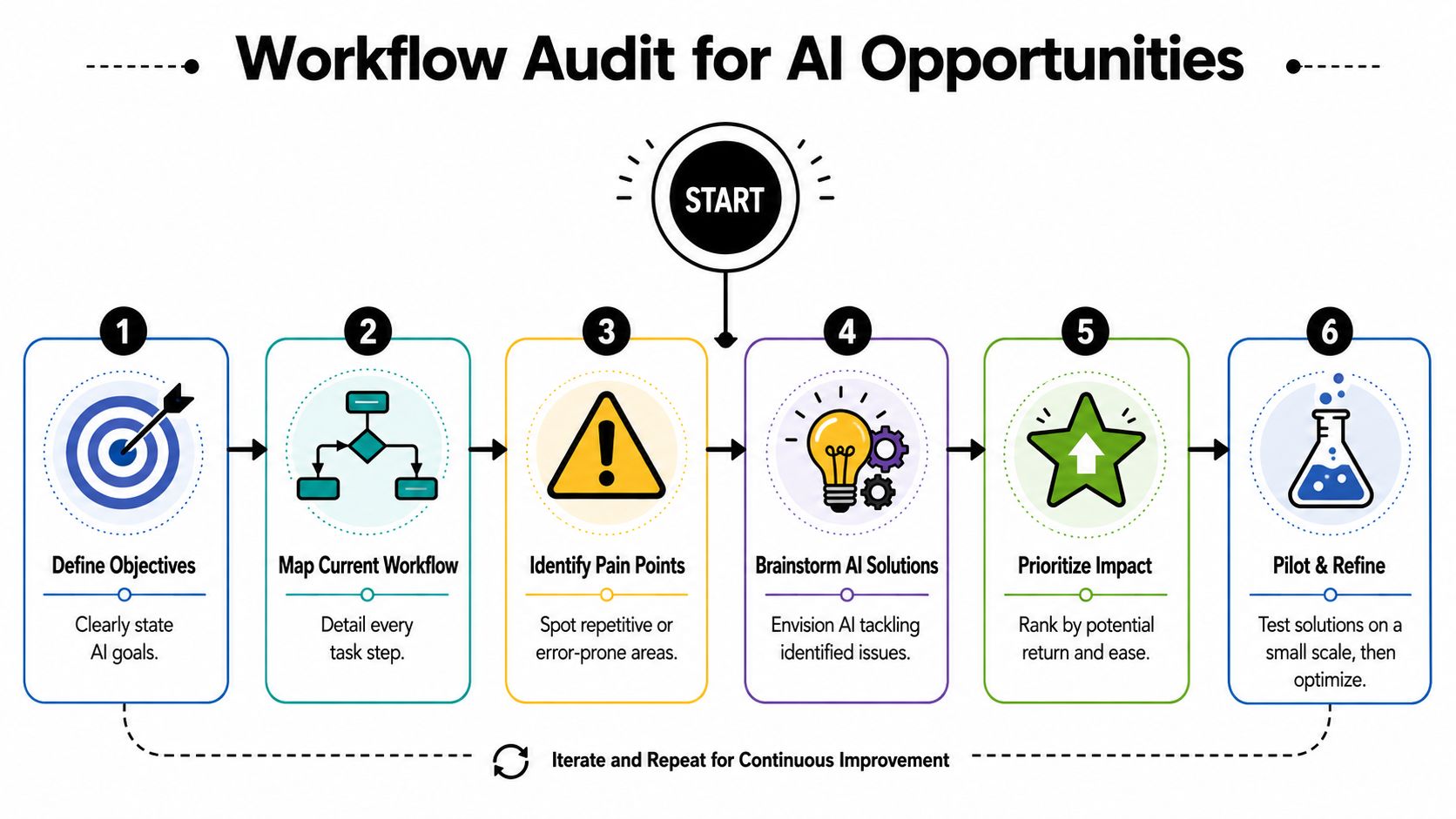
A more formal version of this process appears in Applied's practical AI implementation guide, and the underlying logic is solid. Start with the workflow, not the tool.
Sort tasks by judgment level
Not every annoying task should be delegated to AI. Some work is repetitive but still depends on human sensitivity, organizational context, or political awareness.
Use this filter:
| Task type | Good AI fit | Human-led |
|---|---|---|
| First drafts | Yes | Final version |
| Summaries | Yes | Final interpretation |
| Research synthesis | Yes | Decision-making |
| Data cleanup and formatting | Yes | Exception handling |
| Sensitive feedback | Assist only | Delivery and nuance |
| Hiring or people decisions | Assist only | Final judgment |
Practical rule: Use AI to prepare, structure, summarize, compare, and suggest. Keep humans responsible for judgment, approval, and consequence.
A lot of professionals fail here because they try to automate whole jobs. That usually backfires. The more useful move is to break a role into sub-tasks and identify where AI can take the first pass.
Choose three to five starting use cases
At the end of your audit, pick three to five use cases only. That limit matters. Too many experiments create noise. A smaller set gives you enough repetition to build skill.
Strong starting examples include:
- Weekly planning support by turning a messy task list into a prioritized action plan
- Document summarization for proposals, research, or internal updates
- Meeting prep that generates questions, risks, and decision points from notes
- Drafting support for project briefs, updates, and outlines
- Information transformation such as turning rough notes into a polished format
Write each use case in one sentence:
“Use AI to help me do X so I can spend more time on Y.”
That sentence forces clarity. It also keeps AI connected to a business outcome rather than casual curiosity.
Choosing Your AI Toolkit for Maximum Impact
The average professional doesn't need more AI tools. They need fewer tools with clearer jobs.
Tool sprawl creates its own tax. You waste time testing interfaces, moving information around, and forgetting where a useful workflow lives. A smaller toolkit wins because it becomes habitual.
Pick tools by job to be done
Think in categories, not brand hype.
General-purpose assistants are good for drafting, summarizing, brainstorming, and structured reasoning. For many, they are the starting point.
Specialized writing tools are useful when tone control, editing help, or publishing workflows matter more than broad problem-solving. If you want a market scan before choosing one, HumanizeAIText's AI tool reviews give a practical overview of writing-focused options.
Research synthesizers are better when you need source-heavy outputs, comparisons, or longer-form synthesis.
Code helpers fit engineers, analysts, and technical operators who want support with debugging, refactoring, test generation, or documentation.
Goal and execution systems matter when you want AI connected to planning and accountability rather than one-off chat. For that category, this roundup of AI productivity tools is useful because it frames tools around execution, not just idea generation.
Public tools versus secure work tools
Many teams often become careless. A public AI interface may be convenient, but convenience isn't the same as workplace suitability.
Use public tools for low-risk material such as generic brainstorming, writing practice, or process design. Use approved workplace tools for anything that touches internal data, customer context, sensitive documents, or proprietary material.
That distinction matters because the upside is real. A Harvard Business School study summarized by Fullview found AI users completed tasks 25.1% faster with over 40% higher quality, and employees using Generative AI saved an average 5.4% of work hours. But those gains only matter if your workflow is secure enough to keep using at scale.
A practical starter stack
Most knowledge workers can start with a setup like this:
- One general LLM for drafting, synthesis, and planning
- One workplace-approved AI environment for company material
- One note or document system where prompts and outputs are stored
- One execution layer that ties outputs to deadlines, routines, or goals
A good toolkit should answer four questions fast: where do I think, where do I write, where do I store, and where do I act?
If you can't answer those quickly, your setup is too messy.
Mastering AI Prompts for Your Specific Role
Bad prompts make AI look worse than it is. Vague input produces generic output, and generic output creates rework. Most professionals don't need “prompt engineering” in a technical sense. They need a reliable structure that works under normal work pressure.
One framework I use constantly is persona, context, task, format.
Use a four-part prompt structure
Instead of typing “summarize this” or “write an update,” give the model a role, operating context, a defined job, and a target format.
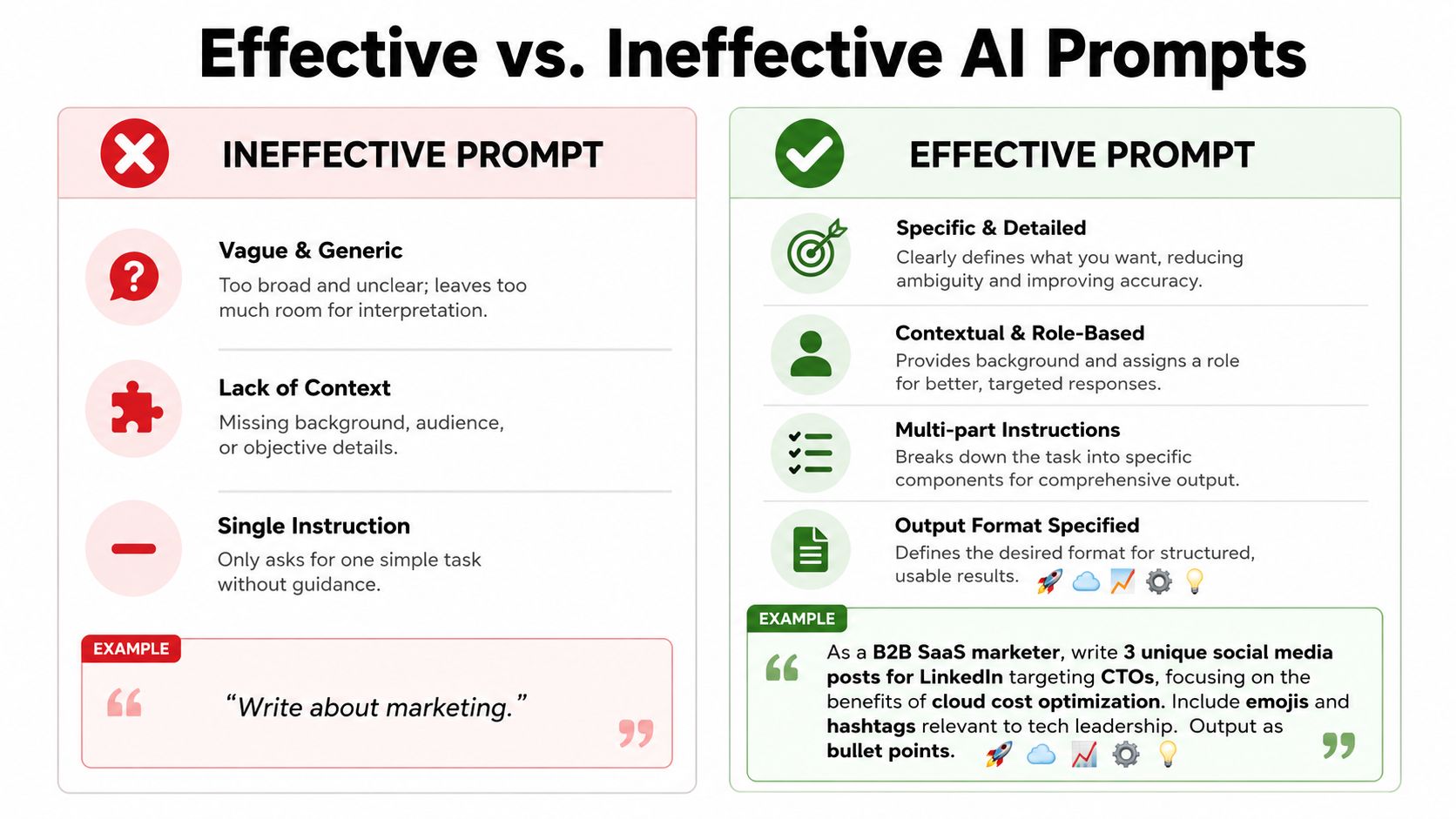
Here's the formula:
Persona
Who the AI should act likeContext
What background it needsTask
What specific outcome you wantFormat
How the output should be structured
A lot of prompt skill is just disciplined briefing. If you want to deepen that skill, AI Academy's essential AI upskilling guide is worth reading because it focuses on prompt quality as a practical workplace capability.
Nexos also makes a point that's easy to overlook in their guidance on AI in the workplace. Effective use starts with clear goals, defined guidance, and piloting before scaling. Prompting improves fast when you work from a real use case instead of abstract experimentation.
Prompt templates for founders
Founders often use AI poorly by asking for polished copy before they've clarified their own thinking. It works better as a strategic drafting partner.
Investor update prompt
Act as a startup chief of staff.
Context: I'm preparing a monthly investor update for a B2B software company. The main themes are wins, risks, metrics movement, and help wanted.
Task: Turn my rough notes into a concise investor update that sounds factual and calm, not promotional. Flag any section that lacks clarity or evidence.
Format: Use headings for Highlights, Challenges, Key Learnings, and Asks. End with 3 suggested subject lines.
Market trend prompt
Act as a market research analyst for an early-stage founder.
Context: I'm evaluating changes in customer demand, competitor positioning, and buyer objections in this category.
Task: Synthesize the notes below into a market brief. Distinguish signal from noise and list open questions I still need to validate.
Format: Give me a one-page brief with sections for Trends, Risks, Competitor Moves, Customer Language, and Next Research Steps.
A founder's real gain from AI isn't speed alone. It's thinking with more structure when information is scattered.
Here's a short walkthrough on prompting that pairs well with the templates above:
Prompt templates for managers
Managers get strong returns from AI when they use it to improve preparation, not replace leadership.
Project planning prompt
Act as an operations manager with strong project planning skills.
Context: I'm leading a cross-functional initiative with dependencies across product, design, and marketing.
Task: Convert these raw notes into a draft project plan. Identify likely bottlenecks, decisions that need owners, and risks that need early attention.
Format: Output a table with Workstream, Owner, Dependency, Risk, and Next Action.
Feedback drafting prompt
Act as an experienced people manager.
Context: I need to give constructive feedback to a team member about missed deadlines and unclear communication. I want to be direct, respectful, and specific.
Task: Draft a feedback script I can adapt for a live conversation. Include examples of what to say and what to avoid saying.
Format: Give me a short opening, three discussion points, two coaching questions, and a closing summary.
“Use AI to sharpen the message before the meeting. Don't use it to outsource the relationship.”
Prompt templates for knowledge workers
Analysts, marketers, operators, consultants, and researchers usually need AI for throughput and clarity.
Research summary prompt
Act as a senior research assistant.
Context: I'm reviewing multiple documents on the same topic and need the common themes, contradictions, and practical implications.
Task: Summarize the material and highlight anything that needs human fact-checking.
Format: Use bullet points under Themes, Disagreements, Missing Information, and Recommended Next Steps.
Report first-draft prompt
Act as a professional business writer.
Context: I need a first draft of an internal report based on the notes below. The audience is a busy leadership team.
Task: Turn the material into a clear report with a strong executive summary and concise recommendations.
Format: Use an executive summary, key findings, implications, and recommended actions. Keep the tone direct and practical.
The best prompt is rarely the cleverest. It's the one that reduces revision cycles.
Integrating AI into Your Daily Work Routines
Useful AI habits are boring in the best way. They repeat. They reduce startup friction. They show up at the same moments every day or every week, so you don't have to keep deciding when to use them.
That's when AI stops being a toy and starts becoming part of your operating rhythm.
Build a daily loop instead of random usage
A simple workday loop can look like this:
Morning briefing
Feed your calendar, open tasks, and top goals into AI. Ask for the three highest-impact actions for the day, the likely blockers, and what can wait.Midday unblock
When you stall, use AI for a narrow assist: outline the next steps, draft a rough response, summarize a long thread, or turn messy notes into a clean sequence.End-of-day debrief
Ask AI to summarize what moved, what slipped, what created drag, and what tomorrow's first move should be.
That rhythm matters more than flashy one-off prompts because it creates continuity. Your work stops being a pile of disconnected tasks and starts becoming a trackable loop.
Connect AI outputs to real goals
Individuals often leave value on the table. They generate useful text, but they never tie it back to the bigger objective.
A system like Beyond Time by Tribble Software Private Limited can help here because it connects goals to milestones, daily routines, and planned-versus-actual time tracking. That's different from using AI as a chat box. It lets you ask better questions, such as whether today's draft, planning session, or research summary moved a core objective forward. If you want a model for that kind of operating rhythm, this daily routine checklist is a practical reference.
Use AI as a personal co-pilot for communication and structure
One of the most overlooked uses of AI at work is personal adaptation. Some professionals use it to rehearse difficult conversations, rephrase messages for tone, or draft accommodation requests before a meeting with a manager.
That matters because emerging guidance summarized by Inclusion Hub shows neurodivergent workers use AI to rehearse difficult conversations and rephrase communication, yet only 22% of companies offer AI customization training for disability inclusion.
AI can support performance without forcing everyone to work in the same style.
That doesn't just help neurodivergent workers. It helps anyone who thinks better in draft form, processes information verbally before writing, or needs a lower-friction way to prepare for stressful interactions.
Using AI Safely and Ethically at Work
Unsafe AI use isn't a side issue. It cancels out the productivity gain.
A fast workflow that leaks sensitive information or spreads unverified output is not efficient. It's just risk delivered faster.
The non-negotiable rules
Start with the obvious line. Don't paste confidential company data, customer information, legal material, private employee details, or proprietary strategy into public AI tools unless your organization explicitly allows it and has approved controls in place.
Then apply the second line. Never treat AI output as trustworthy just because it sounds polished. Check facts, numbers, names, citations, calculations, and any recommendation that could affect a customer, colleague, or decision.
Those two failures show up constantly. Samir Patel's guidance on responsible workplace AI use notes that 45% of AI-related incidents stem from unauthorized data input, while 30% of errors occur due to lack of human verification, as summarized in this responsible use of AI at work article.
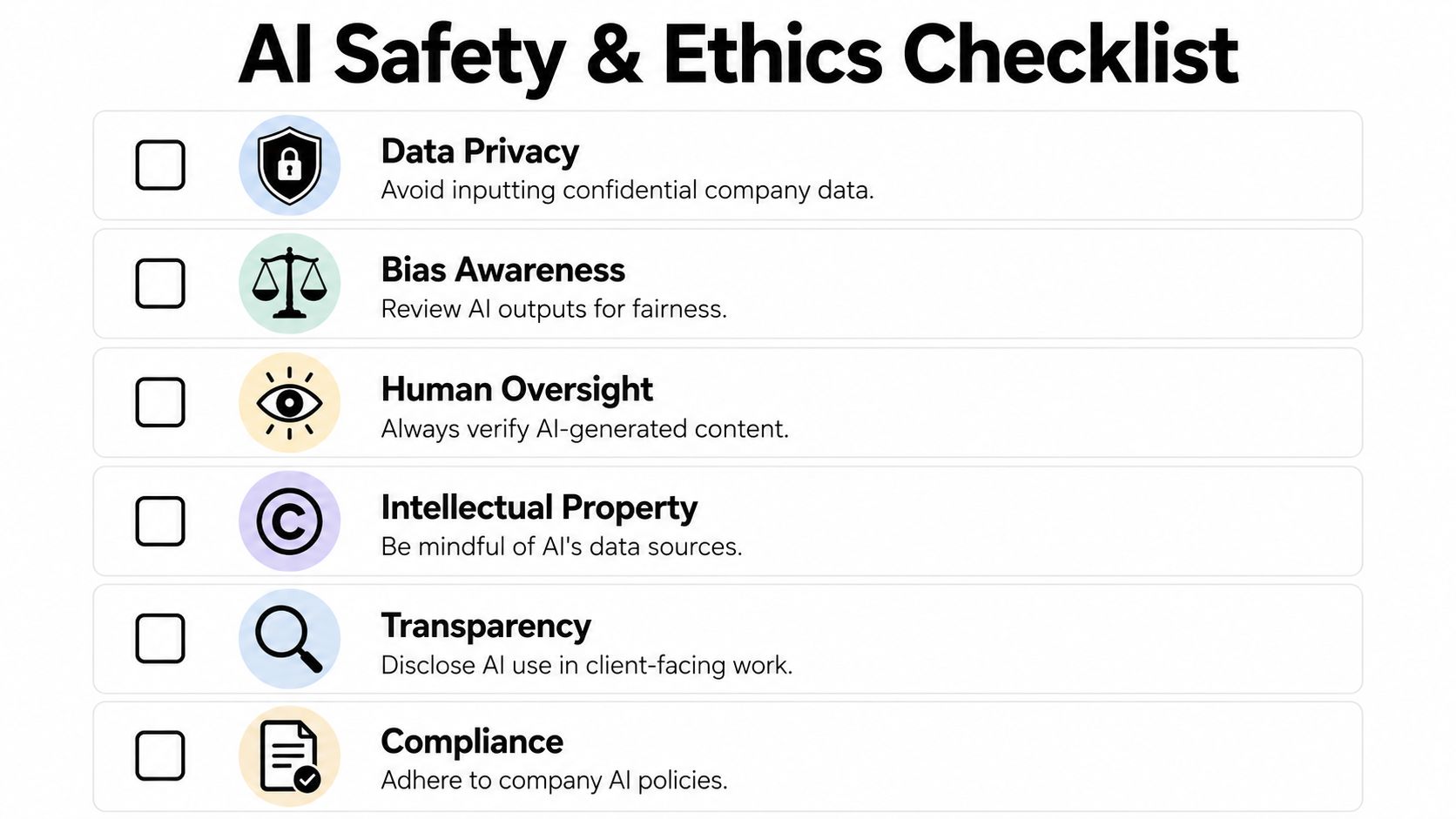
A simple workplace checklist
Use this before you send, submit, or share AI-assisted work:
Check the data source
Ask whether the material belongs in that tool at all.Check the output
Verify claims, wording, and logic before it leaves your hands.Check the policy
Follow your employer's rules on approved platforms and disclosure.Check the stakes
If the work affects hiring, performance management, legal interpretation, or external commitments, increase human review.Check for bias or tone problems
AI can flatten nuance, overstate certainty, or produce language that feels fair on the surface but misses context.
Ethical use also includes transparency. If AI shaped client-facing or high-stakes internal work, don't hide behind the tool. Own the output.
How to Measure the Real Impact of AI on Your Productivity
If you don't measure AI use, you'll overestimate the wins and miss the waste.
The cleanest way to evaluate how to use AI at work is to track three things: time reclaimed, quality improvement, and capabilities gained.
Track time quality and capability
Keep a weekly log for the handful of tasks where you actively use AI. For each one, note:
- Planned time versus actual time
- How much editing the output required
- Whether the result was better, equal, or worse than your normal baseline
- Whether AI helped you do something you otherwise wouldn't have started
This doesn't need to be complex. A simple table in your notes app works. The key is consistency.
Use a simple weekly review
At the end of each week, answer five questions:
- Which AI-assisted task saved the most time?
- Which output required too much cleanup?
- Which prompt produced the best result?
- Where did AI improve quality, not just speed?
- What should move into a repeatable routine next week?
If you want a more structured way to think about the measurement side, this guide to productivity measurement is a useful framework for tracking outputs against actual progress.
Good AI usage should leave evidence. You should see cleaner starts, faster drafts, fewer stalled tasks, and more time spent on work that needs your judgment.
Tribble Software Private Limited builds Beyond Time, an AI-powered goal achievement system that connects objectives, milestones, routines, and time tracking. If you want AI to support real execution at work instead of isolated chat sessions, it's worth looking at tools that tie daily actions back to measurable goals.
Put this into practice
Free tools that match this article.
Productivity Score Calculator
Discover your productivity score and get personalized recommendations to improve.
Try Productivity ScoreTime ManagementWeekly Schedule Optimizer
Generate an optimized weekly schedule with AI-powered time blocking for maximum productivity.
Try Schedule OptimizerTime ManagementTime Blocking Template
Map your day into focused time blocks with a free printable time blocking template.
Try Time BlockingGoal SettingGoal Setting Worksheet
Turn a vague goal into milestones, habits, blockers, and a weekly review plan.
Try Goal WorksheetKeep exploring this topic
Related Articles
How to Track Multiple Goals Without Getting Overwhelmed
Learn a proven system for managing multiple goals simultaneously without losing focus or burning out. Practical frameworks for tracking 3-5 goals at once.
Accountability Partner Guide: Achieve Goals Faster
Learn how to find, structure, and get the most from an accountability partner. Research shows accountability can boost goal achievement by up to 95%.
5-Year Plan Template: Build Your Life Roadmap Step by Step
Build your life with this step-by-step 5 year plan template. Set goals across 5 key life domains and break them into year-by-year milestones you can act on.
How to Set Life Priorities: A Framework for What Matters Most
Learn how to set priorities in life with a proven values-based framework. Discover what matters most and start building goals aligned with your life today.
Life Audit: The Complete Guide to Redesign Your Life
A life audit helps you step back, evaluate every major area of your life, and redesign it with intention. Discover how to do yours in five clear steps.
How to Stay Motivated: Science-Backed Strategies That Work
Struggling with how to stay motivated on long-term goals? Discover science-backed systems and practical strategies to build lasting motivation that sticks.