Rob Dyrdek Life Spreadsheet: What Is Known and a Copy
The Rob Dyrdek life spreadsheet is mostly told in interviews. See what is documented, build a 168-hour sheet today, and learn when an app is easier to use.
People search for the Rob Dyrdek life spreadsheet expecting a file they can download. As far as we could find, Dyrdek has not published one. What exists is a set of interviews in which he describes how he tracks his life: daily scores, tracked habits and a rough split of his week. This post separates what is documented from what is repeated, then gives you a spreadsheet you can build in ten minutes that follows the same logic.
We have written about Dyrdek before. Our earlier posts cover the four-pillar method and how to track 168 hours like Rob Dyrdek. This one does something different. It sticks to what can be traced to interviews, says plainly where the trail ends, and hands you the actual sheet, formulas included. On 17 September 2026, there are exactly 15 weeks left in the year. That is a good week to start a log.
Key takeaways
- We could not find a published Rob Dyrdek spreadsheet. The details people share come from interviews and summaries of them.
- What interview summaries report: daily 0 to 10 scores, tracked habits, and a split of roughly 30% sleep, 30% family, 30% work and 10% health.
- A week has 168 hours. That split works out to about 50 hours each for three areas and 17 for health.
- A spreadsheet needs a log tab, a scores tab and a week summary. An app is easier when the typing becomes the obstacle.
Does Rob Dyrdek have a life spreadsheet?
Dyrdek is known for tracking his life closely, and the word "spreadsheet" is how many people describe it. But in the sources we could check, he talks about a system, not a file. He calls his approach the "Rhythm of Existence." Summaries of his interviews describe a personal dashboard, daily scores, tracked habits, and a long planning document his team helps maintain.
We searched for a published template or a screenshot of the sheet from Dyrdek himself and did not find one. Third parties have built trackers "inspired by" his system, and some describe them as based on his exact setup. Those are the creators' own claims, so treat them as interpretations.
That is not a criticism of the idea. It means that if you want a Dyrdek-style sheet, the honest route is to build one from what he has said, not to hunt for a file that may not exist.
What has Rob Dyrdek actually said about tracking his time?
Three podcast interviews are the main public sources we found. None is a spreadsheet walkthrough, and what follows comes from episode descriptions and written summaries, not transcripts. Check the audio if a detail matters to you.
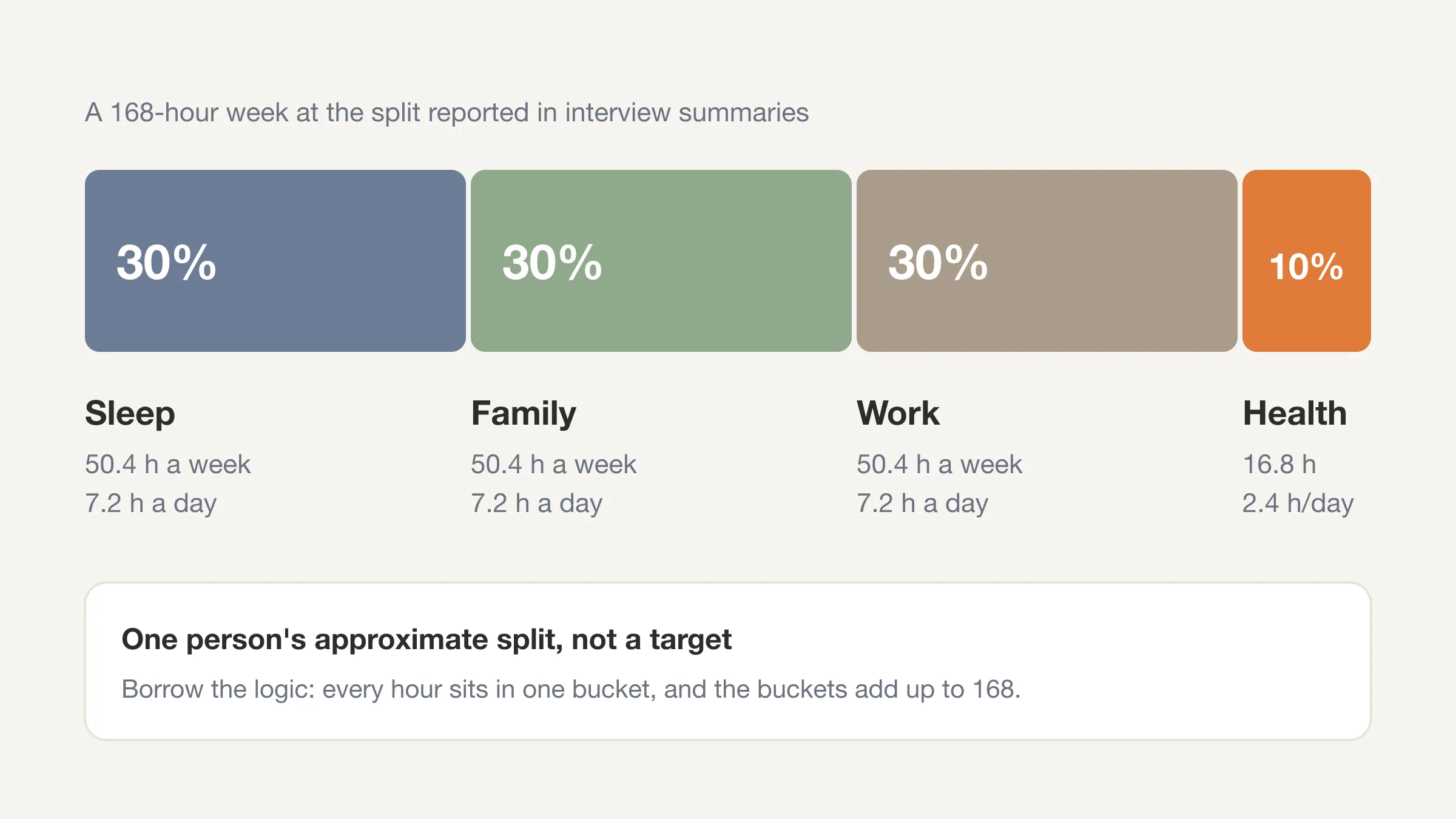
- My First Million, episode 224 (October 2021). The episode title describes how tracking every second took him "from 0 to $405M in exits." Written summaries of it report that he rates his health, life and work each day from 0 to 10 and tracks many small items, such as whether he woke early or meditated. Summaries also report a rough split of his time of about 30% sleep, 30% family, 30% work and 10% health. See this summary and the episode page.
- Modern Wisdom, episode 636 (June 2023). The episode is titled "The Man Who Tracks Every Second Of His Life," and its description asks whether he tracks every moment of his life. It is a listing you can open and then listen to for his own words. See the episode listing.
- The School of Greatness (2026). A written summary of the episode "How to Design a Life That Runs Without You" reports daily scoring across work, health, relationships and fulfillment, tracked habits reviewed each morning and night, a refinement of the system since 2015, and an 80-page "Rhythm of Existence" document managed by a chief of staff. See the summary.
Notice what is missing. No source we found shows the grid, the formulas, or the exact categories as a downloadable sheet. The categories vary a little between summaries (health, life and work in one, work, health, relationships and fulfillment in another). The consistent parts are the ones we use below: a daily score, a list of habits, and a view of how the week divides.
What can you reasonably copy from his approach?
Strip away the celebrity and four ideas remain. All of them work in a plain spreadsheet.
- Log time in categories that add up to the whole week. Sleep, family, work and health are reported as his broad buckets. The point is that the buckets cover everything, so nothing hides.
- Score the day. A quick 0 to 10 for how health, life and work felt. The number is subjective on purpose. Over weeks, the trend matters more than any one day.
- Track a few habits yes or no. Reports mention things like waking early and meditating. You pick your own.
- Review on a schedule. The summaries mention checking the data in the morning and at night. A short weekly look at the totals is the part most people skip.
A word on his 30/30/30/10 split. It is one person's life: someone who runs a venture studio, has a family, and, per one summary, has a chief of staff. It is not a target for you. We show it as a worked example because the arithmetic is instructive.
| Area (as reported) | Share | Hours in a 168-hour week | Hours per day |
|---|---|---|---|
| Sleep | 30% | 50.4 | 7.2 |
| Family | 30% | 50.4 | 7.2 |
| Work | 30% | 50.4 | 7.2 |
| Health | 10% | 16.8 | 2.4 |
| Total | 100% | 168 | 24 |
Those shares are an approximation from interviews, so they will not match any exact week he logged. They do show how the whole week fits into four boxes, which is the part to borrow.
Skip the sheet building
Beyond Time gives you the day as 96 fifteen-minute blocks, grouped into Health, Life, Work and Sleep, with weekly totals done for you.
Try Beyond Time freeHow do you build a Rob Dyrdek style spreadsheet?
Make one file with three tabs: Log, Scores and Week. This takes about ten minutes. We use 15-minute blocks because 96 blocks fit a day neatly and match how long most small tasks take. (There is more on that in our guide to the 15-minute time block method.)
Tab 1: Log
One row per stretch of time, not per block. When you do the same thing for two hours, that is one row.
| A: Date | B: Start | C: End | D: Category | E: Minutes | F: Note |
|---|---|---|---|---|---|
| 2026-09-21 | 06:30 | 07:15 | Health | 45 | Run |
| 2026-09-21 | 07:15 | 08:00 | Life | 45 | Breakfast, kids |
| 2026-09-21 | 09:00 | 11:00 | Work | 120 | Draft proposal |
In column E, use this formula so minutes calculate themselves: =(C2-B2)*1440. Format B and C as time. Use only four categories in column D: Health, Life, Work, Sleep. A drop-down (Data, Data validation, List of items) stops typos from breaking the totals.
Tab 2: Scores
One row per day, with the scores and habits.
| A: Date | B: Health (0-10) | C: Life (0-10) | D: Work (0-10) | E: Woke by 6:30 (Y/N) | F: Moved 30+ min (Y/N) | G: Phone off by 10 pm (Y/N) |
|---|---|---|---|---|---|---|
| 2026-09-21 | 7 | 8 | 6 | Y | Y | N |
The habits in E to G are examples. Replace them with whatever you are working on, and keep the list short. Three is plenty for the first month.
Tab 3: Week
This tab adds up the Log so you can see the week at a glance. In a cell next to each category name, paste:
=SUMIFS(Log!E:E, Log!D:D, "Work", Log!A:A, ">="&$B$1, Log!A:A, "<="&$B$1+6)/60
Put the Monday of the week you want in cell B1. Change "Work" to each category. The result is hours. Add a final row for "Not logged": =168-SUM(...). That number matters, and we come back to it in the next section.
For the habits, a simple =COUNTIF(Scores!E:E, "Y") shows how many days you hit each one. For the scores, =AVERAGE(Scores!B2:B8) gives the week's average.
What does the sheet show after one week?
Three things, if you are honest with it.
- Your actual split. Compare it with the example table above, or with the split you would have guessed. The distance between your guess and the log is the finding.
- The "not logged" row. Every week has 168 hours. If your categories add to 140, you do not know where 28 hours went. Many people find that number larger than expected, and it is a fair place to start.
- Which scores track which hours. After a few weeks, you can see whether your health score rises in the weeks you logged more exercise. That is the feedback loop the interviews describe, in miniature.
If you want a worked method for the audit side of this, see the complete guide to a time audit. For a week of waking hours specifically, the hours in a week post explains why 112 of your 168 are awake time.
How do you read the week once the sheet is filled in?
Look at the Week tab in three passes. Each takes a minute, and together they turn totals into a decision.
Pass 1: compare to the week you meant. Before you open the totals, write down your guess for each category. Then check. A gap of an hour or two is normal. A gap of ten hours tells you your picture of the week is out of date. The useful question is not "why did I fail?" but "what did I not know?"
Pass 2: find the smallest change that matters. Pick one category that is off from where you want it. Ask what single block, moved or removed, would close part of the gap. For example, if Health is at 3 hours and you wanted 5, find two one-hour blocks that could move. Change one thing for the next week, not five.
Pass 3: check the scores against the hours. Look at the Scores tab next to the Week tab. Did the days with the lowest work score also have the most unplanned hours? Did the high life scores come with more family time? You are not proving anything. You are noticing patterns that you can test next week by changing one block and seeing if the score moves.
A short example, with invented numbers for illustration. Suppose your week shows 41 hours of Work, 49 of Sleep, 9 of Health and 38 of Life, with 31 hours not logged. The 31 is the headline. That is almost four eight-hour workdays of unknown time. Your first goal for week two is not to fix anything. It is to log more of it. Once the unknown shrinks to under 10 hours, the other numbers become trustworthy enough to act on.
This is also the point where a spreadsheet and an app diverge most. A sheet makes you do the pass by hand. An app can show the share you logged and the gaps as you go, so you can see the 31 hours shrinking in real time.
Where does a spreadsheet start to hurt?
A spreadsheet is a good first tool. You own the file, you can bend it, and it costs nothing. The friction shows up in a few places.
- Typing times on a phone. Start and end times in a small grid are slow to enter, which is where most logs fail after the first week.
- Logging late. If you enter the whole day at 10 pm, you are reconstructing from memory. Small leaks, like a ten-minute scroll, vanish.
- Rebuilding the summary. Formulas break when someone sorts a column or drags a cell. Fixing them is a Sunday-night chore nobody wants.
- No interpretation. The sheet gives you totals. It does not tell you that Wednesdays leak, or what to change.
None of this is a reason to avoid a sheet. It is a reason to know when to switch. If you notice you are skipping entries because of the typing, the tool is the problem, not you.
When is an app easier than a spreadsheet?
An app is easier when logging needs to take seconds and the totals should build themselves. In Beyond Time, the day is 96 fifteen-minute blocks. You pick a block, pick what you were doing, and routines are grouped into Health, Life, Work and Sleep. Anything you have not logged shows as "not logged," so the gaps are visible instead of hidden.
You start the day by scoring your sleep and picking the one to three goals that matter. You end it by rating how health, life and work felt from 1 to 10, with an optional line. The week view splits every hour by category and shows your trend. That is the same loop as the sheet, with the formulas gone.
Beyond Time also reads the logged day and writes a short AI reflection: what went where you meant it to, where time leaked, and one or two changes for tomorrow. Whether it is worth it depends on how you feel about typing. If the sheet works for you, keep it.
If you are weighing it against the Dyrdek-inspired apps, our comparison with Existence lays out the differences, and Existence app alternatives lists the options you can use today. If you are holding out for his own app, our Existence app review covers what has been shown, and we also looked at whether it is worth waiting for.
Log your day without the grid
Two minutes in the morning and two at night. Your week adds itself up, split by Health, Life, Work and Sleep.
Start free on the webShould you copy someone else's system at all?
Borrow the logic, not the numbers. Dyrdek's split reflects his life. A student, a parent of toddlers or a night-shift nurse will have a different shape, and that is fine. What carries over is the habit of looking: log the week, score the days, check the totals, adjust.
A fair test of any borrowed system is whether it changes a decision within a month. If your log leads you to move one block, drop one commitment or protect one habit, it is working. If it only produces tidy totals, simplify it.
You can also start smaller than the sheet above. A single week with just the Log tab is enough. Add scores in week two and habits in week three. Our daily time log template gives you a printable page if you would rather start on paper.
Frequently Asked Questions
Is there a downloadable Rob Dyrdek life spreadsheet?
Not that we could find. Dyrdek describes his tracking system in interviews, but we found no official spreadsheet or template from him. The sheet in this post is built from what he has described, not a copy of his file.
What does Rob Dyrdek track?
Interview summaries report daily 0 to 10 scores for areas like health, life and work, plus a list of tracked habits such as waking early and meditating. They also report a rough split of his time of about 30% sleep, 30% family, 30% work and 10% health. These come from written summaries of podcasts, so check the episodes for exact wording.
What is the Rhythm of Existence?
It is Dyrdek's name for the personal system he uses to run his life. Summaries of his interviews describe it as a long planning document that his team helps maintain, alongside a dashboard of scores and habits.
How many hours are in a week to track?
A week has 168 hours. If you sleep eight hours a night, about 56 are sleep and 112 are waking. In 15-minute blocks that is 672 blocks in total, or 448 waking blocks.
Should I use 15-minute blocks or hourly blocks?
Fifteen-minute blocks are more precise and still quick to log. Hourly blocks hide short leaks, like a ten-minute scroll, which is often what you are trying to find. If 15 minutes feels like too much, start with 30 and tighten later.
Is a spreadsheet or an app better for tracking my week?
A spreadsheet is better if you like control and do not mind building the summary. An app is better when typing is the obstacle and you want totals without formulas. Many people start with a sheet and move once the upkeep gets in the way.
The Rob Dyrdek life spreadsheet, in short
There is no published Rob Dyrdek life spreadsheet that we could find. There is a documented approach: daily scores, a few tracked habits, and a view of how the 168 hours of the week divide up. You can build that in a sheet with three tabs, or use an app if the typing slows you down. Your time is limited, so the useful move is to look at it. Log a week, and see where it goes.
See where your time goes
Start your day, log it in 15-minute blocks, end your day. See your week split by category, and the gaps in it.
Try Beyond Time freeSources: My First Million #224 summary, My First Million #224 episode page, Modern Wisdom #636 listing, School of Greatness summary (Shortform). These are secondary summaries and listings, not transcripts. Beyond Time is not affiliated with Rob Dyrdek or the Existence app.
Put this into practice
Free tools that match this article.
Life Audit Tool
Score your life in 6 key areas and get a personalized action plan to create balance and fulfillment.
Try Life AuditTime LeftWeeks Left in the Year
How many weeks are left in the year? A live countdown of weeks, days, weekends and waking hours.
Try Weeks LeftTime ManagementTime Blocking Template
Map your day into focused time blocks with a free printable time blocking template.
Try Time BlockingPersonal DevelopmentPersonal Development Plan Generator
Generate a personalized development plan with quarterly milestones, skill gaps, and daily habits tailored to your goals.
Try Development PlanKeep exploring this topic
Life audit guide
Review the areas of life that need more attention and intention.
Personal development plan
Create a growth plan that connects identity, habits, and goals.
Guide articles
Explore more guide articles from the Beyond Time blog.
rob dyrdek life spreadsheet
Read more articles tagged rob dyrdek life spreadsheet.
Related Articles

How Many Minutes in a Week? 10,080, and Where They Go
How many minutes in a week? 10,080, or 6,720 waking minutes at 8 hours of sleep. See the minutes in each activity for an average week and how many are left.

Bucket List Ideas: 100 Ideas Grouped by Theme and Lead Time
100 bucket list ideas grouped by theme and tagged by lead time: now, this year, or years ahead. Count the weeks you have, then pick ten. Start your list today.

How to Stop Doomscrolling: 9 Practical Fixes That Work
How to stop doomscrolling: add friction, swap in better habits and check your Screen Time against a real log of your day. Nine fixes, with sources. Try one.
Life Plan Template: A One-Page Plan With Weekly Costs
A free life plan template you can copy: eight areas of life, one outcome each, and a weekly time cost so your plan fits the 112 waking hours you really have.
How Many Work Weeks in a Year? 52 Minus Your Time Off
How many work weeks in a year? 52 on paper, usually 46 to 50 after holidays and leave. See the table by days off, 2026's count and the weeks left this year.

Second Brain Method Explained: CODE, PARA and Who It Suits
A second brain is a trusted place outside your head for notes and ideas. See how Tiago Forte's CODE and PARA work, who it suits, and what notes can't tell you.