Second Brain Method Explained: CODE, PARA and Who It Suits
A second brain is a trusted place outside your head for notes and ideas. See how Tiago Forte's CODE and PARA work, who it suits, and what notes can't tell you.
A second brain is a personal system, usually digital, where you keep the notes, ideas and information you want to use later, so your head does not have to hold them. Tiago Forte popularized the term with his 2022 book Building a Second Brain. His method has two parts: a workflow called CODE and a folder structure called PARA.
It is a useful idea for anyone who reads, researches or creates a lot. It also has a blind spot. A second brain stores what you know. It does not record what you did with your hours. This post explains the method correctly, tells you who it suits, and shows what to add if you want to see where your time goes. On 13 October 2026, there are about 11 weeks left in the year, and a note-taking system that eats several of them deserves a look.
Key takeaways
- A second brain is an external, trusted store for notes and ideas. It is Tiago Forte's term.
- CODE is the workflow: Capture, Organize, Distill, Express. PARA is the structure: Projects, Areas, Resources, Archives.
- It suits people who produce work from information. It can turn into a hobby if you only collect.
- Notes record what you learned. A time log records where the hours went. They answer different questions.
What is a second brain?
A second brain is an outside place for your thinking: notes, articles you saved, ideas, quotes, plans. The goal is simple. You stop trusting your memory with things you want to keep, and you put them somewhere you can find them later. That frees your attention for the task in front of you.
Forte, the founder of Forte Labs, describes it as a system that helps you turn what you take in into things you make. The "brain" in the name is a metaphor. The tool can be an app such as Notion, Obsidian, Evernote or Apple Notes, or paper. What matters is the habit, not the software. Some people now add an AI assistant to the mix, for example to track goals from Claude.
There is a related older idea that you may know, the Zettelkasten, a slip-box of linked notes. We compare it with other approaches in note-taking systems ranked. Forte's method is less about linking every idea and more about getting useful material to your projects.
What is the CODE method?
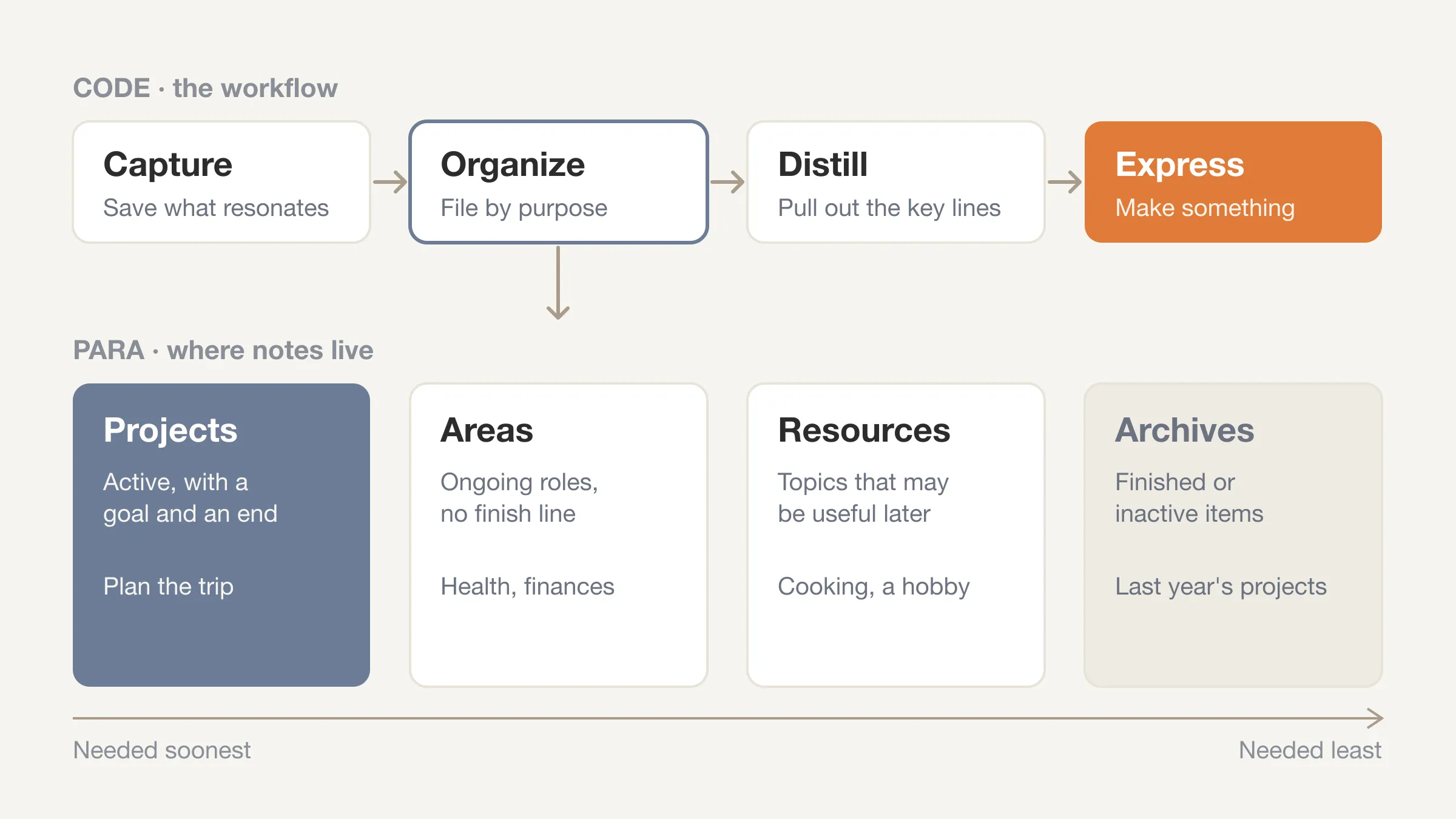
CODE is the four-step workflow at the heart of the book. The letters stand for Capture, Organize, Distill and Express.
- Capture. Save what resonates. An article, a quote, a thought from a walk. Keep only what feels worth keeping, not everything you see.
- Organize. File it where it will be useful, not where it came from. This is where PARA comes in.
- Distill. Make notes easier to use later by pulling out the essential points. Highlight the key lines. Add a short summary on top. The idea is that future you should grasp a note in seconds.
- Express. Use the material to make something: a draft, a decision, a presentation, a plan. The notes exist to produce output.
The sequence matters more than the labels. The workflow is meant to end in something you make, not in a bigger pile of notes.
What is the PARA method?
PARA is the way you organize notes so they are easy to find. It sorts everything into four categories, ordered by how soon you will need it. Here are the four, following Forte's own page, with examples of ours.
| Category | What goes in it | Example |
|---|---|---|
| Projects | Things you are actively working on right now, with a goal and an end | "Launch the website," "Plan the trip" |
| Areas | Roles and responsibilities you manage over time, with no finish line | Health, finances, a client relationship |
| Resources | Topics of interest that may be useful later | Productivity, cooking, a hobby |
| Archives | Completed or inactive items moved out of the others | Last year's finished projects |
The logic is that where a note lives should depend on what it is for, not on its subject. A note about sleep might sit in an Area (your health), in a Project (a sleep experiment), or in a Resource (general reading). A note moves as your life changes. When a project ends, it goes to the Archives.
The difference between a Project and an Area is the one most people miss. A project can be finished. An area is ongoing. "Run a half marathon in March" is a project. "Stay healthy" is an area.
Start with what the week really holds
Log your day in 15-minute blocks and see how much of your week your projects and areas actually get.
Try Beyond Time freeWho is a second brain for?
It suits people who produce work from information. Writers, researchers, students, consultants, designers, analysts and managers who read a lot and need to pull ideas together all fit that description. If you ever think "I read something about that once, but where?", the method is aimed at you.
It tends to be less useful in three situations.
- When your job is mostly doing, not synthesizing. If you rarely refer back to notes, the system has little to feed.
- When the setup becomes the activity. Redesigning folders, tags and templates can feel like work and produce nothing. This is a common trap with any note system.
- When your biggest problem is time, not memory. If the issue is that the week has no room, a better filing system will not create any.
The last point is the one this post is built around, and it is worth a closer look.
What are the limits of a second brain?
A second brain answers "what do I know, and where did I put it?" It does not answer "where did my week go?" Those are different questions, and a note system can hide the difference.
Consider the cost. Capturing, organizing and distilling take time. Each step is small, but they repeat every day. If you spend 30 minutes a day on notes, that is 3.5 hours a week, or 14 fifteen-minute blocks. Whether that is a good trade depends on whether the notes feed work you care about. Without a log, you are guessing.
Three common limits show up.
- Collecting is easier than using. Saving an article feels productive. Expressing, the fourth step, is harder, so the pile grows faster than the output.
- Notes record ideas, not hours. Your system might hold a thousand good notes and tell you nothing about whether you gave your main project enough time.
- It can substitute for a decision. Saving something for later postpones a choice about whether it matters now.
None of this means you should skip the method. It means a second brain works best next to something that shows where your time goes.
Why don't notes tell you where your time went?
Notes are written about content. They are rarely written about duration. Your note on a book says what the book argued. It does not say you spent 6 hours on it, or that those 6 hours came out of the week you meant to spend on your main project.
A time log is a different record. In 15-minute blocks, you note what you were doing. At the end of a week, you can add up how many hours went to each area of your life. A week has 168 hours, and about 112 of them are waking. In 15-minute blocks, that is 448 waking blocks. (The arithmetic is in our post on how many hours are in a week.)
The two records complement each other.
| Question | Where the answer lives |
|---|---|
| What did I read, learn and decide? | Your second brain |
| Where did my 112 waking hours go? | Your time log |
| Did my main project get the hours I planned? | The log, compared with your plan |
| What should I do with these ideas? | Your second brain, via Express |
A useful pairing is to link them. When you finish a project in PARA, glance at your log for how many hours it took. Next time, you can plan from data instead of optimism.
How do you combine a second brain with a time log?
You do not need to change your note system. Add a small layer on top.
Step 1: log a normal week
Keep the log simple. Pick a block, pick what you were doing, and group it into Health, Life, Work and Sleep. Add a short note if a block went to note-taking or research. The daily time log template gives you a starting page.
Step 2: count the hours your system takes
After a week, add up the blocks that went to capturing, organizing and distilling. This is your maintenance cost. If it is small and your output is growing, the system is paying for itself. If it is large and output is flat, simplify.
Step 3: match projects to hours
Open your Projects folder and list what is active. Next to each, write the hours it received in your log. A project with zero hours is not active, whatever the folder says. Either schedule time for it or move it to the Archives. This is where PARA and the log reinforce each other. If you have too many active projects, how to prioritize when everything feels important can help you choose.
Step 4: protect blocks for Express
The fourth step of CODE is where the value lives, and it needs unbroken time. Block two or three stretches a week for creating, not collecting. Our guide to deep work covers how to structure them, and time blocking shows how to put them on a calendar.
Step 5: review weekly
At the end of the week, compare what you planned to what you logged. The gap is the useful number: where you meant your hours to go, versus where they went. Beyond Time's AI reflection reads your logged day and highlights what went where you meant it to, where time leaked, and one or two changes for tomorrow. The complete guide to weekly reviews shows how to run the review itself.
Add the missing record
Beyond Time splits every hour of your week by Health, Life, Work and Sleep, so you can see what your projects really get.
Start free on the webShould you build a second brain?
Ask three questions.
- Do I produce work from information? If yes, the method has a clear use.
- Do I forget useful things I have already read? If yes, a trusted capture habit helps.
- Do I have the hours? Check your log. If a system will add 3 hours a week to a calendar that is already full, something needs to go.
If the answers are yes, yes and yes, start small. Use one app you already have. Create four folders called Projects, Areas, Resources and Archives. Capture a little each day, and create something from your notes within the first two weeks, so the habit has a purpose.
If you want a lighter option, a single running note for each current project is often enough. You can grow into the full method if you find the need.
Frequently Asked Questions
What is a second brain?
A second brain is a personal system, usually digital, for storing notes, ideas and information you want to use later. The term comes from Tiago Forte, who describes a method for capturing and using that material in his 2022 book Building a Second Brain.
What does CODE stand for in Building a Second Brain?
CODE stands for Capture, Organize, Distill and Express. It is the four-step workflow: save what resonates, file it, boil it down so it is easy to reuse, and then use it to make something.
What does PARA stand for?
PARA stands for Projects, Areas, Resources and Archives. Projects are active efforts with an end, Areas are ongoing responsibilities, Resources are topics of interest, and Archives hold completed or inactive items.
What is the difference between a project and an area in PARA?
A project can be finished, and an area cannot. "Run a half marathon in March" is a project. "Stay healthy" is an area. The distinction tells you where a note belongs and when to archive it.
Is a second brain the same as Zettelkasten?
No. Both are note systems, but a Zettelkasten focuses on linking small notes into a network of ideas. Forte's method focuses on organizing notes by how soon they will be useful to your projects. You can read about the older approach in note-taking systems ranked.
Which app is best for a second brain?
The one you will actually use. The method works in Notion, Obsidian, Evernote, Apple Notes or on paper. Pick a tool you already have, and avoid spending weeks on setup before you have captured anything.
Does a second brain save time?
It can, if your notes feed work you finish. It can also cost time, because capturing and organizing take hours every week. Log a normal week to see how many blocks the system takes, and compare that to what it gives back.
The second brain, in short
A second brain is a trusted place outside your head for notes and ideas. Forte's CODE workflow takes you from Capture to Express, and PARA sorts notes into Projects, Areas, Resources and Archives. It suits people who make things from information. What it cannot tell you is where your hours went. Add a simple log, and your notes and your time can finally be read side by side. Your time is limited. See where it goes.
See where your time goes
Start your day, log it in 15-minute blocks, end your day. See your week split by category, and the gaps in it.
Try Beyond Time freeSources: Tiago Forte, Building a Second Brain (2022), and the official PARA page, for the definitions of Projects, Areas, Resources and Archives. The CODE description follows common summaries of the book, in our own words. Read the book for the full method. Beyond Time is not affiliated with Forte Labs.
Put this into practice
Free tools that match this article.
Goal Setting Worksheet
Turn a vague goal into milestones, habits, blockers, and a weekly review plan.
Try Goal WorksheetTime ManagementWeekly Schedule Template
Plan your week with a free printable weekly schedule template for goals, routines, and focus blocks.
Try Schedule TemplateHabit BuildingHabit Tracker Template
Create a free printable habit tracker template — weekly or monthly. Customize your habits and download a clean PDF in seconds.
Try Habit TrackerTime ManagementTime Blocking Template
Map your day into focused time blocks with a free printable time blocking template.
Try Time BlockingRelated Articles
How Many Minutes in a Week? 10,080, and Where They Go
How many minutes in a week? 10,080, or 6,720 waking minutes at 8 hours of sleep. See the minutes in each activity for an average week and how many are left.
Bucket List Ideas: 100 Ideas Grouped by Theme and Lead Time
100 bucket list ideas grouped by theme and tagged by lead time: now, this year, or years ahead. Count the weeks you have, then pick ten. Start your list today.
How to Stop Doomscrolling: 9 Practical Fixes That Work
How to stop doomscrolling: add friction, swap in better habits and check your Screen Time against a real log of your day. Nine fixes, with sources. Try one.
Life Plan Template: A One-Page Plan With Weekly Costs
A free life plan template you can copy: eight areas of life, one outcome each, and a weekly time cost so your plan fits the 112 waking hours you really have.
How Many Work Weeks in a Year? 52 Minus Your Time Off
How many work weeks in a year? 52 on paper, usually 46 to 50 after holidays and leave. See the table by days off, 2026's count and the weeks left this year.
How to Journal: Start in 5 Minutes With Any Format
Learn how to journal in five minutes a day: pick a format, a time and a first line. Includes seven formats, starter prompts and ways to make the habit stick.