Weekly Status Report Form: A Complete Guide for 2026
Learn to create and use a weekly status report form that saves time and improves communication. Get templates, examples, and automation tips.
By Friday afternoon, the same scene plays out in a lot of teams. A manager opens a stack of updates that say things like “making progress,” “on track,” or “waiting on a few things.” Nothing is technically false. None of it is useful.
A good weekly status report form fixes that. It turns scattered work into a short, decision-ready record that leaders can scan quickly, contributors can fill out consistently, and teams can use to surface problems before they become excuses. The point isn't documentation for its own sake. The point is operational clarity.
The best forms also reflect how work happens now. Tasks live in Jira, Asana, Linear, email, chat, calendars, docs, and sometimes inside AI tools that never leave a clean audit trail. If your reporting system still assumes one person can remember everything and summarize it manually every Friday, it will fail under hybrid and remote conditions.
Table of Contents
- Why Your Weekly Status Report Fails
- Anatomy of an Effective Weekly Report Form
- From Template to Action A Filled-Out Example
- Distribution Cadence and Reading Between the Lines
- Supercharge Your Reporting with Automation
- Common Questions About Weekly Status Reports
Why Your Weekly Status Report Fails
Friday, 4:45 PM. A team member submits a status report that says, “Made good progress on onboarding updates. A few items are pending. Will continue next week.” On paper, that looks fine. In practice, it forces the manager to ask three follow-up questions, leaves risk unstated, and gives no clue whether the work is tied to a real team goal or just activity.
That is how weekly reporting turns into admin instead of management.
The failure usually starts with the purpose. Teams use the form to prove they were busy, protect their image, or dump notes before the week ends. A useful report does something else. It helps the reader decide whether progress is real, whether a target is slipping, and whether intervention is needed now.
The standard weekly format exists for speed and consistency. Readers should not have to relearn the layout every Friday. They should know where to find status, risk, decisions needed, and next steps within seconds. That is even more important for hybrid teams, where the report often replaces the hallway conversation that used to expose problems early.
Practical rule: If a manager has to hunt for the problem, the report has already failed.
I see four patterns over and over:
- Activity without outcome: “Worked on dashboard fixes” says what happened, not what changed.
- Polished language hiding uncertainty: Writers say “on track” when the actual status is “waiting on approval” or “capacity is tight.”
- Weak connection to goals: Updates list tasks, but they do not show whether those tasks moved an OKR, milestone, KPI, or customer commitment.
- No clear ask: A blocker is mentioned, but nobody names the decision owner or deadline.
The third problem gets missed a lot. If the report is disconnected from goal tracking, it becomes a weekly diary. If it is tied to objectives and execution data, it becomes a control system. Teams using performance metrics software have an advantage here because they can connect weekly updates to output, capacity, and trend lines instead of asking people to reconstruct the week from memory.
There is also a cultural failure behind bad reports. Teams that punish bad news train people to write vague updates. Teams that reward early visibility get better reports fast. “Vendor delay puts testing at risk unless procurement approves the revised quote by Tuesday” is useful. “Progressing with some challenges” is filler.
Weekly reports also fail when they try to do the job of another communication format. A status report should not read like meeting notes, and meeting notes should not replace a status report. Teams that create effective meeting recaps reduce confusion after discussions, but the weekly report still needs to answer a different question: where does the work stand right now, and what needs attention next?
A good weekly status report form creates clarity without theater. It gives contributors a repeatable structure and gives managers a fast way to spot drift, risk, and stalled decisions before the problem gets expensive.
Anatomy of an Effective Weekly Report Form
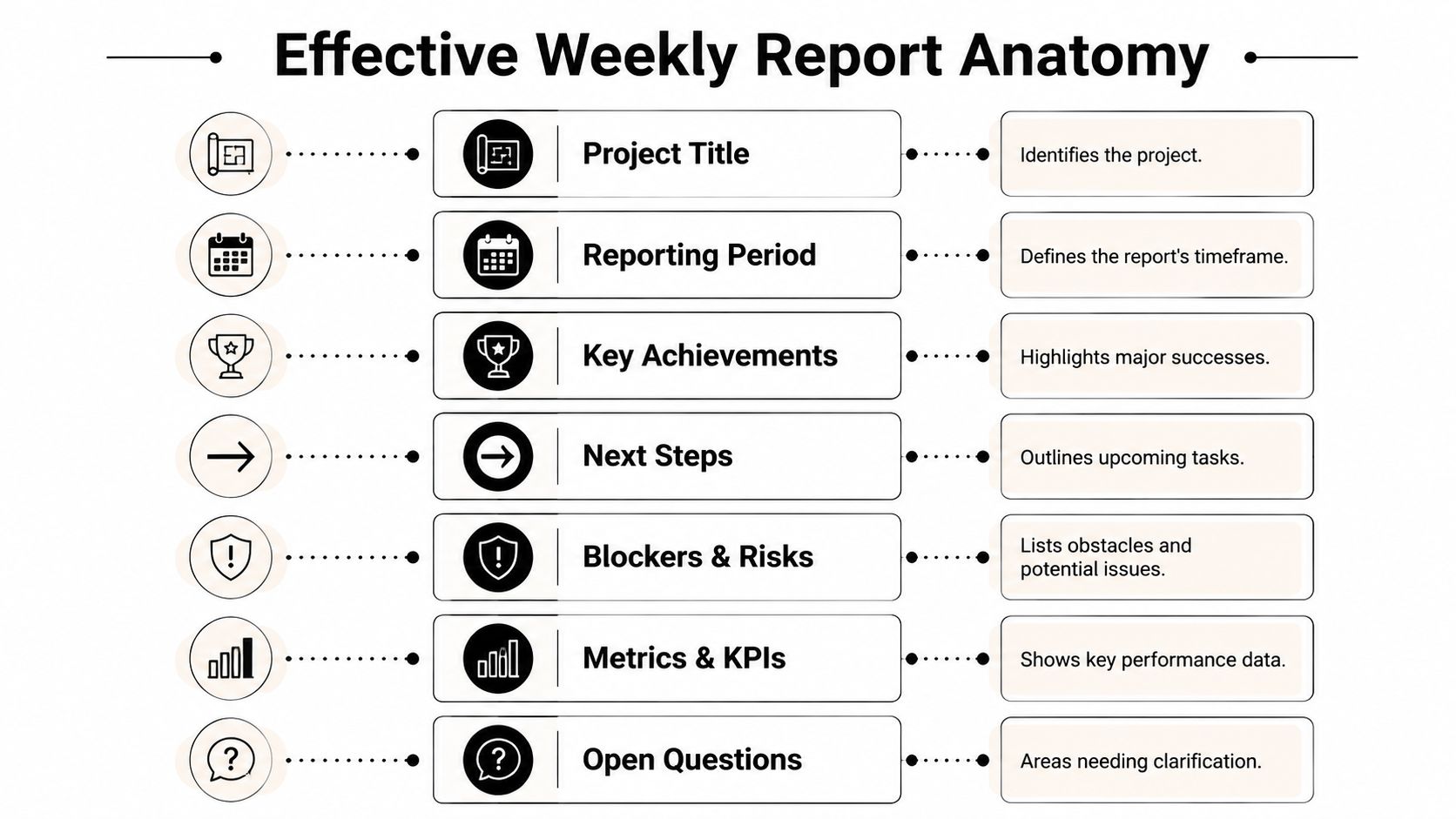
The form should be short, standardized, and front-loaded. An expert-grade report uses an inverted-pyramid structure. Put decisions needed, blockers, and overall health at the top, then add the supporting detail underneath. Guides on status reporting also recommend keeping the executive summary to about six sentences or fewer in Monday.com's status report guidance.
Lead with what needs attention
Start with the part teams often place too low.
Your top section should tell the reader three things immediately:
- Overall health: Is the work moving cleanly, under pressure, or stalled?
- Decision or support needed: What do you need from the reader, if anything?
- Primary blocker or risk: What could slow or stop progress next?
If your weekly status report form begins with “What I worked on,” it encourages backward-looking writing. If it begins with “Current status” and “Support needed,” it encourages judgment.
Keep the summary short enough that a busy stakeholder can read it in one screen without scrolling.
That same logic is why meeting follow-ups and status reports should fit together. If your team struggles to turn discussions into clean weekly updates, it helps to learn how to create effective meeting recaps so decisions and action items are already captured before reporting day.
Build the five core fields correctly
The five essential blocks are simple. The hard part is using each one for the right purpose.
Executive summary
This is not a general introduction. It is the verdict. In a few sentences, explain the state of the work, what changed, and whether leadership attention is needed.
Key achievements List meaningful outcomes, not motion. “Drafted onboarding flow copy” is weak unless that work enabled review, launch prep, or another dependency. Tie achievements to goals, milestones, or customer-facing movement whenever possible.
Schedule progress
This field should answer whether the timeline still makes sense. Don't paste a task list. Summarize what moved forward, what slipped, and what dependency might change the plan.
Budget or resource health
Even when you don't track formal budgets every week, you should still track resource health. That might mean design capacity, engineering availability, contractor dependence, or a missing stakeholder review. If capacity is the constraint, say so plainly.
Risks or blockers
Separate probable trouble from actual stoppage. A risk is something you can see coming. A blocker is something preventing progress right now. This distinction matters because readers respond differently.
For teams that want a stronger measurement layer, use a consistent KPI source rather than hand-entering numbers every week. A dedicated system for performance metrics software can make the metrics section more credible because the data comes from the same place each cycle.
Essential Fields for Your Weekly Status Report Form
| Field Name | Purpose | What to Include |
|---|---|---|
| Project title | Establish context immediately | Project or initiative name, team name if needed |
| Reporting period | Define the time window | Week ending date or start and end range |
| Executive summary | Give the verdict fast | Overall health, key change, decision needed, major risk |
| Key achievements | Show meaningful movement | Completed milestones, approved deliverables, shipped work, resolved issues |
| Schedule progress | Clarify timeline reality | On-track work, slippage, milestone movement, dependency effects |
| Budget or resource health | Surface capacity constraints | Staffing gaps, review bottlenecks, spending concerns, tool or vendor limits |
| Risks and blockers | Trigger action early | Current blockers, emerging risks, owner, requested help |
| Next steps | Make the coming week explicit | Top priorities, planned decisions, handoffs, upcoming reviews |
| Metrics or KPIs | Add measurable evidence | A small set of relevant indicators tied to goals |
| Open questions | Capture unresolved ambiguity | What needs clarification, from whom, by when |
From Template to Action A Filled-Out Example
Friday, 4:45 p.m. A project lead opens a weekly report that says “good progress overall” and learns nothing useful. By Monday's leadership review, the same team is blocked on security approval, staging is slipping, and nobody asked for help early enough.
That is the gap between a template and a reporting system. A good weekly status report form does more than summarize work. It shows whether the team is advancing a goal, where execution is constrained, and what decision needs to happen next. For hybrid and remote teams, that clarity matters even more because the report often replaces hallway context.
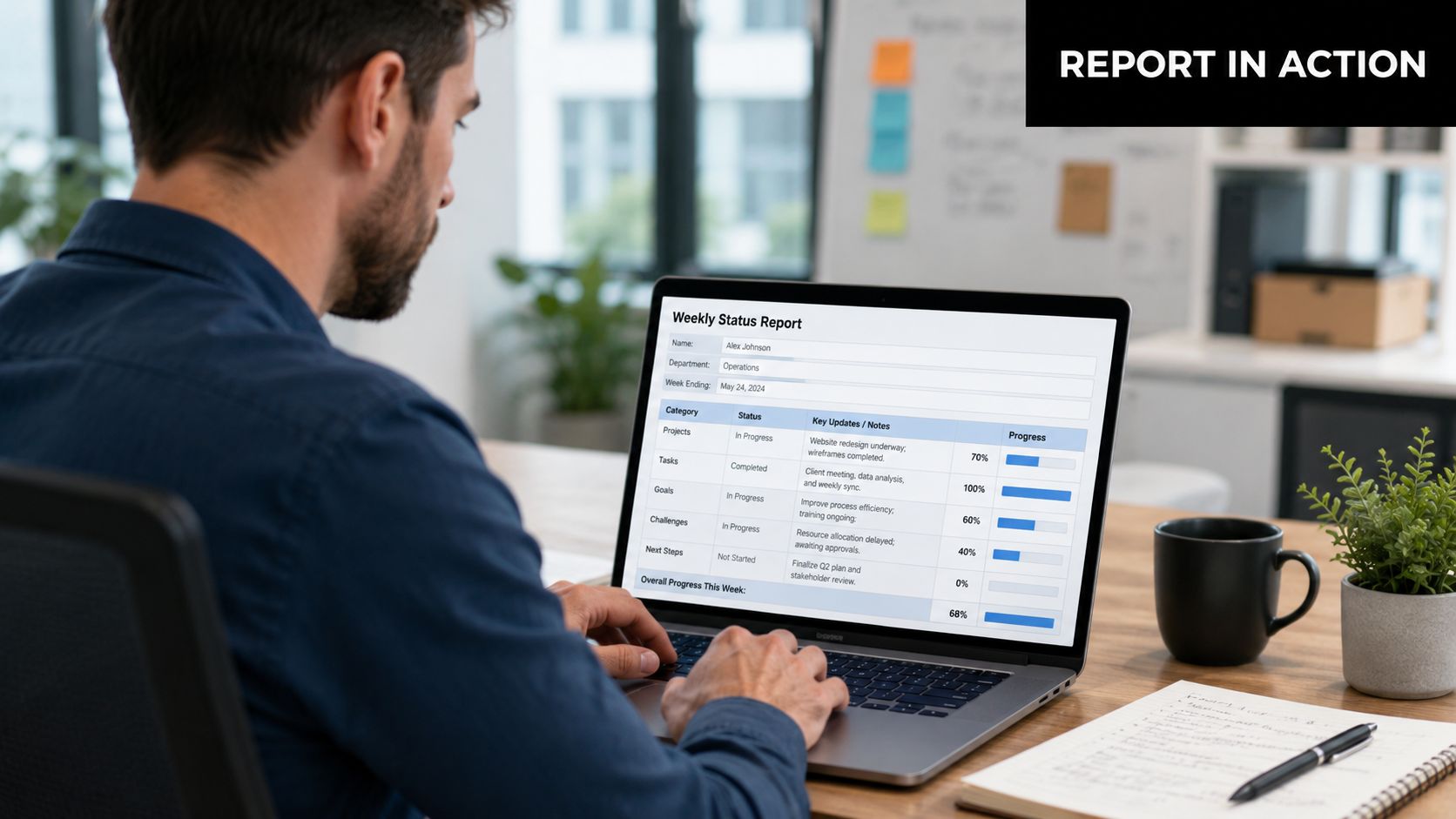
Use this example as a before-and-after test. The project is a customer login improvement initiative with engineers, a designer, and a product manager. The team is not just reporting activity. It is reporting progress against a business outcome, reduced login friction, with one dependency that can change the release plan.
The weak version
Executive summary
Worked on login improvements this week. Progress is steady. Team is aligned and continuing work.
Achievements
- Worked on the API
- Had meetings with design
- Looked into test issues
Progress
Several items advanced, but there is still work to finish.
Resources
May need support later.
Risks
Waiting on one item from security.
This report is common. It is also expensive. A manager now has to chase basic facts: what shipped, what slipped, what is blocked, and whether the blocker affects a team goal or just a minor task.
The version that gets read
Project: Customer Login Improvement
Reporting period: May 6 to May 10
Goal link: Support the Q2 product OKR to reduce login failure rate and improve first-attempt sign-in completion
Executive summary
The project is on plan for core development, but release timing now depends on security review of the updated authentication flow. Engineering completed the v2 authentication endpoint and passed integration testing in the test environment. Design approved revised error states for failed login attempts. The immediate decision is whether security can finish review before the staging handoff scheduled for Tuesday. If not, the team can keep documentation and internal QA moving, but staging validation will slide.
Key achievements
- Completed and deployed the v2 authentication endpoint to the test environment
- Approved updated error-state designs and product copy for login failure screens
- Resolved the highest-priority integration defect affecting session timeout behavior
Schedule progress
Build work stayed on schedule. Staging validation is at risk because it cannot start until security signs off. This is the point many reports miss: one delayed review can matter more than five completed tasks. Call out the dependency, the owner, and the effect on the next milestone.
A quick walkthrough helps if you're training a team to write reports that lead cleanly into discussion using stronger weekly meeting check-in questions:
Budget or resource health
No spend issue this week. The constraint is reviewer capacity, not budget. That distinction matters because the fix is escalation or reallocation, not more funding.
Risks and blockers
- Blocker: Security review is still pending for authentication changes
- Owner: Product lead
- Requested action: Confirm review timing by Monday noon and escalate if the security team cannot complete it before staging
- Impact if unresolved: Staging validation moves, release confidence drops, and downstream support prep compresses
Metrics or KPIs
- Authentication endpoint build completed for the current sprint
- Integration test pass status: complete for the test environment
- Login failure reduction metric: baseline established, post-release measurement starts after staging validation
Next steps
- Complete staging validation after security approval
- Update release checklist and support documentation
- Prepare rollout notes for customer success and support teams
- Confirm how post-release login success data will be pulled from the analytics source instead of entered manually next week
This is the standard I use with teams. Each field has a job. The summary gives the verdict. Achievements prove movement. Schedule shows whether the milestone is still real. Risks ask for action. Metrics connect the week's work to the outcome the team is supposed to improve.
The best report does not sound polished. It sounds clear enough that a leader knows whether to approve, escalate, or stay out of the way.
Distribution Cadence and Reading Between the Lines
A strong weekly status report form can still fail if the reporting rhythm is sloppy. Reports sent at random times get skimmed late, ignored, or discussed without the right people in the room.
Choose a cadence people can maintain
Weekly is the default for a reason. Atlassian and similar project-management guidance treat weekly reporting as the right rhythm for regular monitoring, while monthly summaries are better suited to higher-level decision making, as referenced in the earlier discussion of standard reporting cadence. In practice, weekly works when the project is active enough to change materially but not so volatile that yesterday's status is already obsolete.
The better question is not “Should we report weekly?” but “When should this report become available so someone can act on it?” Many teams find success with one of these patterns:
- End-of-week submission: Best when leaders review on Monday and want a clean weekend cutoff.
- Start-of-week submission: Better when teams use Monday planning meetings to turn reported blockers into decisions.
- Tool-based live report plus weekly summary: Best for distributed teams already working in Jira, Asana, ClickUp, or Linear.
For teams that pair reports with recurring syncs, a set of stronger check-in questions for meetings helps keep the conversation focused on decisions instead of restating the document.

How writers should frame updates
Writers often understate the exact thing managers need to know. They soften risk, bury requests, or report effort instead of outcome.
Use these rules instead:
- Name the change: State what became true this week that wasn't true before.
- State the dependency: If another team, vendor, or approver controls the next step, identify them.
- Ask cleanly: If you need a decision, say who needs to make it.
- Avoid narrative drift: Keep completed work short. Give more space to current risk and next action.
How managers should read them
Managers shouldn't read weekly updates like press releases. Read them like operating signals.
Watch for these warning signs:
- Everything sounds positive, but nothing is concluded. That usually means the team is active but not finishing.
- The same risk appears repeatedly with new wording. That usually means nobody owns escalation.
- Achievements are detailed, next steps are fuzzy. That often means the path ahead is less clear than the team wants to admit.
- Resource health is blank every week. Either the team is unusually overstaffed, or nobody is reporting capacity accurately.
When the wording gets softer, the risk is usually getting harder.
The report shouldn't end the conversation. It should make the next conversation shorter and better.
Supercharge Your Reporting with Automation
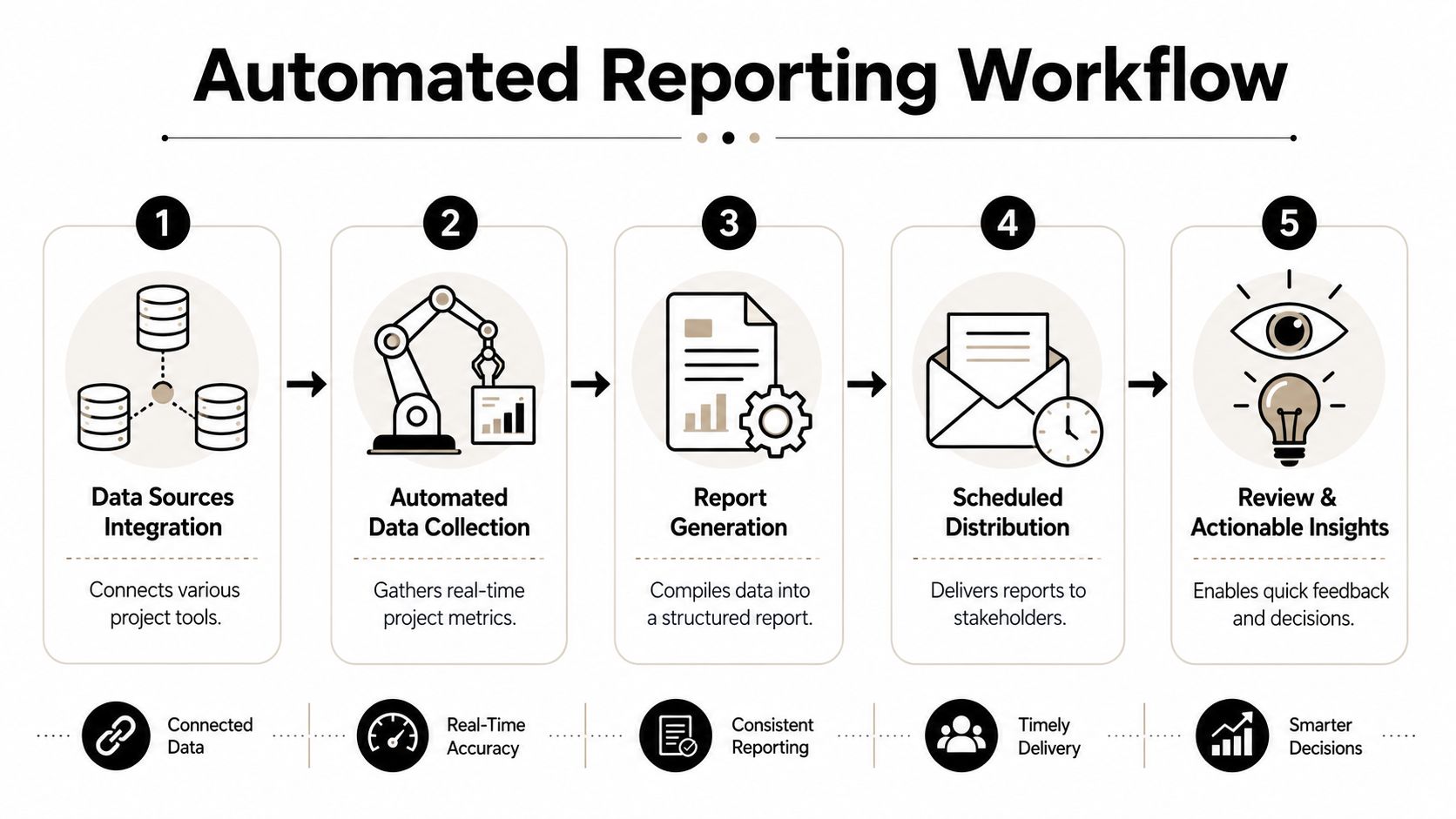
Modern teams don't fail at reporting because they don't care. They fail because their work is scattered across too many systems. Existing templates still leave a real gap for hybrid, remote, and AI-assisted work, especially around questions like how to report work across multiple tools and how to keep the report useful when much of the work is invisible, as highlighted in Unito's discussion of weekly status reporting gaps.
Stop asking people to reconstruct the week from memory
Manual reporting breaks first in distributed teams. Someone closes tasks in Jira, discusses trade-offs in Slack, reviews a document in Google Docs, logs time elsewhere, and drafts customer-facing content with AI support. By Friday, the official record is fragmented.
A better weekly status report form pulls from systems people already use:
- Project tools: Jira, Asana, ClickUp, Trello, Linear
- Communication tools: Slack, Microsoft Teams, email summaries
- Documentation systems: Notion, Confluence, Google Docs
- Time tools: Planned work versus actual time spent
- Goal systems: OKRs, milestone trackers, team scorecards
If you're starting from scratch, an AI Form Generator can speed up the first draft of the form itself. The true value comes after that, when you decide which fields should be manually written and which should be pre-filled from your systems.
Tie weekly updates to goals and execution data
The biggest upgrade is connecting the report to goal achievement, not just task completion.
A task tracker tells you what was done. An OKR-style layer tells you why it mattered. When the weekly status report form includes a small “goal alignment” field, teams stop writing isolated updates like “completed dashboard revisions” and start writing “completed dashboard revisions tied to the current retention objective.”
That change improves judgment. It also helps when a week feels messy. Teams may not finish every planned task, but they can still explain whether the week moved the objective forward.
The execution side matters too. When teams pull data from a progress tracking software workflow, the report can show whether the work plan matched reality. That makes schedule and capacity discussions less subjective. Instead of saying “we got pulled into support work,” the team can point to actual drift between intended focus and actual execution.
Where automation helps and where it fails
Automation works best for facts that systems already store well. It works poorly for judgment.
Good automation candidates include:
- Completed work: Closed tickets, merged pull requests, approved documents
- Current in-flight items: Tasks still active at report cutoff
- Goal references: Objective or milestone tags linked to work items
- Time evidence: Planned versus actual effort, if your team tracks it consistently
- Distribution: Scheduled delivery to a channel, inbox, or dashboard
Poor automation candidates include:
- Blocker severity: A system can detect delay. It usually can't judge business impact cleanly.
- Confidence level: A human still needs to say whether the plan is realistic.
- Decision requests: The writer must phrase the ask in a way the stakeholder can act on.
- Invisible work: Research, thinking, coordination, stakeholder management, and AI-assisted drafting still need interpretation.
The strongest setup is hybrid. Let tools collect the evidence. Let people write the conclusion.
Automate collection. Don't automate accountability.
Common Questions About Weekly Status Reports
Should every team use the same form
Use the same backbone, not the exact same wording. A shared structure improves scanning and consistency, but product, marketing, operations, and client-service teams may need different prompts inside the same framework.
Keep the required fields stable. Then customize examples, dropdowns, or metric fields by function.
What counts as a blocker versus a challenge
A blocker stops progress on an important next step right now. A challenge makes work slower, harder, or less efficient, but the team can still move.
That distinction matters because leaders respond differently. If everything is labeled a blocker, people stop reacting. If real blockers are softened into “minor challenges,” issues sit too long without escalation.
How do I report AI-assisted work without sounding vague
Don't report the tool. Report the output, review, and result.
Weak update: “Used AI to help with research and drafts.”
Strong update: “Used AI to generate initial support article drafts, reviewed and edited the content, and finalized the version submitted for legal review.”
That format tells readers what the tool contributed, what human judgment was applied, and what changed in the workflow.
A weekly status report form is only useful if it helps people act sooner, not if it merely records that work happened. If your current form creates ambiguity, shorten it, standardize it, and move important issues to the top where they belong.
If you want a system that connects weekly reporting to goals, milestones, routines, and actual execution data, Tribble Software Private Limited built Beyond Time for exactly that kind of operational clarity. It combines OKR-based planning, AI-guided prioritization, and planned-versus-actual time analysis so teams and individuals can turn updates into forward momentum instead of retrospective admin.
Put this into practice
Free tools that match this article.
Weekly Schedule Template
Plan your week with a free printable weekly schedule template for goals, routines, and focus blocks.
Try Schedule TemplateTime ManagementTime Blocking Template
Map your day into focused time blocks with a free printable time blocking template.
Try Time BlockingTime ManagementWeekly Schedule Optimizer
Generate an optimized weekly schedule with AI-powered time blocking for maximum productivity.
Try Schedule OptimizerFocusFocus Session Planner
Create AI-optimized focus sessions with structured work blocks and refreshing breaks.
Try Focus PlannerKeep exploring this topic
Related Articles
Master Your Estimated Completion Date in 2026
Calculate and manage an accurate, motivating estimated completion date. Our 2026 guide covers formulas, tracking, and common pitfalls to help you achieve goals.
Mastering Software Project Planning for Success
Master software project planning with our playbook. Define goals, manage scope, estimate accurately, and mitigate risk for successful launches.

How to Track Multiple Goals Without Getting Overwhelmed
Learn a proven system for managing multiple goals simultaneously without losing focus or burning out. Practical frameworks for tracking 3-5 goals at once.
Accountability Partner Guide: Achieve Goals Faster
Learn how to find, structure, and get the most from an accountability partner. Research shows accountability can boost goal achievement by up to 95%.
5-Year Plan Template: Build Your Life Roadmap Step by Step
Build your life with this step-by-step 5 year plan template. Set goals across 5 key life domains and break them into year-by-year milestones you can act on.
How to Set Life Priorities: A Framework for What Matters Most
Learn how to set priorities in life with a proven values-based framework. Discover what matters most and start building goals aligned with your life today.