How to Stop Doomscrolling: 9 Practical Fixes That Work
How to stop doomscrolling: add friction, swap in better habits and check your Screen Time against a real log of your day. Nine fixes, with sources. Try one.
To stop doomscrolling, add friction between you and the feed, decide in advance what you will do instead, and measure how much time it actually takes. Willpower alone rarely works, because a feed has no natural end and you pick up the phone before you decide to.
Doomscrolling means scrolling through bad news or upsetting content for far longer than you meant to. This guide explains why it hooks us, what the research says about the cost, and nine fixes you can try this week. It ends with a simple check: compare what your phone says with a log of what the time displaced.
On 27 October 2026 there are 65 days left in the year, about nine weeks. At 16 waking hours a day, that is 1,040 hours. One hour of scrolling a day uses 65 of them, roughly 6 percent. That might be fine if you chose it. The trouble starts when you did not.
Key takeaways
- Doomscrolling is a habit loop, not a character flaw. Feeds are designed to have no stopping point.
- Even a few minutes of negative news can lower mood, according to a randomized study.
- The most reliable fixes change the environment: phone out of reach, app limits, a different first move at night.
- Check your Screen Time number against a day log. It shows what the scrolling replaced.
Why do we doomscroll?
There is no single settled answer, but several pieces fit together.
The feed has no end. A book has a last page and a TV episode has credits. An endless feed gives you no natural moment to stop, so stopping becomes a decision you must make over and over, usually when you are tired.
Bad news can feel useful. Scanning for threats feels like being prepared. In practice, reading the fifteenth article on the same event rarely changes what you can do about it. It does change how you feel.
The phone is always there. Pickups are often automatic: you reach before you decide. That is why the fixes below work on the environment and the cue, not on your resolve.
Tired brains scroll. Late evening, low energy and a wish to switch off make a feed the easiest option. That is also when scrolling costs the most, because it eats into sleep.
None of this is a diagnosis. If scrolling is tied to persistent anxiety, low mood or trouble sleeping, talk to a doctor or a licensed mental health professional. This guide is general information.
What does doomscrolling actually cost?
It can lower your mood fast
In two randomized experiments, researchers found that just 2 to 4 minutes of COVID-related news, on a Twitter feed or in a YouTube video, reduced positive feeling compared with a control group. The YouTube study also found lower optimism. Content about acts of kindness did not have the same effect (Buchanan, Aknin, Lotun and Sandstrom, 2021, PLOS ONE). The authors suggest the negative content, not social media itself, drives the effect.
Less time on social media helped in one trial
In a three-week experiment, 143 University of Pennsylvania undergraduates were asked to cap Facebook, Instagram and Snapchat at about 10 minutes per platform per day. Compared with a control group, they reported larger drops in loneliness and depression (Hunt, Marx, Lipson and Young, 2018). Interesting detail: both groups also showed small drops in anxiety and fear of missing out, which the authors attribute to simply monitoring their own use. The sample was students on three platforms, so do not generalize too far.
It can cut into your sleep
A survey of 844 Flemish adults found that texting and calling after lights out were the main predictors of poorer sleep quality, and bedtime phone use more broadly predicted more fatigue and insomnia symptoms (Exelmans and Van den Bulck, 2016). It was a cross-sectional study, so it shows an association, not proof of cause. Still, bedtime scrolling is the version that tends to hurt the most.
It takes attention even when you are not scrolling
In experiments with nearly 800 smartphone users, people did worse on cognitive tests when their phone sat on the desk, even face down and silent, than when it was in another room (Ward and colleagues, 2017). The effect was strongest in the most phone-dependent. Not every later attempt to repeat the experiment has found the effect (Ruiz Pardo and Minda, 2022), so treat this as a cheap experiment, not settled science. Either way, the phone's presence is a cue.
How do you stop doomscrolling? 9 fixes
1. Charge your phone outside the bedroom
This single move removes the worst scrolling window. Buy a cheap alarm clock if you need one. The first and last 30 minutes of your day are the most valuable, and the phone is the main thing eating them. Our guide to an evening routine for better sleep has ideas for what to do instead.
2. Move news and social apps off your first screen
Make the apps harder to reach: move them to a folder on the last page, or remove them and use the website for a while. The extra steps give you a half-second to notice what you are doing. You are not blocking yourself. You are adding a pause.
3. Set app limits and downtime on iPhone
Apple's Screen Time lets you set a daily limit for a category or an app, and schedule downtime, when only the apps you allow are available. By default you can ignore a limit when it is reached, so for it to work, consider setting a Screen Time passcode and turning on Block at Downtime (Apple Support). Menu names vary by iOS version, so check the path on your phone.
4. Turn off non-essential notifications
Most alerts are invitations to open the feed. Keep calls, messages from people and anything you truly need. Turn off the rest. If it is important, you will hear about it.
5. Pick a news window
If you want to stay informed, choose one or two set times, such as 15 minutes at lunch. Read, then stop. A fixed window turns "keeping up" into a bounded task. Outside it, the news will still be there.
6. Decide what you will do instead
Removing a habit leaves a gap, and the gap gets filled by whatever is closest. Pick a replacement for each trigger:
| Trigger | Instead of scrolling |
|---|---|
| Waiting in a queue | Look around, or listen to a podcast you chose |
| Last thing at night | Read a few pages of a book on the nightstand |
| Boredom mid-afternoon | Walk for two minutes, or fill a water bottle |
| Anxious about the news | Write down what you can and cannot do about it |
| Stuck on work | Stand up, then do the smallest next step |
Write the plan in if-then form: "If I reach for my phone in bed, then I pick up my book." Planning a response in advance is a well-studied technique, and a meta-analysis of 94 tests found medium-to-large effects on goal attainment (Gollwitzer and Sheeran, 2006). A later analysis of 642 tests found effect sizes ranging from 0.27 to 0.66, so treat it as a help, not a cure.
7. Keep the phone out of reach during focus time
Given the smartphone-presence research above, try putting it in another room for the first hard block of the day. If you cannot, at least put it face down and out of arm's reach. For more on focus, see deep work.
8. Notice the urge before you act
Many scrolling sessions start with a feeling: boredom, worry, loneliness, fatigue. Next time, pause and name it, even silently: "I'm tired and I want a break." You may still scroll. But a named feeling often has a better answer than a feed, such as water, a walk or a call.
9. Track it for a week
In the Penn study, even the control group, who only monitored their use, showed small drops in anxiety and fear of missing out. Looking is a first step. Look at your weekly Screen Time report, then log the day to see what the time replaced. That is the next section.
See what the scrolling replaced
Log your day in 15-minute blocks. Two minutes in the morning, two at night, and the hours behind your Screen Time number become visible.
Try Beyond Time freeHow do you check Screen Time against a real log?
Screen Time tells you how long your phone was on and which apps were open. It does not tell you what else you could have been doing, or what you meant to be doing. A day log fills that in.
Here is a simple one-week experiment:
- Open your weekly Screen Time report. Note your daily average and your top three apps. On iPhone, the report is in Settings under Screen Time, and you can view it by week.
- Log the same days in 15-minute blocks. A waking day (7 a.m. to 11 p.m.) is 64 blocks. Tag each block with what you were doing, including "not logged" gaps.
- Compare. Does the number match your feeling? Which blocks did the scrolling land on? Was it evening, morning, or in the middle of work?
- Choose one change. Pick the window where scrolling costs you most, and apply one fix from the list.
Take a typical weekday. If your phone says 3 hours and 2 of those happen in bed after 10:30 p.m., the problem is not "too much phone". It is a bedtime window. If the hours are scattered between meetings, it is notifications and friction. The fix depends on the pattern, and the pattern shows only in the log.
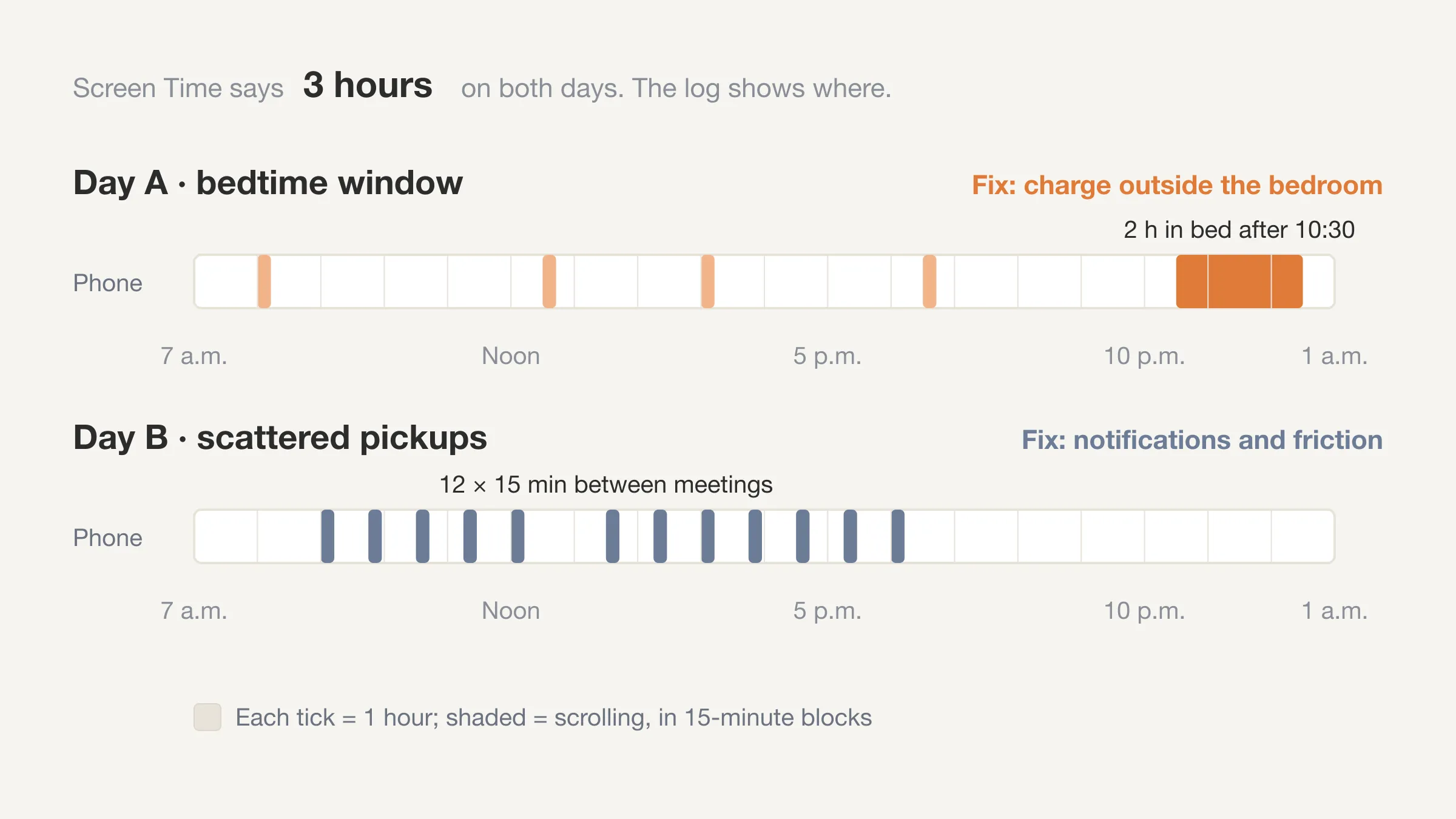
Do some arithmetic for scale. An hour a day is 365 hours a year. At 16 waking hours a day, that is about 23 waking days. Two hours a day is about 46. That is time you might well choose to spend. The point is that it should be a choice. For the full method, see our guides to how to do a time audit and the daily time log template.
What if you need to stay informed?
Staying informed and doomscrolling are different. The first has an end and a purpose. The second has neither.
- Choose sources, not feeds. A morning newsletter or one news site you visit on purpose gives you the facts without the infinite scroll.
- Read the summary, not the 40th take. One good article on an event is usually enough.
- Act on something. If a story matters to you, give money, send a message, or sign up to help. Doing something can feel better than watching.
- Mind the evening. News late at night is least useful and most disruptive for sleep.
If news is making you anxious, our piece on time anxiety covers the related worry of time slipping away, and when to talk to a professional.
What should you do when you slip?
You will slip. A heavy news week or a rough night will bring it back. Treat it as data. Notice when it happened and what the trigger was, then go back to the plan the next day. One bad evening does not undo a week.
Keep a minimum version for hard days: phone out of the bedroom, one news window, that is all. The minimum viable day idea applies here too. If scrolling is really procrastination in disguise, see our guide to the psychology of procrastination and these practical fixes for procrastinating.
Frequently Asked Questions
What is doomscrolling?
Doomscrolling is scrolling through bad news or upsetting content for much longer than you intended. It is usually automatic and often late at night, and it tends to leave you feeling worse, not better informed.
Why can't I stop doomscrolling?
Feeds have no natural stopping point, the phone is always within reach, and tired or anxious moods make scrolling the easiest choice. Changing the environment, for example moving the phone out of the bedroom, usually works better than trying harder.
Is doomscrolling bad for your mental health?
It can be. In two randomized experiments, 2 to 4 minutes of negative COVID news lowered positive feeling (Buchanan and colleagues, 2021). If scrolling goes along with persistent anxiety or low mood, talk to a health professional.
How long should I spend on social media a day?
There is no research-backed number that fits everyone. One three-week trial of students capped each of three platforms at about 10 minutes a day and saw lower loneliness and depression (Hunt and colleagues, 2018). A better question is whether the time you spend matches what you would choose.
Does Screen Time on iPhone actually help?
It helps you see your numbers and set limits. By default a limit can be dismissed, so add a Screen Time passcode if you want it to hold. Pair it with a day log to see what the time replaced.
How do I stop doomscrolling at night?
Charge your phone outside the bedroom, set downtime from an hour before bed, and put a book or a notepad where the phone used to be. Bedtime phone use was linked to poorer sleep in one large survey (Exelmans and Van den Bulck, 2016).
How to stop doomscrolling: the short answer
To stop doomscrolling, make the feed harder to reach, plan what you will do in its place, and measure the time against a real log of your day. Start with one change tonight: charge the phone outside your bedroom.
Your time is limited: 65 days, or 1,040 waking hours, remain this year as of 27 October. How you spend them is up to you. Seeing where they go makes it a choice.
Make the hours a choice
Beyond Time shows your day as 96 fifteen-minute blocks, with the gaps marked, so you can see where it goes. Free for two weeks, everything unlocked.
Try Beyond Time freePut this into practice
Free tools that match this article.
Weekly Schedule Template
Plan your week with a free printable weekly schedule template for goals, routines, and focus blocks.
Try Schedule TemplateHabit BuildingHabit Tracker Template
Create a free printable habit tracker template — weekly or monthly. Customize your habits and download a clean PDF in seconds.
Try Habit TrackerTime ManagementTime Blocking Template
Map your day into focused time blocks with a free printable time blocking template.
Try Time BlockingHabit BuildingHabit Stack Builder
Use habit stacking to build new habits by attaching them to your existing routines.
Try Habit Stack BuilderKeep exploring this topic
Atomic Habits summary
Apply the core behavior-change principles behind lasting habits.
Time blocking guide
Turn priorities into protected calendar blocks.
Habit stacking guide
Attach new behaviors to routines you already do every day.
15-minute time blocks
Plan and review your day with more realistic precision.
Related Articles
How Many Minutes in a Week? 10,080, and Where They Go
How many minutes in a week? 10,080, or 6,720 waking minutes at 8 hours of sleep. See the minutes in each activity for an average week and how many are left.
Bucket List Ideas: 100 Ideas Grouped by Theme and Lead Time
100 bucket list ideas grouped by theme and tagged by lead time: now, this year, or years ahead. Count the weeks you have, then pick ten. Start your list today.
Life Plan Template: A One-Page Plan With Weekly Costs
A free life plan template you can copy: eight areas of life, one outcome each, and a weekly time cost so your plan fits the 112 waking hours you really have.
How Many Work Weeks in a Year? 52 Minus Your Time Off
How many work weeks in a year? 52 on paper, usually 46 to 50 after holidays and leave. See the table by days off, 2026's count and the weeks left this year.
Second Brain Method Explained: CODE, PARA and Who It Suits
A second brain is a trusted place outside your head for notes and ideas. See how Tiago Forte's CODE and PARA work, who it suits, and what notes can't tell you.
How to Journal: Start in 5 Minutes With Any Format
Learn how to journal in five minutes a day: pick a format, a time and a first line. Includes seven formats, starter prompts and ways to make the habit stick.