Productivity Tips: 25 That Hold Up, and Why They Work
25 productivity tips grouped by plan, focus, finish and review, each with the evidence behind it. Start with the one tip that makes the other 24 work.
The best productivity tips are the ones that change what you do on a normal Tuesday: find out where your time goes, pick one to three priorities, plan when and where you will do them, protect your focus, and review the day. Everything else is a variation on those five moves.
This guide has 25 tips, grouped into plan, protect focus, finish and review. Each one says why it works, and where there is research behind it, the source is linked. Where the evidence is thin, we say so.
Here is the number that gives the list its point. On 7 July 2026, 177 days are left in the year. At 16 waking hours a day, that is 2,832 waking hours, or about 11,300 fifteen-minute blocks. That is a lot, and it is not unlimited. A tip is worth trying only if it makes those hours go where you meant them to.
Key takeaways
- Tip 1 comes first for a reason: you cannot improve a day you cannot see.
- Plans work best when they name a time and a place, and when they are written down.
- Protecting attention matters more than adding hours. Interruptions are expensive.
- Review closes the loop. Compare what you planned with what happened, then change one thing.
Why do most productivity tips fail?
Most tips fail for one of two reasons. They ask you to be a different person (wake at 4 a.m., never check email), or they treat a symptom without checking the cause.
The cause is often a wrong picture of your own day. People are poor at predicting how long things take. In a well-known study, honors students estimated their thesis would take 33.9 days on average. It took 55.5 days, and only about 30 percent finished by their own prediction (Buehler, Griffin and Ross, 1994). If your map of the day is optimistic, every plan built on it will slip.
So the list below starts with the map, then builds up. If you only try three, try tips 1, 3 and 21.
How do you plan a day that holds? (Tips 1 to 7)
1. Find out where your time goes before you optimize it. Log one ordinary day in 15-minute blocks. An average day has 64 waking blocks (7 a.m. to 11 p.m.), so it fits on one screen. The point is not to judge. It is to replace a guess with a record, because the guess is usually too kind. For context, the U.S. Bureau of Labor Statistics found that in 2025 Americans averaged 5.2 hours a day on leisure and sports, 2.6 of it watching TV. Averages are not you. Your log is. See the daily time log template or the full time audit guide.
2. Pick one to three priorities, not ten. A day has a finite number of blocks, and a list longer than the blocks is a wish list. Choose the one to three outcomes that would make today a good day. Everything else is a bonus. This is arithmetic, not philosophy: if a task takes four blocks, eight tasks like it need 32.
3. Write down when and where you will do each priority. "Write the proposal" is an intention. "After my first coffee, at the kitchen table, I will draft the proposal" is a plan. A meta-analysis of 94 tests found that plans in this if-then form had a medium-to-large effect on goal attainment (Gollwitzer and Sheeran, 2006). A larger, later analysis of 642 tests found effect sizes between 0.27 and 0.66 depending on the outcome, larger for if-then plans, highly motivated people and rehearsed plans (Sheeran, Listrom and Gollwitzer, 2024). The size varies, so treat it as helpful, not magic.
4. Get the plan out of your head. Unfinished goals keep nagging. In experiments, people who made a specific plan for an unfinished goal had fewer intrusive thoughts about it afterward (Masicampo and Baumeister, 2011). Writing down the plan lets you stop rehearsing it.
5. Block the fixed things first. Meetings, commutes, school pickups and meals are not negotiable, so put them on the day before anything else. What remains is the real space for your priorities. A visual day makes this obvious. Try the free time blocking template or read the hourly planner guide.
6. Add slack, and size it from your own history. The planning fallacy says you will underestimate. The fix is not to try harder to guess. It is to look at how long similar tasks took last time. If the report took 90 minutes twice, plan 90, not 45. Leave one or two empty blocks per half day for the overflow.
7. Cut the list to what fits. A day with 64 waking blocks, minus meals, commuting and admin, might have 20 to 30 blocks of discretionary time. Count them. Then remove tasks until the plan fits. The Eisenhower matrix helps decide what goes.
See where today goes
Log your day in 15-minute blocks. Two minutes in the morning, two at night.
Try Beyond Time freeHow do you protect your focus? (Tips 8 to 14)
8. Put your phone in another room for hard work. In experiments with nearly 800 smartphone users, people did worse on cognitive tests when their phone was on the desk, even face down and silent, than when it was in another room (Ward and colleagues, 2017). The effect was strongest among the most phone-dependent. Not every later attempt to repeat the experiment has found the effect (Ruiz Pardo and Minda, 2022), so treat this as a cheap experiment, not settled science. Out of sight is not a perfect rule, but it is cheap to test.
9. Check email and chat on a schedule. Gloria Mark, who studies interruptions at UC Irvine, has said that interrupted work was resumed on the same day 81.9 percent of the time, and that it took 23 minutes and 15 seconds on average to get back to it (Gallup Business Journal interview). Three set times a day is a reasonable start. Tell people so they know when to expect a reply.
10. Do one thing at a time. When you switch tasks, part of your attention stays behind on the first one. Researcher Sophie Leroy calls this attention residue, and found that people who could not let go of an unfinished task did worse on the next one (Leroy, 2009). Single-tasking is not a virtue. It is how to avoid paying the switch cost.
11. Work in blocks, with a clear end time. A 60 to 90 minute block with a stated stop feels shorter than an open-ended afternoon. Shorter blocks of 25 minutes work too, as in the Pomodoro method. Choose a length you will actually keep. The focus session planner can help.
12. Take short breaks on purpose. In a study of 84 people doing a repetitive computer task for about 50 minutes, the group given two brief, planned diversions kept their performance up, while the other groups declined (Ariga and Lleras, 2011). It was one lab task, so do not over-read it. But it fits what most people notice: a two-minute pause before you are fried beats a 20-minute collapse after.
13. Protect your sleep. The CDC says adults need at least 7 hours a day. Nothing else on this list pays off if you are short on sleep every night. See how sleep affects your goals.
14. Move your body. The U.S. Physical Activity Guidelines recommend 150 to 300 minutes a week of moderate activity for adults. That is 10 to 20 fifteen-minute blocks of a 448-block waking week. It is a health recommendation, not a productivity hack, but a body that moves tends to be a body that can sit and focus.
How do you finish what you start? (Tips 15 to 20)
15. Shrink the first step. Big goals are easy to postpone. In a classic experiment, children who set near-term subgoals for arithmetic made faster progress and showed more interest than those given a distant goal or none (Bandura and Schunk, 1981). Make the first step small enough that starting is almost silly: open the document, write one bad sentence.
16. Define done before you start. "Work on the deck" has no end. "Slides 1 to 6 drafted" does. A clear finish line makes it easier to stop, and stopping cleanly helps the next task. Leroy's work suggests that closure on one task helps the mind move to the next.
17. Leave a note for your future self. When you stop mid-task, write the next action in one line. It costs a minute. It means you start the next session in motion instead of rereading.
18. Batch the small stuff. Quick replies, forms, errands and payments are cheap one at a time and expensive in aggregate if they interrupt deep work. Give them one or two blocks a day.
19. Use if-then plans for the moments you usually drift. "If I reach for my phone, then I take three breaths and open my task." This is the same technique as tip 3, pointed at your known weak spots. Pick one, not five.
20. Keep a minimum version for bad days. Some days the plan will not survive. Decide in advance what counts as a win on those days, one block on the priority, say. The minimum viable day framework covers this. It keeps a streak of bad days from becoming a bad month.
How do you review so you actually improve? (Tips 21 to 25)
21. Close each day with a two-minute review. Look at the day and ask what went where you meant it to, and what leaked. This is where most people never go, and it is where the gain is. Beyond Time's end-of-day step is built for this: rate how health, life and work felt from 1 to 10, add a line, done.
22. Compare plan with actual. The gap between what you planned and what happened is the most useful number you have. A 30-minute task that keeps taking an hour is data, not failure. See the planned vs actual gap.
23. Track progress somewhere you can see it. A meta-analysis of 138 studies (about 20,000 participants) found that prompting people to monitor their progress promoted goal attainment, and that the effect was larger when progress was physically recorded or reported (Harkin and colleagues, 2016). Most of the studies were about health, so apply it with care. Still, writing it down beats remembering it.
24. Run a weekly review. Once a week, look at the seven days together. What took more time than you thought? What did you skip? What is the one change for next week? The complete guide to weekly reviews walks through it.
25. Change one thing at a time. If you change your wake time, your phone rules and your task system in the same week, you will not know what worked. Pick one tip, run it for two weeks, and keep it or drop it based on the log.
Review the day in two minutes
Beyond Time's AI reflection reads your logged day and shows what went where you meant it to, where time leaked, and one or two changes for tomorrow.
Try Beyond Time freeWhich productivity tips should you try first?
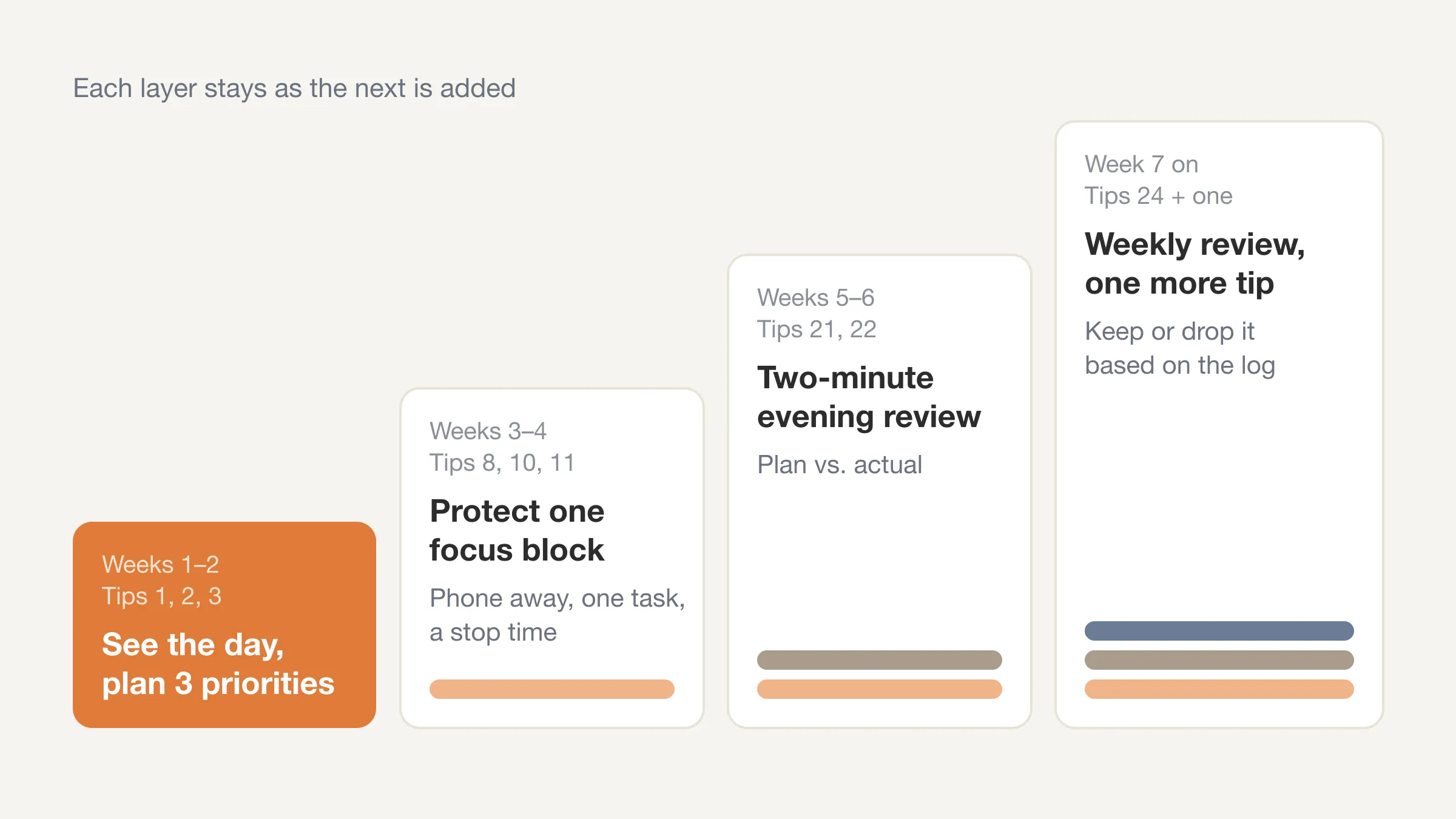
Try them in this order, and give each a fortnight.
| Week | Try | Tips |
|---|---|---|
| 1 to 2 | See the day, then plan three priorities with a time and a place | 1, 2, 3 |
| 3 to 4 | Protect one focus block: phone away, one task, a stop time | 8, 10, 11 |
| 5 to 6 | Add the two-minute evening review | 21, 22 |
| 7 on | Add a weekly review and pick one more tip | 24 and one more |
By week six you will have a small system that fits your life, and a log that tells you whether it is working. That log is what lets you drop tips honestly. A tip that does not move your numbers can go.
For a different angle on the same problem, energy management asks when you are sharp rather than how long you work, and deep work covers how to set up long stretches of focus.
Frequently Asked Questions
What are the best productivity tips?
The best productivity tips are the ones that start with seeing your day: log where your time goes, choose one to three priorities, and plan a time and place for each. After that, protect your focus and review the day. Those five habits carry most of the benefit.
How can I be more productive every day?
Plan three priorities the night before or first thing in the morning, put your phone out of reach for your hardest work, and do a short review at the end of the day. A two-minute review is enough to see what worked.
What is the number one productivity tip?
Find out where your time goes. People tend to underestimate how long tasks take, so a plan built on a guess slips. A log of a normal day gives you the real numbers to plan from.
How many hours a day can you really focus?
There is no single research-backed number that applies to everyone. Many people find they can do a few hours of focused work a day in blocks of 60 to 90 minutes, with breaks. Your own log will show your pattern better than any average.
Do productivity apps help?
They can, if they reduce effort rather than add it. A good tool makes the plan and the review quick. A bad one becomes another inbox. Judge any app by whether it shows you something about your day that you did not already know.
How long does it take to build a productivity habit?
It varies. One study of 96 people found the median time for a new behavior to become automatic was 66 days, with a range from 18 to an estimated 254 days (Lally and colleagues, 2010). Give each change a fortnight to judge, and a couple of months to settle.
Productivity tips: the short version
The best productivity tips are simple: see where your time goes, plan a few priorities with a time and a place, protect your focus, finish with a clear end, and review. Twenty-five tips is a menu, not a to-do list. Pick one, run it for two weeks, and let your log decide.
Your time is limited: 2,832 waking hours remain this year as of 7 July. Seeing where they go is the first productive thing you can do with them.
Start with tip 1
Beyond Time shows your day as 96 fifteen-minute blocks, so you can see where it goes. Free for two weeks, everything unlocked.
Try Beyond Time freePut this into practice
Free tools that match this article.
Time Blocking Template
Map your day into focused time blocks with a free printable time blocking template.
Try Time BlockingTime ManagementWeekly Schedule Optimizer
Generate an optimized weekly schedule with AI-powered time blocking for maximum productivity.
Try Schedule OptimizerAssessmentProductivity Score Calculator
Discover your productivity score and get personalized recommendations to improve.
Try Productivity ScoreTime ManagementWeekly Schedule Template
Plan your week with a free printable weekly schedule template for goals, routines, and focus blocks.
Try Schedule TemplateRelated Articles

How to Stop Procrastinating: 7 Evidence-Based Fixes
How to stop procrastinating: treat it as a mood problem, not laziness. Seven fixes backed by research, plus a log that shows what delay costs. Start today.

How Many Minutes in a Week? 10,080, and Where They Go
How many minutes in a week? 10,080, or 6,720 waking minutes at 8 hours of sleep. See the minutes in each activity for an average week and how many are left.

Bucket List Ideas: 100 Ideas Grouped by Theme and Lead Time
100 bucket list ideas grouped by theme and tagged by lead time: now, this year, or years ahead. Count the weeks you have, then pick ten. Start your list today.

How to Stop Doomscrolling: 9 Practical Fixes That Work
How to stop doomscrolling: add friction, swap in better habits and check your Screen Time against a real log of your day. Nine fixes, with sources. Try one.

Life Plan Template: A One-Page Plan With Weekly Costs
A free life plan template you can copy: eight areas of life, one outcome each, and a weekly time cost so your plan fits the 112 waking hours you really have.

How Many Work Weeks in a Year? 52 Minus Your Time Off
How many work weeks in a year? 52 on paper, usually 46 to 50 after holidays and leave. See the table by days off, 2026's count and the weeks left this year.