Master Task Prioritization Techniques: Boost Productivity
Stop juggling tasks. Learn powerful task prioritization techniques, from Eisenhower to RICE, to focus on what matters and achieve your goals in 2026.
Your task list keeps growing, but your real problem probably isn't effort. It's selection. You answer Slack, clear email, jump into meetings, and end the day with the uncomfortable sense that you worked all day without moving the thing that matters.
That's where task prioritization techniques earn their keep. They give you a decision model so you stop treating every task like it deserves equal attention. Some methods are fast and intuitive. Others are better when multiple people need to agree on trade-offs. The trick isn't finding one magical framework. It's choosing the right one for the size of the decision in front of you.
If you're juggling founder work, team requests, study deadlines, or a pile of personal admin, start simple and build from there. A lot of people don't need a more detailed to-do list. They need a better filter. Even small workflow changes can make daily work feel less chaotic, and practical systems like NotionSender productivity advice often help by reducing background noise before you prioritize the core work.
Table of Contents
- 1. The Eisenhower Matrix
- 2. The MoSCoW Method
- 3. The Ivy Lee Method
- 4. RICE Scoring
- 5. The Eat the Frog Method
- 6. The Pareto Principle
- 7. OKR-Based Prioritization
- 8. Time Blocking
- 9. The ABC/123 Method
- 10. The Kanban Method
- Top 10 Task Prioritization Techniques Compared
- From Theory to Action Build Your Prioritization System
1. The Eisenhower Matrix
The Eisenhower Matrix is one of the most useful task prioritization techniques when everything feels urgent. It sorts work into four buckets: do, schedule, delegate, and delete. That distinction traces back to Dwight D. Eisenhower's presidency from 1953 to 1961, and the model later became the familiar four-quadrant management tool described in Athena's overview of prioritization techniques.
A founder might put “resolve failed payment bug” in do first, “define next quarter positioning” in schedule, “book travel” in delegate, and “scroll industry gossip” in delete. A student might do the same with exam prep, admin forms, group-chat noise, and optional busywork.
Urgent is loud. Important is quieter
The biggest mistake with this matrix is overfilling the urgent box. People often label a task urgent because someone else wants a fast response. That isn't the same as importance.
Use the second quadrant aggressively. Important but not urgent work is where strategy, prevention, planning, and skill-building live. If your calendar never protects that quadrant, you'll spend your week reacting.
Practical rule: If a task keeps improving your future workload, not just today's comfort, it probably belongs in the important category.
A weekly reset helps. Reclassify tasks because context changes fast. Product issues cool down, deadlines move, and a task that mattered last week may not deserve attention now. If you want a practical companion to this method, Beyond Time's advice on improving work productivity fits well with turning important work into scheduled action rather than leaving it on a wish list.
2. The MoSCoW Method
MoSCoW works well when a list has become political. It forces you to separate what must happen from what would be nice to include. The four buckets are Must have, Should have, Could have, and Won't have.
This method is common in product and project work, but it also works for personal planning. If you're launching a course, “record core lessons” may be a must, “design polished motion graphics” may be a could, and “translate the course into another language” may be a won't for now.
Use it when trade-offs need a shared language
MoSCoW is less about personal discipline and more about team clarity. It gives stakeholders a structure for saying no without pretending everything is equal.
Try a short classification session with the people affected by the work. Keep the conversation blunt:
- Must have: Work without which the project fails, stalls, or misses its core promise.
- Should have: High-value work that matters, but can slip without breaking the outcome.
- Could have: Useful additions if time, energy, or budget remain.
- Won't have: Explicitly excluded items, at least for this cycle.
The method fails when teams stuff too much into must-have. Once that happens, you've rebuilt the original problem with better labels. I usually push people to defend every must-have item by answering one question: what breaks if this doesn't happen now? If the answer is fuzzy, demote it.
Clear exclusions make prioritization believable. A list with no “won't have” category is usually just wishful thinking.
3. The Ivy Lee Method
Some days you don't need a framework for twenty competing initiatives. You need a way to stop pinballing between six tabs, three chats, and a notebook full of half-started tasks. That's where the Ivy Lee Method holds up.
You choose six tasks for the next day, rank them, and work them in order. No reshuffling every hour. No adding ten new “quick things” unless you remove something else.

Why this method still works
Its power is constraint. Six is small enough to force honesty but large enough to cover a real workday. Consultants use it to manage client deliverables. Founders use it to keep decision-heavy days from disappearing into messages. Students use it to prevent one assignment from swallowing the entire afternoon.
The ranking matters more than the list length. If task one is “draft investor update” and task four is “organize desktop folders,” don't touch task four because it feels easier. The method only works when order means something.
A few practical rules make it stronger:
- Set the list the night before: Morning is a bad time to negotiate with yourself.
- Rank by impact: Put outcome-moving tasks higher than easy wins.
- Carry forward with judgment: If the same item keeps rolling over, the issue may be scope, not discipline.
This pairs well with Beyond Time because you can turn your six tasks into routines tied to milestones, then review whether your daily list actually reflected your bigger goals instead of your mood.
4. RICE Scoring
RICE is useful when you need more discipline than “this feels important.” It scores work using Reach × Impact × Confidence ÷ Effort. That formula is widely used for product and project prioritization because it turns loose opinions into a comparable ranking, as described in Atlassian's prioritization framework guide.
This isn't my favorite tool for a daily task list. It shines when you're comparing initiatives that compete for the same limited capacity. Think feature requests, campaign ideas, research projects, or strategic bets.
Best for bigger bets, not inbox triage
A product manager might compare onboarding improvements, a reporting feature, and a pricing test. A marketing lead might use RICE to rank webinar themes, landing page rebuilds, and a partner campaign. The value is in forcing each idea to earn its place.
One detail worth using in practice is confidence. Atlassian notes that teams often express it on a three-level scale of 100%, 80%, or 50%, while effort is estimated as time required to execute the idea in their RICE explanation. That keeps scoring from pretending certainty where there isn't any.
Use RICE well by keeping these trade-offs in mind:
- Score collaboratively: Sales, product, ops, and delivery teams often see different risks.
- Be conservative on confidence: If the evidence is thin, let that lower the score.
- Don't force precision: A rough but honest score beats fake exactness.
RICE can mislead if you score the wrong objective. If the actual constraint is dependency, timing, or strategic fit, the formula alone won't save you. Use it as a decision aid, not a substitute for judgment.
5. The Eat the Frog Method
Eat the Frog is simple. Pick the task you're most likely to avoid, then do it first. The best version of this method doesn't mean “start with the worst-feeling task.” It means start with the meaningful task carrying the most resistance.
That might be a difficult client reply, a hard product spec, a workout you've been dodging, or the first page of a grant application. The common thread is friction.

Your frog should be hard and meaningful
A lot of people misuse this method by choosing a task that's unpleasant but low value. Paying a parking ticket may be annoying, but it probably isn't the defining work of your day. Your frog should have impact.
I like this method most for people who already know their priorities but keep procrastinating on them. It helps writers start with the hardest section, founders take the call they've been avoiding, and students open the most difficult problem set before drifting into easy review.
Do the task that clears the most mental fog, not the task that simply looks ugly on the list.
A few adjustments make it work better in real life:
- Choose the frog in advance: Don't debate it at 8:30 a.m.
- Shrink oversized frogs: Break a vague monster into a visible starting step.
- Protect the opening block of the day: Email can wait if the task matters.
In Beyond Time, this often maps naturally to the first daily milestone or routine. The useful part isn't motivation. It's seeing whether your mornings consistently match your stated priorities.
6. The Pareto Principle
The Pareto lens is one of the most practical mental models in prioritization. Vilfredo Pareto observed in 1896 that about 80% of Italy's land was owned by roughly 20% of the population, and that idea later became a general decision-making rule: a small share of tasks often drives a large share of outcomes, as explained in MeisterTask's task prioritization methods.
Used well, this principle changes how you look at a packed list. Instead of asking, “How do I get all this done?” you ask, “Which few actions are carrying most of the result?”
Find the vital few
For a founder, the vital few may be customer conversations, hiring, and cash review. For a student, it may be exam prep, the major paper, and class attendance. For a manager, it may be clear delegation, feedback, and one strategic decision that removes blockers for the team.
The danger is guessing wrong. People often assume their high-effort tasks are also their highest-value tasks. That's not always true.
Use the principle with evidence from your own work:
- Review completed wins: What actions repeatedly led to progress?
- Trace outcomes backward: Which tasks moved the metric, project, or grade?
- Cut inherited habits: Meetings, reports, and recurring tasks often survive long after their value fades.
This approach connects naturally to quick-wins and time-sinks thinking. Not everything deserves optimization. Sometimes the smartest move is to identify the few activities worth protecting and reduce the rest without guilt.
7. OKR-Based Prioritization
If your task list changes every day, but your goals don't, OKR-based prioritization gives you a more stable filter. You define an objective, clarify the key results that would prove progress, then judge tasks by whether they move those results.
That changes the conversation fast. “Should I do this?” becomes “Which key result does this move?” If the answer is none, the task may still matter, but it shouldn't compete with strategic work.
When goals should drive the list
This works especially well for founders, managers, and students balancing multiple domains at once. A founder can prioritize retention work over random feature requests because the quarter's objective is clearer. A student can say no to low-value activity when the primary objective is mastering a subject and finishing a major project well.
The method also scales. Teams can align their work to company direction instead of each function building its own private definition of priority. If you're comparing frameworks, Beyond Time's article on goal-setting frameworks is relevant because this method only works when objectives and key results are written clearly enough to guide daily choices.
One expert analytics framework adds a useful decision lens here. It recommends evaluating requests by asking whether the work supports a top priority, what ROI is expected, and whether the business is ready to act on the result. The same framework also describes prioritization at three levels: within business units, across business units, and at the enterprise level, in IIA Analytics' prioritization approach. That's a good reminder that prioritization isn't only personal. It also decides where shared capacity goes.
If a task can't be tied to a goal, a deadline, or a real obligation, it usually belongs lower than you think.
8. Time Blocking
Time blocking is where priorities become visible. You reserve calendar space for specific work and treat that block like an appointment. Without that step, many people don't have priorities. They have intentions.
This method is strongest when paired with another framework. Eisenhower tells you what matters. ABC/123 tells you what comes first. OKRs tell you what aligns. Time blocking is how those decisions survive contact with meetings and interruptions.
A calendar is where priorities become real
An engineer might block the morning for coding and the afternoon for communication. A manager might reserve office hours instead of staying interruptible all day. A creator might protect early hours for drafting and move admin to later blocks.
What doesn't work is filling the calendar with fantasy. If you stack deep work, meetings, email, and overflow tasks with no transition time, the plan collapses by lunch.
Use a few simple rules:
- Block high-value work first: Don't leave strategy for leftover time.
- Match blocks to energy: Some people think best before lunch. Others don't.
- Keep buffer space: Transition time prevents one delay from wrecking the day.
If you want a practical model for this, Beyond Time's guide to a time-blocked calendar is useful because it ties planned work to actual tracked time. That reveals where your schedule is realistic and where interruptions keep stealing the hours you thought were protected.
9. The ABC/123 Method
The ABC/123 method is what I recommend when someone needs immediate order, not a workshop. Label tasks A, B, or C by priority. Then rank within those groups as A1, A2, A3 and so on.
It looks basic, and that's the point. A system you can use in three minutes often beats a complex one you avoid because it feels like homework.
Fast triage for busy weeks
This method works especially well for professionals with mixed workloads. A manager can sort hiring feedback, report review, and budget prep into A tasks, while lower-stakes admin drops to B or C. A solo founder can put “close payroll” at A1 and “test new website font” at C3 without overthinking it.
The method also exposes a common lie: too many A tasks. If you have ten A's, you have none. You just wrote “important” next to your whole backlog.
Try this format:
- A tasks: High consequence. Finish these before touching B tasks.
- B tasks: Important, but they can wait if A work remains unfinished.
- C tasks: Optional, light, or low-impact work.
Then add the numbers. A1 should be the clearest answer to “what must happen next?” If that's still hard to decide, your issue may be goal clarity, not task sorting.
10. The Kanban Method
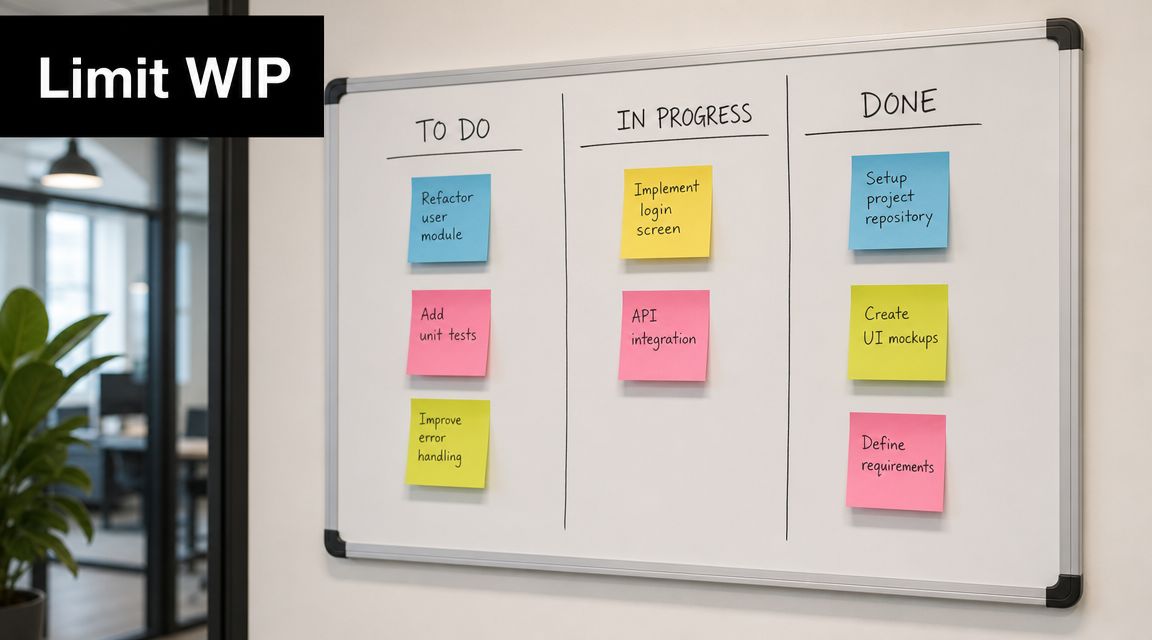
Kanban is less about ranking tasks and more about controlling work in progress. You move tasks across visible stages such as To Do, In Progress, and Done, while limiting how many items can be active at once. That's what makes it powerful for people who start too much and finish too little.
For teams, this method surfaces bottlenecks fast. For individuals, it exposes an uncomfortable truth: most productivity problems aren't caused by a lack of options. They're caused by too many open loops.
A simple board makes that visible.
Prioritize less. Finish more
A marketing team might move campaign work through concept, approval, launch, and analysis. A support team might track ticket flow to see where requests stall. An individual knowledge worker can use a three-column board and cap active work tightly enough that context switching drops.
The trick is respecting the limit. If your In Progress column becomes a parking lot, the board turns into decoration.
Another useful point comes from broader guidance on prioritization failure. Some frameworks break down because they optimize the wrong objective, especially in multi-goal settings. Fibery's write-up also notes a growing shift toward AI-assisted prioritization and dynamic, data-informed systems rather than one-time ranking in its review of prioritization techniques. That's exactly where Kanban helps. It keeps prioritization alive after the initial decision by showing what your system is carrying right now.
A short visual explainer can help if you're introducing this to a team:
Use Kanban with a second method. Let OKRs or Eisenhower decide what enters the board. Let Kanban decide how much you can responsibly handle at once.
Top 10 Task Prioritization Techniques Compared
| Method | 🔄 Implementation complexity | ⚡ Resource requirements | 📊 Expected outcomes | 💡 Ideal use cases | ⭐ Key advantages |
|---|---|---|---|---|---|
| The Eisenhower Matrix (Urgent/Important) | Low, simple quadrant mapping, needs periodic review | Low, brief review time, subjective judgment | Clear separation of urgent vs important; fewer reactive decisions | Individuals/teams balancing daily work vs strategic tasks | Clear visual prioritization; encourages delegation and long-term focus |
| The MoSCoW Method | Medium, requires stakeholder alignment and rules | Medium, workshops/meetings, consensus building | Controlled scope; reduced scope creep and clearer delivery priorities | Product roadmaps, MVP planning, multi-stakeholder projects | Forces trade-offs; aligns teams on must-haves |
| The Ivy Lee Method | Low, very simple nightly ritual, minimal setup | Very low, 10–15 minutes planning, personal discipline | Higher daily completion of top tasks; reduced decision fatigue | Knowledge workers, founders, consultants focused on deep work | Extremely simple; creates laser focus and habit of planning |
| RICE Scoring | High, four-variable scoring and formulaic comparison | High, data, cross-functional input, time to estimate | Numerical ranking of initiatives; objective comparisons across types | Product roadmaps, portfolio prioritization, strategic bets | Data-driven prioritization; reduces bias and highlights high-leverage work |
| Eat the Frog Method | Low, pick one hard task and do it first | Low, requires schedule protection and discipline | Reduced procrastination; momentum for the rest of the day | Creative/knowledge tasks that require high focus early | Powerful anti-procrastination tactic; leverages peak energy |
| The Pareto Principle (80/20 Rule) | Medium, requires analysis or informed intuition | Medium, data collection or retrospective review | Disproportionate results from a small subset of activities | Strategy, revenue/channel focus, prioritizing high-leverage tasks | Drives efficiency by concentrating on the vital few |
| OKR-Based Prioritization | High, requires structured goal-setting and cadence | High, alignment meetings, tracking systems, measurable metrics | Strategic alignment; measurable progress toward objectives | Organizations and teams seeking cross-functional alignment | Ensures work ties directly to measurable outcomes and strategy |
| Time Blocking (Time Boxing) | Medium, calendar planning and discipline needed | Medium, calendar tools, negotiation for protected time | Protected focus windows; reduced context switching | Deep work, leaders, engineers, creators managing fragmented days | Increases focus and flow; makes priorities visible to others |
| The ABC/123 Method | Low, simple labeling and numeric ordering | Very low, minutes to categorize, minimal tools | Fast actionability and reduced daily decision fatigue | Rapid daily triage, solo entrepreneurs, small teams | Very quick to implement; provides a clear next-action sequence |
| The Kanban Method (WIP Limits) | Medium, board setup and WIP rules, ongoing management | Medium, visual board/tool, team discipline, reviews | Continuous flow, visible bottlenecks, higher completion rates | Teams with ongoing delivery (dev, support, marketing) | Visual workflow control; enforces WIP limits and reduces multitasking |
From Theory to Action Build Your Prioritization System
Knowing these task prioritization techniques doesn't change much on its own. The change happens when you connect strategic planning, weekly review, and daily execution into one system. That's where the implementation often falters. They choose a framework, feel organized for two days, then slide back into reactive work because the method never made it into the calendar, the routine, or the team's operating rhythm.
The better approach is layered. Use OKRs for quarterly direction. Use the Eisenhower Matrix during weekly planning to separate important work from noise. Use Ivy Lee, ABC/123, or Eat the Frog for daily focus. If you're managing many moving parts, add Kanban so you stop flooding yourself with open work.
This mix works because each method answers a different question. OKRs answer what matters this quarter. Eisenhower answers what deserves attention this week. Ivy Lee and ABC/123 answer what gets done today. Time blocking answers when the work will happen. Kanban answers how much you can carry without losing flow.
A modern tool can make that combination easier to sustain. Beyond Time, from Tribble Software Private Limited, is one relevant option because it uses an OKR-based structure, helps turn objectives into milestones, and connects those milestones to routines, habits, and tracked time. That matters because prioritization usually fails in the gap between “important” and “scheduled.” If your system doesn't push important work into daily execution, your priorities stay theoretical.
The AI layer is useful when it stays grounded in your actual goals. Beyond Time's model fits this topic because it can help generate milestones from objectives, track planned versus actual time in the iOS app, and surface a high-impact daily focus based on your current context. That's a practical bridge between framework knowledge and behavior. You're not just choosing a method. You're building a loop.
One combination I like for real life looks like this:
- Quarterly: Set a small number of OKRs and define milestone-level progress.
- Weekly: Run an Eisenhower review and decide what gets scheduled, delegated, or dropped.
- Daily: Pick an A1 task or frog, then work from an Ivy Lee style list.
- Operationally: Use time blocks and a WIP-limited Kanban board to protect focus.
That system is flexible enough for founders, professionals, students, and self-improvers because it respects both strategy and messy reality. Some weeks require scoring frameworks like RICE. Other weeks require simple triage and a protected calendar. Good prioritization isn't loyalty to one model. It's knowing which tool fits the decision in front of you.
If you want a final mindset shift, stop asking whether your list looks organized. Ask whether your priorities are changing outcomes. That's the standard that matters. For a complementary perspective on staying in productive rhythm once priorities are set, these Voice Control Pro insights on flow are worth reading.
If you want an AI-supported way to turn goals into daily priorities, Tribble Software Private Limited offers Beyond Time as an OKR-based system that links objectives, milestones, routines, and time tracking so your prioritization method doesn't stop at planning.
Put this into practice
Free tools that match this article.
Time Blocking Template
Map your day into focused time blocks with a free printable time blocking template.
Try Time BlockingTime ManagementWeekly Schedule Optimizer
Generate an optimized weekly schedule with AI-powered time blocking for maximum productivity.
Try Schedule OptimizerGoal SettingGoal Setting Worksheet
Turn a vague goal into milestones, habits, blockers, and a weekly review plan.
Try Goal WorksheetTime ManagementWeekly Schedule Template
Plan your week with a free printable weekly schedule template for goals, routines, and focus blocks.
Try Schedule TemplateKeep exploring this topic
Goal setting guide
Start with the fundamentals of setting goals that turn into action.
Time blocking guide
Turn priorities into protected calendar blocks.
Goal frameworks compared
Choose between SMART goals, OKRs, BHAGs, and 12-week goals.
15-minute time blocks
Plan and review your day with more realistic precision.
Related Articles
How to Be Efficient and Productive: A 2026 System
Stop being busy and start being efficient and productive. Learn a practical, AI-enhanced system to set goals, track progress, and build unstoppable momentum.
Regain Focus and Clarity: A System for High Achievers
Stop feeling busy and start being effective. Learn a practical, evidence-backed system to build sustained focus and clarity for meaningful, measurable results.
AI Accountability Partner: Smarter Goal Setting
Tired of missed goals? An AI accountability partner provides the structure & feedback you need. Explore benefits, workflows, and tools.
The Force of Habit: Master Your Autopilot for Success
Learn what the force of habit is and how to use its power. This guide explains the neuroscience and gives you evidence-based strategies to build good habits.

Master Your Estimated Completion Date in 2026
Calculate and manage an accurate, motivating estimated completion date. Our 2026 guide covers formulas, tracking, and common pitfalls to help you achieve goals.
How to Improve Focus: A 6-Step System for Deep Work
Learn how to improve focus with a practical, evidence-backed system. This guide covers everything from sleep and nutrition to time-blocking and daily routines.